Why Choose Next.js for Your MVP? Cost, Speed, and Scale

Written by
Bhalli B
Full-Stack Engineer & SaaS MVP Architect
Certified Full-Stack Developer & MVP Specialist · Lahore, Pakistan
Choose Next.js for your MVP when you need public pages, an authenticated product, and backend endpoints in one TypeScript codebase, without running a separate frontend and API. Next.js 16 supplies the App Router, Server Components, Route Handlers, and flexible deployment, so one engineer can validate a SaaS idea quickly.
The framework does not make an MVP cheap or scalable on its own. This guide gives you a decision framework, a realistic architecture, production-grade code, cost and timeline models, and failure conditions, so you can judge whether Next.js can carry your product from a 4–8 week validation build to a multi-instance SaaS system.
1. Why choose Next.js for an MVP in 2026?
Next.js is a strong MVP choice because it combines the browser experience, server-side application logic, routing, rendering, and deployment model in one React-based application.
The practical benefit is not "one framework is always better." The benefit is that fewer boundaries need to be designed, deployed, monitored, and debugged before you have evidence that customers want the product.
The Next.js deployment documentation lists Node.js servers, Docker containers, static exports, and platform adapters as deployment options, and the docs currently show 16.3.8 as the latest release. The App Router is the newer router, built around React features such as Server Components.
What does Next.js remove from an MVP architecture?
A conventional product may begin with:
- A React frontend.
- A separate Node.js, Python, or Go API.
- A separate frontend deployment.
- A separate backend deployment.
- Cross-origin authentication configuration.
- Shared TypeScript types or generated API clients.
- Separate observability and environment configuration.
- A second CI/CD pipeline.
- A proxy or gateway between browser and API.
A Next.js MVP can begin with one application boundary:
app/owns routes and layouts.- Server Components read data without shipping database code to the browser.
- Route Handlers expose HTTP endpoints when an external client needs them.
- Server Actions can handle form mutations when an endpoint is unnecessary.
- A database client remains server-only.
- The application can deploy as a container or to a managed platform.
- The same repository can contain the product UI, backend boundaries, tests, and infrastructure configuration.
This does not mean the database, email provider, payment provider, or queue disappear. It means the first application boundary is smaller.
Why does a smaller boundary matter?
A smaller boundary reduces coordination cost during discovery. When a founder changes "workspace members can invite users" to "teams can invite users with role-based access," the developer can change the schema, validation, mutation, and UI in one repository without synchronizing a separate API contract first.
That advantage compounds when the product is still changing weekly. It becomes less valuable when multiple clients, independent release cycles, or different runtime requirements require a formal service boundary.
When is Next.js a poor MVP choice?
Do not choose Next.js merely because it is popular. Choose another architecture first when the core product is:
- A native mobile application with no meaningful web product.
- A high-throughput ingestion system where the web UI is secondary.
- A real-time collaboration engine built around persistent WebSocket connections.
- A data-processing platform dominated by Python scientific or machine-learning libraries.
- A service mesh with independently scaling domains from the first release.
- A workflow system requiring durable background execution as its primary behavior.
- A regulated system where deployment, audit, and data residency requirements dictate another platform.
Next.js can still host the web control plane for those products. It should not be forced to become the entire backend when the core workload does not fit its request-response model.
2. How does Next.js reduce MVP development time and cost?
Next.js reduces MVP delivery time when the product needs several web primitives at once: SEO pages, authenticated screens, server-side data access, forms, and backend endpoints.
The framework does not remove product decisions, QA, security work, or integration effort. It mainly reduces repeated plumbing between frontend and backend.
A realistic MVP timeline
For a focused SaaS MVP with one primary workflow, a realistic delivery model is:
| Workstream | Typical working days | What must be true |
|---|---|---|
| Product framing | 2–4 | One measurable activation event is defined |
| Data model and permissions | 3–5 | Tenant boundaries and roles are explicit |
| Core Next.js shell | 3–5 | App Router, layouts, auth boundary, error states |
| Primary workflow | 7–12 | One complete create-to-value path works |
| Billing and email | 3–7 | Provider integration and failure handling are tested |
| Observability and security | 3–5 | Logs, alerts, rate limits, validation, audit events |
| Deployment and launch QA | 3–5 | Production environment and rollback path work |
| Sequential total | 24–43 | Overlapping workstreams bring elapsed time to roughly 4–8 weeks |
The bottom end assumes a clear product decision, an existing design direction, and one experienced engineer. The upper end is more realistic when authentication, billing, multi-tenancy, imports, or third-party integrations are part of the first release.
Development-cost model
Use this model before discussing a fixed project price:
C = (N × r + S) × (1 + k)
The rate below is an illustrative figure, not a quote. Compare a scoped build with an uncontrolled one at the same daily rate of $500:
The important number is not the exact dollar result. It is the multiplier created by untested scope: 15 extra engineering days and a higher reserve added $11,265 to the same product idea. A second client type, a second platform, or a second complex integration can increase validation cost before the first customer has used the core workflow. For a wider look at how AI tooling shifts these inputs, read SaaS MVP cost with AI tools in 2026, and if you want this model run against your own scope, hire a SaaS MVP developer for a scoped estimate.
Why one codebase is not the same as zero complexity
A Next.js application still needs:
- Environment separation.
- Database migrations.
- Authentication session management.
- Authorization tests.
- Input validation.
- Rate limiting.
- Background job handling.
- Error tracking.
- Database backups.
- Deployment rollback.
- Cache invalidation rules.
A framework can reduce duplicated infrastructure. It cannot replace engineering judgment.
As a Certified Project Manager, I treat the first release as a controlled learning system rather than a small version of the final product. The planning question is not "How many screens can we build?" It is "What is the smallest production path that proves or disproves the business assumption?"
3. What architecture should a Next.js MVP use?
A good Next.js MVP architecture keeps synchronous user actions inside the application while pushing durable or independently scaling work to external services.
That shape keeps the deployable unit count at 1 instead of the 2 you would run with a separate frontend and API, which is the main structural saving in a 4–8 week build.
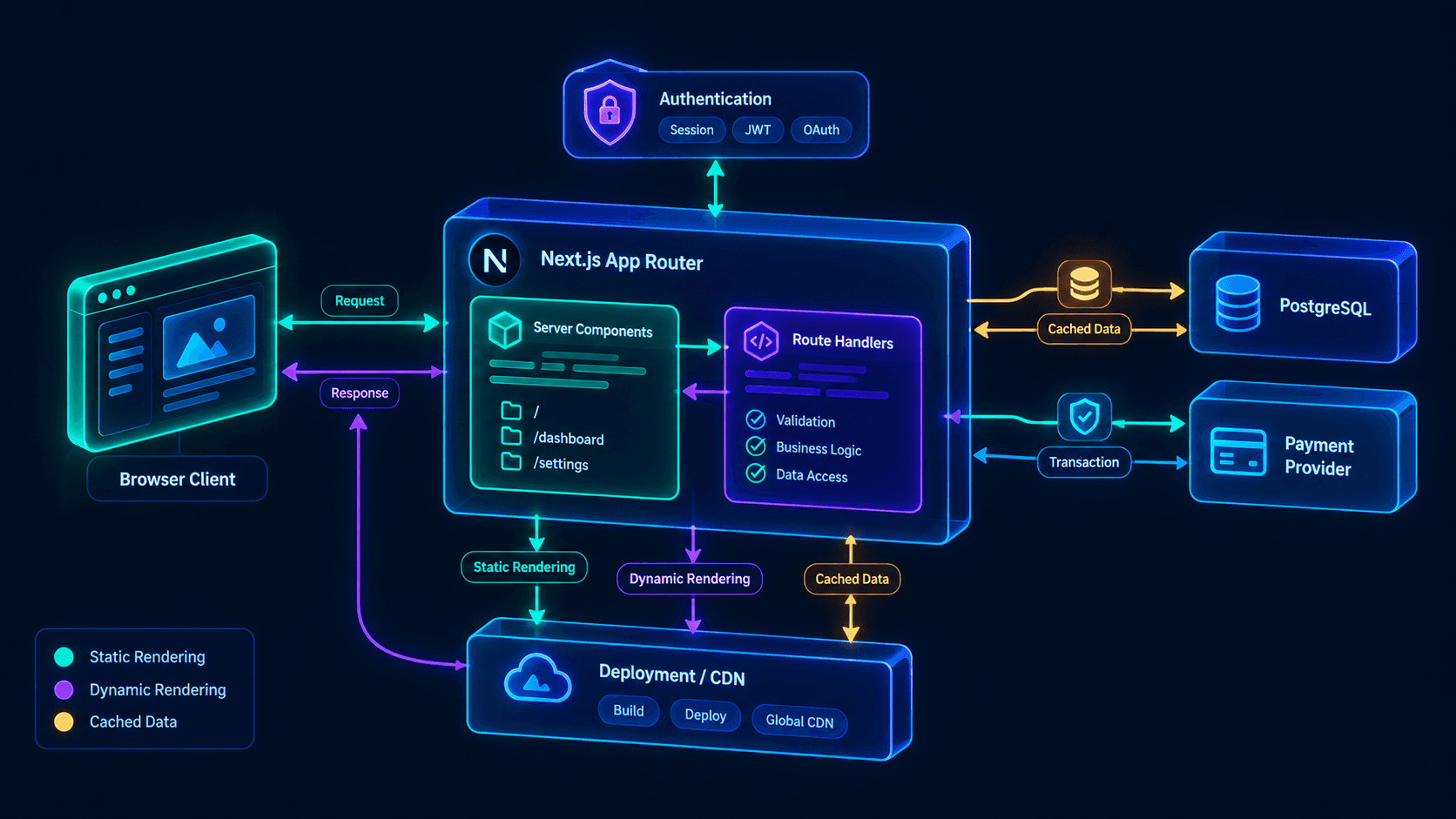 Figure 1: The diagram shows browser requests entering the Next.js App Router, passing through Server Components or Route Handlers, reaching validated server-side services and a database, with authentication, payments, caching, and deployment boundaries kept explicit.
Recommended application shape
src/
  app/
    (marketing)/
      page.tsx
      pricing/page.tsx
    (app)/
      dashboard/page.tsx
      settings/page.tsx
    api/
      webhooks/stripe/route.ts
    error.tsx
    global-error.tsx
    layout.tsx
  lib/
    auth.ts
    db.ts
    permissions.ts
    validation.ts
  server/
    projects/
      create-project.ts
      get-projects.ts
  components/
  tests/
The route groups separate URL organization from layout boundaries. The lib directory contains infrastructure and policy code. The server directory contains use-case-oriented application logic instead of turning every Route Handler into a database script.
Server Components versus Client Components
Server Components should own:
- Database reads.
- Permission checks.
- Secret-bearing integrations.
- Initial page rendering.
- Data formatting that does not require browser state.
Client Components should own:
- Interactive controls.
- Browser event handlers.
- Local optimistic state.
- Drag-and-drop interfaces.
- Web APIs such as camera, clipboard, or geolocation.
A common production mistake is marking a high-level layout with "use client" because one button needs interactivity. That can pull more code into the browser and make server-only access harder to reason about. Keep the client boundary as low as possible.
Route Handlers versus Server Actions
Use a Route Handler when:
- A mobile app or external integration needs an HTTP endpoint.
- A payment provider sends a webhook.
- A third party needs a stable API contract.
- You need explicit HTTP status codes and headers.
- You are building an API consumed outside the Next.js UI.
Use a Server Action when:
- The mutation is only used by your own web application.
- The operation maps directly to a form or button.
- You want server-side validation without creating an internal HTTP hop.
- The action can return a structured result to the UI.
Do not create an API endpoint for every internal button just because REST feels familiar. An internal HTTP hop adds authentication, serialization, error mapping, and testing surface without necessarily adding useful decoupling.
Production-grade mutation example
This example keeps validation, authorization, and persistence on the server, inside a use-case function rather than a visual component.
// src/server/projects/create-project.ts
import { z } from "zod";
import { db } from "@/lib/db";
import { requireUser } from "@/lib/auth";

const createProjectSchema = z.object({
  workspaceId: z.string().uuid(),
  name: z.string().trim().min(2).max(80),
});

export type CreateProjectResult =
  | { ok: true; projectId: string }
  | { ok: false; code: "UNAUTHENTICATED" | "FORBIDDEN" | "INVALID_INPUT" | "CONFLICT" };

export async function createProject(
  rawInput: unknown,
): Promise<CreateProjectResult> {
  const user = await requireUser();

  const parsed = createProjectSchema.safeParse(rawInput);
  if (!parsed.success) {
    return { ok: false, code: "INVALID_INPUT" };
  }

  const { workspaceId, name } = parsed.data;

  // workspaceId arrives from the client, so it is never trusted on its own:
  // membership in that exact workspace is what grants access.
  const membership = await db.workspaceMember.findUnique({
    where: {
      workspaceId_userId: {
        workspaceId,
        userId: user.id,
      },
    },
    select: { role: true },
  });

  if (!membership || !["OWNER", "ADMIN", "MEMBER"].includes(membership.role)) {
    return { ok: false, code: "FORBIDDEN" };
  }

  // Friendly-error pre-check only. The real guard is a unique index on
  // (workspaceId, lower(name)); two concurrent requests can both pass this read.
  const existing = await db.project.findFirst({
    where: {
      workspaceId,
      name: { equals: name, mode: "insensitive" },
    },
    select: { id: true },
  });

  if (existing) {
    return { ok: false, code: "CONFLICT" };
  }

  const project = await db.project.create({
    data: {
      workspaceId,
      name,
      createdById: user.id,
    },
    select: { id: true },
  });

  return { ok: true, projectId: project.id };
}
The important security property is that workspaceId comes from submitted input but is never trusted. The membership query establishes whether the current user can act inside that tenant. Client-side hiding of a button is not authorization.
Route Handler example for a webhook
Webhooks need a different path because an external provider initiates the request. Signature verification must use the raw request body before any JSON parsing, and the database's unique constraint, not a read-then-write check, should be the idempotency guard.
// src/app/api/webhooks/stripe/route.ts
import Stripe from "stripe";
import { Prisma } from "@prisma/client";
import { db } from "@/lib/db";

const stripe = new Stripe(process.env.STRIPE_SECRET_KEY!);

export async function POST(request: Request) {
  const signature = request.headers.get("stripe-signature");

  if (!signature) {
    return Response.json({ error: "Missing signature" }, { status: 400 });
  }

  // Verification needs the exact bytes Stripe signed, so read text() first.
  const rawBody = await request.text();

  let event: Stripe.Event;

  try {
    event = stripe.webhooks.constructEvent(
      rawBody,
      signature,
      process.env.STRIPE_WEBHOOK_SECRET!,
    );
  } catch (error) {
    console.error("Stripe webhook signature verification failed", error);
    return Response.json({ error: "Invalid signature" }, { status: 400 });
  }

  try {
    await db.$transaction(async (tx) => {
      // Unique index on providerEventId: a duplicate delivery fails here
      // and rolls the whole transaction back.
      await tx.webhookEvent.create({
        data: {
          provider: "stripe",
          providerEventId: event.id,
          payload: event as unknown as Prisma.InputJsonValue,
        },
      });

      if (event.type === "customer.subscription.updated") {
        const subscription = event.data.object as Stripe.Subscription;
        // On newer Stripe API versions the billing period lives on the item.
        const periodEnd = subscription.items.data[0]?.current_period_end;

        await tx.subscription.updateMany({
          where: { stripeSubscriptionId: subscription.id },
          data: {
            status: subscription.status,
            ...(periodEnd ? { currentPeriodEnd: new Date(periodEnd * 1000) } : {}),
          },
        });
      }
    });
  } catch (error) {
    if (
      error instanceof Prisma.PrismaClientKnownRequestError &&
      error.code === "P2002"
    ) {
      // Event ID already recorded: acknowledge so Stripe stops retrying.
      return Response.json({ received: true });
    }

    console.error("Stripe webhook processing failed", error);
    // A 500 makes Stripe retry; nothing was committed.
    return Response.json({ error: "Processing failed" }, { status: 500 });
  }

  return Response.json({ received: true });
}
A webhook endpoint that returns 200 without durably recording the event is not reliable; providers retry, users refresh checkout pages, and network failures create duplicate-delivery scenarios.
4. How should a Next.js MVP handle rendering, caching, and performance?
A Next.js MVP should choose rendering per route and data dependency rather than applying one global rule.
The correct default is usually static or cached rendering for public content, dynamic rendering for personalized pages, and explicit cache invalidation after mutations.
Rendering decision table
| Route type | Recommended approach | Reason | Typical mistake |
|---|---|---|---|
| Marketing homepage | Static or revalidated | Fast, cacheable, SEO-friendly | Fetching session data in the root layout |
| Public documentation | Static or ISR | Content changes less often than requests arrive | Making every page dynamic |
| Authenticated dashboard | Dynamic, with tenant-scoped cached reads | Data is private and personalized | Publicly caching user-specific HTML |
| Product detail page | Revalidated or tagged cache | Shared content can be reused | Revalidating the entire application |
| Payment webhook | Dynamic Route Handler | Must verify the raw request and process events | Treating it like a browser page |
| Admin reporting | Dynamic with database aggregation | Freshness may matter more than caching | Running expensive queries on every render |
Static routes can be cached at the CDN for long periods, while dynamic routes that read request-specific data should be marked private and stay out of shared caches.
The multi-instance cache gotcha
The first deployment often works with one instance and a local cache. The same design becomes inconsistent across multiple containers or ephemeral instances because each instance keeps its own copy.
The Next.js self-hosting guide states that the default cache is in-memory and not shared across instances, and that calling revalidateTag() on one instance only invalidates that instance by default. For multi-instance deployments you need a shared cache handler, and the guide points to use cache: remote for exactly this case.
import { cacheLife } from "next/cache";

export async function getWorkspaceSummary(workspaceId: string) {
"use cache";
cacheLife("minutes");

// In-memory by default: every instance keeps its own copy.
return db.workspaceSummary.findUnique({ where: { workspaceId } });
}
With two or more instances, hit rates drop and one instance can serve data another already invalidated. The bug is intermittent and hard to reproduce locally.
import { cacheLife, cacheTag } from "next/cache";

export async function getWorkspaceSummary(workspaceId: string) {
"use cache: remote";
cacheTag("workspace-summary-" + workspaceId);
cacheLife({ expire: 60 });

return db.workspaceSummary.findUnique({ where: { workspaceId } });
}
The cache strategy is visible at the data boundary, tagged for invalidation, and backed by a shared handler instead of per-instance memory.
The use cache: remote directive needs cacheComponents: true in next.config.ts, and self-hosted apps must configure a cache handler (hosting providers usually supply one). Two limits matter in practice. Cached functions cannot read cookies or headers directly, so run the membership check first and cache only the tenant-scoped read. And remote entries do not survive a new deploy, because the cache key includes the build or deployment ID.
Do not add it everywhere. Remote caching costs infrastructure and a network lookup per hit, and the Next.js docs note that operations already faster than about 50 ms may not benefit.
A simple request-cost model
W = R × (D + C + E + M)
Take a dashboard with 100,000 monthly requests, 1 compute unit, and 0.2 external-call units per request. An uncontrolled version runs 8 separate queries and has no cache, so every request is a miss with a 2-unit penalty. An aggregated version runs 3 queries and misses on 10% of requests:
The model is intentionally abstract because cloud bills differ by provider and workload. The engineering decision stays concrete: measure queries, external calls, cache-hit behavior, and response latency before scaling infrastructure.
If you want a second opinion on rendering and cache boundaries before you build, book a call and bring your riskiest workflow.
5. Is Next.js better than React, Laravel, or a separate backend for an MVP?
Next.js is better than a separate React frontend for many web MVPs because it adds routing, server execution, rendering, and deployment conventions without requiring a second application.
It is not automatically better than Laravel, Rails, Django, FastAPI, or a dedicated backend. The right comparison is based on the product's dominant workload and the team's strongest implementation speed.
Stack comparison
| Stack | Best MVP fit | Main advantage | Main risk | Choose it when |
|---|---|---|---|---|
| Next.js 16 | Web SaaS and product-led apps | One TypeScript application for UI and server logic | Caching and server/client boundaries need discipline | SEO, authenticated UI, APIs, and fast iteration all matter |
| React + separate API | Multiple clients or independent teams | Explicit service boundary and client independence | More deployment and contract overhead | Mobile, partner, and web clients need the same API early |
| Laravel | CRUD-heavy business systems | Mature conventions for server-rendered product workflows | Smaller JavaScript-first hiring pool for some teams | The strongest implementer is highly productive in PHP |
| Django | Data-heavy and Python-centered products | Excellent ecosystem for Python data and admin workflows | Interactive frontend may require another layer | Python libraries are central to the product |
| FastAPI + frontend | API-first or ML-backed systems | Clear typed API and Python execution model | Two applications before product-market evidence | The API itself is the product or will serve many clients |
Next.js versus React
React is a UI library. Next.js is an application framework built around React.
A React-only MVP often requires separate decisions for:
- Routing.
- Server-side rendering.
- SEO metadata.
- API communication.
- Authentication.
- Deployment.
- Environment variables.
- Static assets.
- Error boundaries.
- Data fetching.
You can solve all of these well with React and a separate service. The cost is not technical impossibility; it is additional architecture before the product has proven demand. If you already have a React single-page app and are weighing a move, the React SPA to Next.js migration guide covers that path.
Next.js versus a separate backend
Choose a separate backend early when:
- A mobile application is being launched simultaneously.
- Public API consumers are part of the business model.
- Backend and frontend need independent scaling profiles.
- The backend requires long-running workers or specialized runtimes.
- A team already has mature service boundaries and deployment automation.
- Regulatory constraints require independent data and application boundaries.
Otherwise, begin with a modular monolith. A modular monolith is not careless coupling; it is a deliberately bounded application that postpones network boundaries until they produce real value. For the wider framework, database, and hosting decision, see how to choose a startup tech stack .
A decision scorecard
Score each category from 0 to 2, where 2 always favors Next.js:
| Question | 0 points | 1 point | 2 points |
|---|---|---|---|
| Does SEO or public rendering matter? | No | Some pages | Core acquisition channel |
| Is the product primarily web-based? | No | Web plus future mobile | Web is the first product |
| Does one TypeScript codebase increase speed? | No | Neutral | Yes |
| Do external clients need the API immediately? | Many clients | One integration | Internal web app only |
| Is real-time state central? | Yes | Partial | No |
| Are background jobs the dominant workload? | Yes | Partial | No |
My rule of thumb for the 12-point total: 9–12 is a strong Next.js fit, 5–8 means validate the weakest category before committing, and 4 or below points to a hybrid or separate backend.
6. What are the biggest Next.js MVP mistakes?
The six biggest Next.js MVP mistakes are not syntax mistakes; they are boundary mistakes that make a small product difficult to secure, test, and operate.
The most expensive errors usually happen when developers optimize for framework features before defining the product's tenant, mutation, and deployment boundaries.
Mistake 1: Building a frontend prototype instead of a production path
A polished dashboard with mocked data does not validate a SaaS workflow. The first usable path should include:
- Real authentication.
- A real database record.
- A real permission check.
- A recoverable error state.
- An observable production request.
- A way to delete or correct bad data.
A client I worked with had a beautiful onboarding flow that failed at the first real import because the UI assumed one record per customer while the database allowed multiple records. The visual work was reusable; the missing domain decision was not.
Mistake 2: Treating the browser as a trusted boundary
This is wrong:
// Client-side role checks are useful for UI, not authorization.
if (currentUser.role === "ADMIN") {
  showDeleteButton();
}
A user can call the request manually even when the button is hidden. Authorization must run on the server against the current session, tenant, resource, and requested operation.
The server-side check should answer:
- Who is this user?
- Which workspace or tenant does the request target?
- Does the user belong to it?
- Does the role permit this action?
- Does the resource belong to the same tenant?
- Is the operation allowed in the current state?
Mistake 3: Using dynamic APIs in the wrong layout
Reading cookies, headers, or session state high in the component tree can make otherwise public routes dynamic. That affects cacheability and can create slower initial responses.
Keep user-specific data below the smallest authenticated boundary. Do not fetch the current user in the root layout unless every route genuinely needs it.
Mistake 4: Ignoring webhook idempotency
Payment and integration webhooks are retried. If a handler creates a subscription, credits an account, or sends an email without recording the provider event ID, duplicate delivery can create duplicate business effects.
The production pattern is:
- Verify the signature against the raw body.
- Store the provider event ID with a unique constraint.
- Process the event transactionally where possible.
- Return a successful response only after durable recording.
- Make downstream effects idempotent too.
Mistake 5: Assuming serverless means background processing
A request handler should not perform a long document conversion, video transcode, large import, or multi-step AI workflow synchronously. Request timeouts and retries can leave partial state.
Use a queue or durable job system when work can outlive the request. The Next.js application can enqueue the job and display its status; it should not pretend that a web request is a worker.
Mistake 6: Adding microservices before the first useful release
A service boundary is justified by an independent scaling, ownership, security, or deployment requirement. "We may need to scale later" is not enough.
Having architected SaaS MVPs from idea to launch, I prefer a modular monolith with explicit interfaces and a clear extraction seam. That preserves speed now without making future separation impossible.
7. How do you deploy and scale a Next.js MVP safely?
Deploy a Next.js MVP as a single managed application with one managed PostgreSQL database first, then add infrastructure when measured workload or reliability requirements justify it.
Next.js supports Node.js servers, Docker containers, static exports, and platform adapters, and the deployment documentation rates Node.js and Docker as supporting all features while static export is limited. Fully static products can use static hosting; authenticated and server-rendered products need a runtime.
A sensible launch topology
For most first releases:
- Next.js application on a managed Node.js or container platform.
- Managed PostgreSQL database.
- Object storage for uploads.
- Managed authentication or a carefully implemented session layer.
- Payment provider with verified webhooks.
- Transactional email provider.
- Error tracking and structured logs.
- Scheduled backups and a tested restore procedure.
- CDN for static assets and cacheable public pages.
This is enough for many early SaaS products. Kubernetes, service meshes, and multi-region databases should be triggered by requirements, not by anxiety.
Deployment checks before launch
Run these checks against a production-like environment:
npm run buildsucceeds with production environment variables.- Database migrations are forward-only and reversible through a documented recovery process.
- Health checks verify application and database dependencies separately.
- Errors include request IDs without exposing secrets.
- Logs do not contain tokens, passwords, or full payment payloads unnecessarily.
- Rate limits protect login, password reset, uploads, and expensive endpoints.
- Image and file uploads enforce type, size, and storage policy.
- Webhook retries do not duplicate business effects.
- One rollback version is known and deployable.
- A backup restore has been tested, not merely configured.
When should you add a queue?
Add a queue when at least one of these is true:
- The operation takes longer than a normal interactive request.
- The operation must retry independently.
- The operation touches several external providers.
- The user needs progress reporting.
- The operation must continue after the browser closes.
- The operation can be safely processed asynchronously.
Examples include CSV imports, PDF generation, email campaigns, AI document extraction, search indexing, and subscription reconciliation.
When should you add a separate service?
Extract a service when a module has its own:
- Runtime requirements.
- Scaling profile.
- Deployment cadence.
- Security boundary.
- Data ownership.
- Team ownership.
- Failure isolation requirement.
Until then, keep the module behind a function or interface inside the Next.js application. A clean internal boundary is cheaper than a premature network boundary.
8. How should you decide whether Next.js is right for your MVP?
Choose Next.js for your MVP when one web application needs public pages, authenticated product screens, server-side data access, and a path to scale without prematurely operating multiple services.
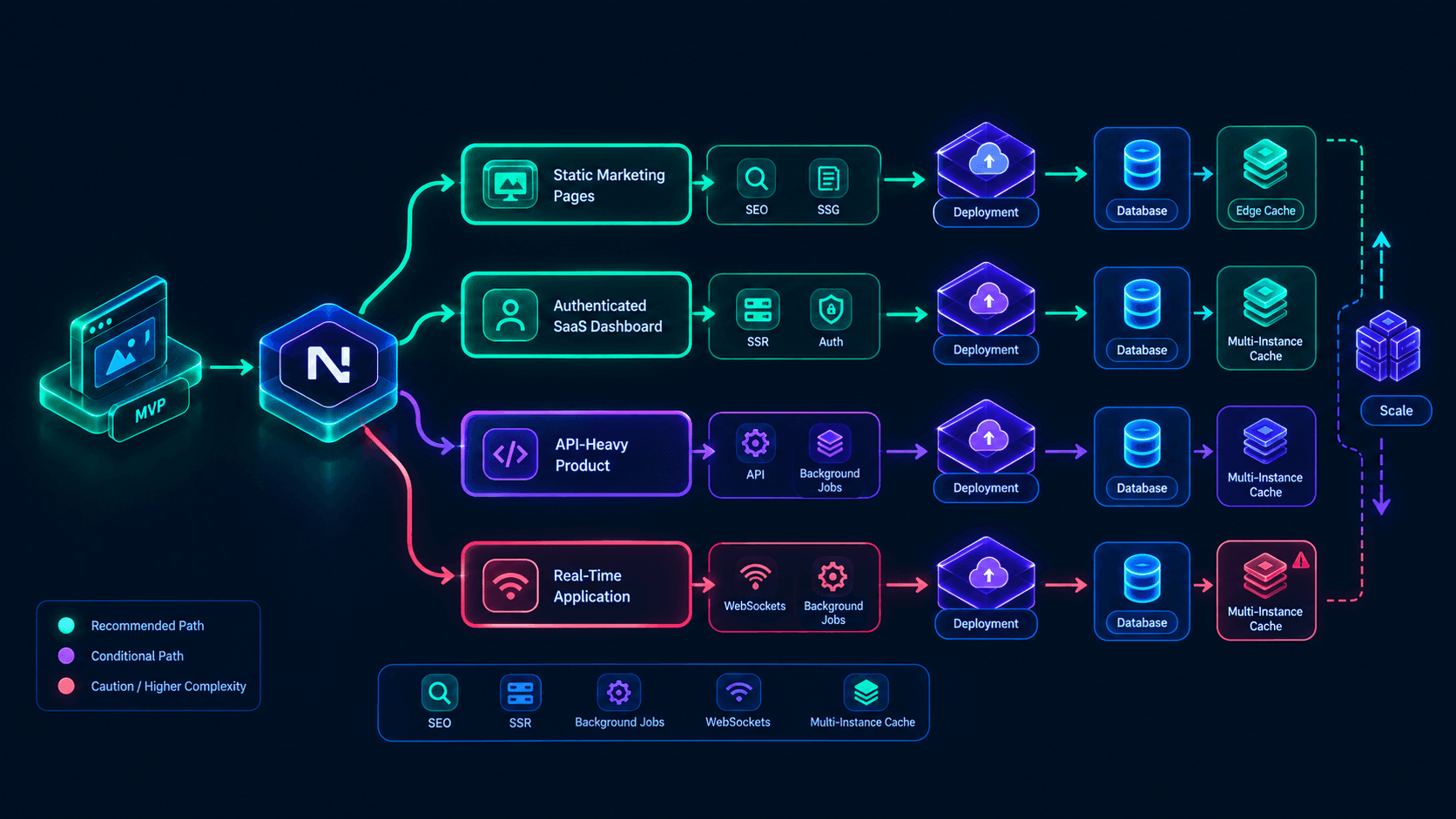 Figure 2: The diagram shows a central architecture decision branching into static marketing pages, an authenticated SaaS dashboard, an API-heavy product, and a real-time application, with each path connected to its deployment, database, and scaling outcome.
The decision can be made in four steps.
Step 1: Identify the irreversible risk
Ask what could invalidate the architecture:
- Real-time collaboration.
- Heavy background processing.
- Native mobile requirements.
- External API consumers.
- Data residency.
- High-volume ingestion.
- Specialized Python or GPU workloads.
- Strict independent scaling.
If none of these is central to version one, Next.js remains a strong candidate.
Step 2: Define one activation event
Examples:
- A workspace creates its first project.
- A recruiter publishes the first job.
- A finance team imports the first reconciled dataset.
- A customer completes the first paid workflow.
- A manager receives the first automated report.
The MVP should optimize for the shortest reliable path to that event, not the highest feature count.
Step 3: Establish the architecture boundary
Write down:
- Which routes are public.
- Which routes are authenticated.
- Which records are tenant-owned.
- Which actions are synchronous.
- Which operations become jobs.
- Which pages are static, cached, or dynamic.
- Which integrations are optional at launch.
- Which event IDs need idempotency.
This document can be one page. If it cannot be expressed clearly, implementation is premature.
Step 4: Set a launch threshold
Use a threshold such as:
- 4–8 weeks to first production release.
- One primary workflow.
- No more than two user roles initially.
- No more than one payment provider.
- No more than one import path.
- Core requests under an agreed latency target.
- Zero unresolved tenant-isolation issues.
- A tested backup and rollback path.
The exact numbers change by product, but the threshold forces trade-offs into the open.
9. Conclusion and Actionable Roadmap
Next.js is a strong MVP foundation when the product is a web-first SaaS or application that needs public pages, authenticated workflows, server-side data access, and a credible path from one deployable application to a larger system. Its value comes from reducing application boundaries while preserving control over rendering, caching, APIs, and deployment.
Start with a modular monolith, explicit tenant and permission checks, one activation workflow, production-grade webhook handling, and route-level rendering decisions. Add queues, shared caches, containers, or separate services only when measured workload or reliability requirements justify them, and keep the first release inside the 4–8 week window.
Build the smallest Next.js MVP that can survive real usage: I design and ship production SaaS systems with Next.js 16, React, TypeScript, PostgreSQL, authentication, payments, background jobs, and deployment automation. Contact me today to book a 30-minute Next.js MVP architecture audit.