React SPA to Next.js 16 Migration: Steps, Redirects, SEO


Written by
Bhalli B
Full-Stack Engineer & SaaS MVP Architect
Certified Full-Stack Developer & MVP Specialist · Lahore, Pakistan
To migrate a React SPA to Next.js without a rewrite, install Next.js, turn your index.html into an app/layout.tsx, and mount your existing app inside a client-only optional catch-all route. Every URL stays the same, so nothing breaks on day one. Then move one route at a time to real pages, adding redirects only for URLs that change.
Most migration guides stop at "it runs on localhost". The expensive mistakes come later: a static export that silently ignores your redirects, a Next.js 16 build that fails on a leftover webpack config, or a launch where old URLs return 404 and rankings drop. This guide covers the whole path for a Create React App or Vite project: the shell-first setup from the official guides, a route-by-route plan for leaving React Router, the Next.js 16 breaking changes that hit migrations, a redirect and URL parity model, a planning formula for effort, and a pre-launch test script you can run against your old sitemap.
1. Should you migrate a React SPA to Next.js at all?
Migrate only if a specific problem justifies it: pages that must be found in search, a slow first load caused by a large client bundle, or data-fetching waterfalls that server rendering would remove. If none of those describes your product, a working SPA is a perfectly good place to stay.
The official migration guides for Create React App and Vite give the same list of reasons, and it is worth reading as a checklist instead of a sales pitch. A client-only app makes the browser download and run your whole bundle before it can even request data. Bundles grow with every feature. Manual code splitting tends to create network waterfalls, where a child component cannot start fetching until its parent finishes. Next.js addresses these with automatic code splitting per route, server-side data fetching, and streaming through React Suspense.
There is a second reason that matters for a business site: the HTML a crawler receives first. A strict SPA serves one near-empty document and fills it in with JavaScript. A server-rendered page ships the headline, body text, and metadata in the first response. That does not make a client-rendered page unindexable, but it does mean your content depends on a second step succeeding.
When is staying on your SPA the better call?
Run each product area through this table before you commit any engineering time. The answers differ by area, so you may migrate the marketing site and leave the dashboard alone.
| Situation | Decision | Reason |
|---|---|---|
| Public pages that should rank (landing, docs, blog, pricing) | Migrate first | Server-rendered HTML and per-page metadata are the main gain |
| Logged-in dashboard behind authentication | Usually stay | Crawlers never see it, so the benefit is mostly bundle size and data loading |
| Internal tool with no search traffic | Stay | There is no ranking benefit to buy |
| Product in maintenance mode | Stay | No roadmap work to absorb the regression risk |
| Active roadmap, small team | Migrate incrementally | Feature work continues while routes move one at a time |
If you are still deciding between a plain React app and Next.js for a new build rather than an existing one, Next.js vs React for startups compares the two for MVP work. This post assumes you already have a SPA in production and want to move it safely.
What is the three-question gate I use before scoping a migration?
As a Certified Project Manager, I will not scope a migration until three questions have written answers. First, which URLs need server-rendered content, and what is their current organic traffic? Second, what measurable result would make the migration a success, such as a faster Largest Contentful Paint on the top five landing pages or an indexed page count? Third, what is the rollback plan if the first deployment goes wrong?
If the answer to the first question is "none of them", the project is a developer preference, not a business need. That is allowed, but it should be budgeted as a refactor, with the lower urgency and tighter scope that implies. If the answer to the third question is "we cannot roll back", the plan is not ready, and the shell-first approach in the next section is how you fix that.
2. How do you migrate a React SPA to Next.js without a rewrite?
Treat the migration as two stages. Stage one wraps your existing app in a Next.js project and renders it client-only, so behavior is identical and rollback is trivial. Stage two removes the static export and replaces SPA routes with real Next.js pages, one at a time.
This is the approach in the official Next.js guides for Create React App and Vite. Both begin by keeping your router and treating the app as a single-page application, to reduce complexity and merge conflicts. The diagram shows the full path, including the checkpoints I add around it.
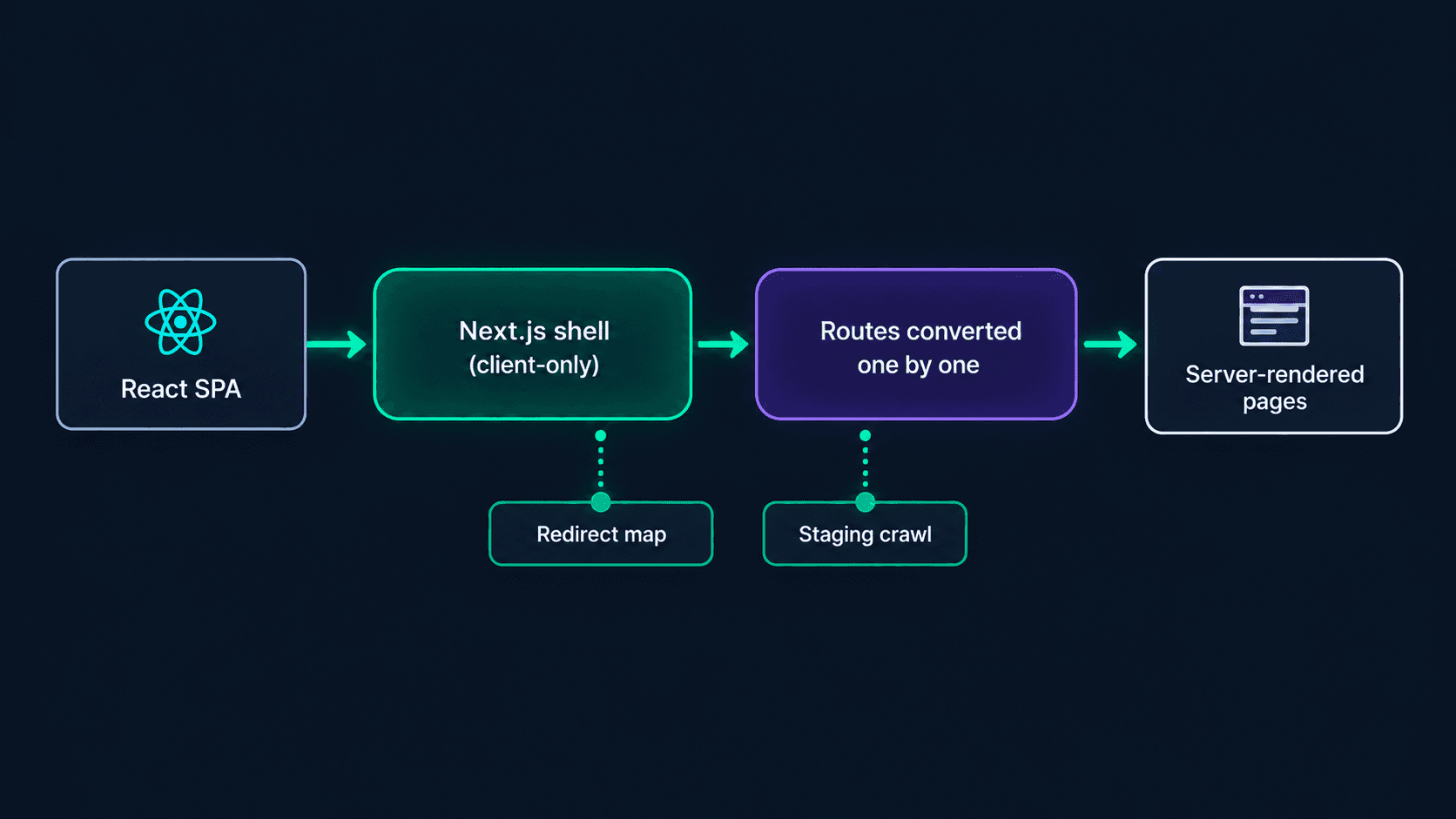 Figure 1: The diagram shows the two-stage path. Stage one mounts the old app inside a Next.js catch-all route. Stage two converts routes to server-rendered pages while a redirect map and a staging crawl guard every release.
Step 1: What do you install and configure first?
Install Next.js in the existing project and add a config file. The two guides differ only in where the build output goes.
npm install next@latest react@latest react-dom@latest
npm install -D @types/react@latest @types/react-dom@latest
// next.config.ts
import type { NextConfig } from 'next'

const nextConfig: NextConfig = {
  output: 'export', // SPA mode: static HTML, CSS, and JS only
  distDir: 'build', // CRA used build; the Vite guide uses ./dist
}

export default nextConfig
Next.js 16 needs Node.js 20.9 or newer and TypeScript 5.1 or newer, so check your CI image before anything else. A common first failure is a build server still on Node 18.
Step 2: How do you replace index.html with a root layout?
Create app/layout.tsx. It is the Next.js equivalent of the HTML shell in public/index.html (CRA) or index.html (Vite). Copy your head content into the Metadata API and keep a single root div, as the guides do.
// app/layout.tsx
import type { Metadata } from 'next'
import '../src/index.css' // your existing global stylesheet

export const metadata: Metadata = {
  title: 'Your App Name',
  description: 'Your existing meta description',
}

export default function RootLayout({
  children,
}: {
  children: React.ReactNode
}) {
  return (
    <html lang="en">
      <body>
        <div id="root">{children}</div>
      </body>
    </html>
  )
}
Delete the charset and viewport tags, since Next.js adds both. Move favicon.ico, icon.png, and robots.txt into the app directory so they are injected automatically.
Step 3: How do you mount the old app in a catch-all route?
This is the core trick. An optional catch-all segment named [[...slug]] receives every URL, and a client-only wrapper loads your existing App component with server rendering switched off.
// app/[[...slug]]/client.tsx
'use client'

import dynamic from 'next/dynamic'

const App = dynamic(() => import('../../src/App'), { ssr: false })

export function ClientOnly() {
  return <App />
}
// app/[[...slug]]/page.tsx
import { ClientOnly } from './client'

export function generateStaticParams() {
  return [{ slug: [''] }] // prerender a single shell for /
}

export default function Page() {
  return <ClientOnly />
}
Your React Router tree, state library, and data layer run untouched inside that component. For a Vite project, also import your global CSS in the page file, move the tsconfig changes the guide lists, and rename VITE_ environment variables.
Step 4: What changes in environment variables, images, and scripts?
Three small edits cause most of the first-day errors.
| Concern | Create React App | Vite |
|---|---|---|
| Public env variable prefix | REACT_APP_ becomes NEXT_PUBLIC_ | VITE_ becomes NEXT_PUBLIC_ |
| Output directory in config | distDir: 'build' | distDir: './dist' |
| Start script in the guide | npx serve@latest ./build | next start |
| TypeScript | Add next-env.d.ts to include | Several tsconfig changes, listed in the guide |
| Static image imports | Return an object, use the src property | Return an object, use the src property |
Static image imports are the sneaky one. In CRA and Vite, importing a PNG returns a URL string. In Next.js it returns an object, so an img tag needs logo.src instead of logo, or you can reference the file by its public path.
What does stage one actually give you?
Be honest about this with your team. Stage one gives you a Next.js build pipeline, a layout, the Metadata API, and a safe place to start converting routes. It does not give you server-rendered content, because the app is still client-only. Search engines receive the same empty shell as before. Do not announce stage one as an SEO improvement.
Also remember what a static export cannot do. The static exports guide lists redirects, rewrites, headers, proxy, Server Actions, and cookies as unsupported. The guide's own generateStaticParams example only produces the root route, so on a plain static host, deep links to routes like /pricing still depend on your host's SPA fallback, exactly as they did with your old build. Keep whatever fallback rule your host already uses.
3. How do you move from React Router to the Next.js App Router, route by route?
Remove output: 'export', deploy to a host that runs Next.js, and convert routes in order of organic traffic. A real page such as app/pricing/page.tsx is a static route, so it is matched before the catch-all. Everything you have not converted keeps running in the shell.
Check that precedence on a preview deployment before you rely on it. The next.config docs describe the full routing order, in which dynamic routes are matched after static files and pages, so a concrete page should win over the optional catch-all.
How do React Router concepts map to the App Router?
| React Router (SPA) | Next.js App Router |
|---|---|
| Route path="/users/:id" | app/users/[id]/page.tsx |
| Link with the to prop | Link from next/link with the href prop |
| useNavigate | useRouter from next/navigation |
| useLocation | usePathname and useSearchParams from next/navigation |
| Navigate component | redirect() from next/navigation |
| Outlet in a layout route | layout.tsx rendering children |
| Route-level lazy loading | Automatic code splitting per route |
One caveat from the official docs: with a static export, the useParams hook is not supported, so keep route-parameter logic in the old shell until you drop the export.
What does a converted data-fetching route look like?
The biggest rewrite inside a route is data loading. An SPA renders a placeholder, mounts, then fetches. A Server Component fetches before the first byte reaches the browser, and the user receives finished HTML.
function Profile() {
const { id } = useParams();
const [user, setUser] = useState(null);

useEffect(() => {
  fetch("/api/users/" + id)
    .then((r) => r.json())
    .then(setUser);
}, [id]);

if (!user) return <Spinner />;
return <h1>{user.name}</h1>;
}
The browser downloads the bundle, mounts the component, and only then requests the data. The first response contains no user name, and every nested component that also fetches adds another round trip.
// app/users/[id]/page.tsx
export default async function Page(
props: PageProps<"/users/[id]">
) {
const { id } = await props.params;
const user = await getUser(id);
return <h1>{user.name}</h1>;
}
The data is loaded before the response is sent, so the headline is in the first HTML. Next.js 16 passes params as a Promise, which is why the component is async and awaits it.
Keep interactive pieces such as forms, charts, and drag-and-drop widgets as Client Components with the use client directive, and pass them data from the server page as props. If the split between server and client code is new to you, React Server Components for founders explains where the boundary belongs without the jargon.
Which migration pattern fits your hosting: catch-all or fallback rewrite?
There are two ways to run old and new code side by side, and the right one depends on where the SPA lives.
| Pattern | How it works | Best when | Watch out for |
|---|---|---|---|
| Catch-all shell in the same project | Old app mounts at the optional catch-all, real pages take priority | You want one repository and one deploy | The old bundle ships with the project until the last route moves |
| Fallback rewrite to the legacy site | Next.js proxies unmatched paths to the old host | The old app is large and deployed separately | Two deployments to monitor, and an extra network hop for old routes |
| Big-bang rewrite | Replace everything in one release | Almost never | No rollback path and every URL changes at once |
The second pattern uses the fallback array from the rewrites configuration, which the docs describe as the way to incrementally adopt Next.js. Fallback rewrites run after pages, static files, and dynamic routes have been checked, so every route you migrate quietly takes over from the legacy site without a config change.
// next.config.js
module.exports = {
  async rewrites() {
    return {
      fallback: [
        {
          source: '/:path*',
          destination: 'https://legacy.example.com/:path*',
        },
      ],
    }
  },
}
Rewrites and redirects both require a Next.js server, so this pattern belongs to stage two. Which URLs do you convert first? Sort the Pages tab of your Search Console Performance report by clicks over the last 90 days and start at the top. High-traffic pages get the benefit sooner, and any mistake there shows up in your numbers quickly while the blast radius is still small.
What if you also run on a static host today?
A static host works for stage one but not for stage two. Once you drop the export, you need a runtime for server rendering, rewrites, and redirects. Budget for that change before you start, because it alters your monthly bill and your deployment process. Next.js 16 hosting costs walks through the options, and CI/CD with GitHub Actions caching and performance budgets covers build caching so migration pull requests stay fast.
4. What breaks when you migrate to Next.js 16?
Six things break most often: synchronous access to params, searchParams, cookies, and headers; a custom webpack configuration now that Turbopack is the default; the middleware file name; the next lint command; image configuration defaults; and code that touches window during prerendering.
The Next.js 16 upgrade guide lists each change with a fix. The table collects the ones that land on a SPA migration, with the official codemod where one exists.
| Change in Next.js 16 | What breaks | Fix |
|---|---|---|
| Async Request APIs | Synchronous params, searchParams, cookies(), headers(), draftMode() access is removed | Await them, and run the next-async-request-api codemod |
| Turbopack by default | next build fails if a custom webpack config exists | Use the --webpack flag, or migrate the config to turbopack options |
| middleware renamed to proxy | middleware.ts is deprecated, and proxy runs on the Node.js runtime | Rename the file and function, or keep middleware if you need the edge runtime |
| next lint removed | Scripts that call next lint fail, and next build no longer lints | Run ESLint or Biome directly, using the lint codemod |
| images defaults | Default quality list is 75 only, minimum cache TTL is 4 hours, domains is deprecated | Set images.qualities, and use remotePatterns |
| Node and TypeScript floor | Node 18 is unsupported | Node 20.9 or newer, TypeScript 5.1 or newer |
Run the two codemods early, in a clean branch, so the diff is reviewable.
npx @next/codemod@canary upgrade latest
npx @next/codemod@canary next-async-request-api .
npx next typegen
The first command applies the general upgrade. The docs note that it does not run every migration, which is why the async Request APIs codemod is listed separately. The typegen command, available since Next.js 15.5, generates the PageProps and LayoutProps helpers used in the examples in this post.
export default function Page({ params }) {
const slug = params.slug;
const theme = cookies().get("theme");
return <h1>{slug}</h1>;
}
Next.js 15 allowed this for compatibility. In Next.js 16 the synchronous access is fully removed, so params and cookies must be awaited.
export default async function Page(
props: PageProps<"/blog/[slug]">
) {
const { slug } = await props.params;
const theme = (await cookies()).get("theme");
return <h1>{slug}</h1>;
}
The page becomes async, params arrives as a Promise, and cookies is awaited before use. The codemod performs most of this rewrite for you.
Why does the build fail on a webpack config you never touched?
Because a plugin may be adding one. The upgrade guide says that if your project has a custom webpack configuration and you run next build, which now uses Turbopack, the build fails to prevent misconfiguration. It also says that if you see this failure without defining a webpack config yourself, a plugin is probably adding the option. Your choices are to build with the --webpack flag, to build with --turbopack and ignore the config, or to port the config. Decide on purpose, because the flags change what ships.
The CRA guide points out the same trade-off from the other direction: custom webpack tweaks can be carried over, but the dev script then needs the --webpack flag.
What about the old middleware file?
If your SPA never had middleware, you have nothing to rename. If you add authentication redirects during migration, create proxy.ts, not middleware.ts. The docs state that proxy runs on the Node.js runtime and the runtime cannot be configured. If you depend on the edge runtime, the guide says to keep using the middleware convention. Treat the proxy as a place for cheap redirects and session refresh, and check authorization again inside each route and Server Function, since a matcher change can silently remove coverage.
Why does window is not defined appear after the migration?
Client Components are prerendered on the server during the build, so any top-level reference to window, localStorage, or document throws. In stage one the dynamic import with ssr set to false hides this, because your whole app skips prerendering. In stage two, as you convert routes, move browser-only access into a useEffect, or load that one component with next/dynamic and ssr false. Fix it at the component level, not by wrapping whole pages in a client-only shell, or you give back the server-rendering gain you migrated for.
If you would rather hand the upgrade and route conversion to someone who has done it before, book a 30-minute call and bring your route list and your build log.
5. How do you keep your SEO when you migrate a React SPA to Next.js?
Keep every indexed URL working with the same path, then redirect only the URLs that change, with a single permanent hop to the final destination. Replicate titles, descriptions, and canonicals through the Metadata API, ship a sitemap, and compare a crawl of the old and new sites before launch.
The most important design decision is also the cheapest: keep your URLs. The catch-all shell does this by default, because every path your SPA served is still served at the same address. Redirects are only needed for paths you deliberately change, so the fewer you change, the smaller your risk.
Should you use 301 or 308 for permanent redirects in Next.js?
Use permanent: true and do not worry about it. In Next.js, permanent set to true returns a 308 status code, and false returns 307. The framework chose these over 301 and 302 because the older codes let some clients change the request method. Google's documentation on redirects lists both 301 and 308 as permanent redirects that signal the new URL as canonical, so the 308 is the right choice for Next.js. A 307, on the other hand, is a temporary redirect, so do not leave permanent: false on a URL you intend to retire.
Note that Google's redirect documentation also says to use JavaScript redirects only when server-side redirects are not possible, because rendering can fail and Google may never see them. A client-side navigate call in your old SPA is not a substitute for a real redirect.
How do you write the redirect map?
Export your old sitemap and your Search Console page list, put every URL in a spreadsheet, and add a column for the new path. Only rows where the path changes become redirects.
// next.config.ts (stage two only: redirects are not supported with output: export)
import type { NextConfig } from 'next'

const nextConfig: NextConfig = {
  trailingSlash: false,
  async redirects() {
    return [
      // exact one-to-one moves
      { source: '/pricing-plans', destination: '/pricing', permanent: true },
      // a whole section, keeping the rest of the path
      { source: '/app/blog/:slug*', destination: '/blog/:slug*', permanent: true },
      // numeric legacy ids only
      { source: '/post/:id(\\d{1,})', destination: '/blog/:id', permanent: true },
    ]
  },
}

export default nextConfig
Three rules keep the map healthy. Never point a redirect at another redirect, because chains waste crawl budget and slow users. Always include a leading slash before a colon in path parameters, or the pattern becomes a literal string and can loop. And mind trailing slashes: if your old host served paths with a trailing slash, set trailingSlash to true so Next.js does not redirect every URL to a slashless version.
How much traffic depends on your redirects?
You can put a number on the risk before you write a line of config. The model uses Search Console clicks over a 90-day window and counts only the URLs whose path will change.
S = C_changed ÷ C_total × 100
Take a hypothetical site with 1,200 organic clicks over 90 days across 40 URLs. Six of those URLs change path, and together they hold 300 of the clicks. The illustration below uses made-up numbers to show how to read the result, so replace them with your own export.
The number does two jobs. It tells you whether the redirect work is a footnote or the main risk, and it tells you which rows to test first. If S is near zero because you kept every URL, your SEO risk shifts to metadata and rendering instead.
What else must match between the old and new site?
Redirects are only one part of URL parity. Check the following on a staging crawl before launch.
- Titles and meta descriptions. Replicate them exactly through the Metadata API or generateMetadata. A framework migration is not the moment to rewrite them, because if traffic moves you will not know which change caused it.
- Canonical URLs. Each page needs a self-referencing canonical on the final domain and path.
- Status codes. Missing pages should return a real 404, not a 200 page that says not found.
- Sitemap and robots. Generate the sitemap from the same route list you used for the redirect map, and confirm robots.txt did not change.
- Structured data. If your SPA injected JSON-LD with JavaScript, move it into the server-rendered page so it exists in the HTML.
- Internal links. Replace old paths in your own navigation so users and crawlers do not travel through redirects.
After launch, submit the sitemap in Search Console, then watch the page indexing report and the 404 list for a few weeks.
6. How long does a React SPA to Next.js migration take?
A small app of around ten routes takes roughly two to three weeks for one developer, a 24-route app roughly six weeks, and a 60-route app roughly three months, using the planning formula below. These are estimates from stated assumptions, not industry benchmarks, so replace the inputs with your own.
Published timelines for migrations vary so much that quoting any of them without your route count is misleading. A better approach is a formula you can recalculate once you have counted routes and sorted them by difficulty.
Days = (F + S × s + D × d) × (1 + B)
The 3, 0.5, 1.5, and 20% inputs are my own planning assumptions for one developer who knows the codebase. A simple route is mostly static content or a thin view. A data-heavy route has fetching, forms, authorization, or heavy client interaction. Adjust the inputs for your team, then use the result to set expectations instead of a promise.
| App size | Routes (simple, data-heavy) | Base days | With 20% contingency | Calendar estimate |
|---|---|---|---|---|
| Small | 10 (6, 4) | 3 + 3 + 6 = 12 | 14 days | About 3 weeks |
| Medium | 24 (16, 8) | 3 + 8 + 12 = 23 | 28 days | About 6 weeks |
| Large | 60 (40, 20) | 3 + 20 + 30 = 53 | 64 days | About 13 weeks |
Two things move these numbers more than anything else. The first is a second developer, which shortens calendar time less than people hope because the fixed work and the redirect map do not split well. The second is test coverage: a route with no tests costs more to convert, because you are guessing what it does.
How do you run the work so it never becomes a four-week black box?
As a Certified Project Manager, I scope migrations in one-week increments, and each increment must end in something deployable. Week one is the shell, the redirect map, and a staging crawl. Every later week converts the next batch of routes by traffic, and ships. If a week slips, the previous week is still live and nothing is blocked.
That cadence also gives you a built-in rollback. Each conversion is a separate pull request, so reverting a route means reverting one change, and the catch-all shell is still there to serve it.
7. How do you test a React SPA to Next.js migration before launch?
Test three things on a staging deployment: every old URL returns either a 200 or a single permanent redirect to the right place, the server-rendered HTML contains the real content, and your key flows still work. Automate the first two with a script that runs against your old sitemap.
A manual spot check of ten pages misses the long tail, which is exactly where redirect mistakes live. The script below takes a list of old URLs and the expected destination for any that moved, then checks the status without following redirects.
// scripts/check-urls.ts (Node 20 or newer; run with: npx tsx scripts/check-urls.ts)
const BASE = process.env.STAGING_URL ?? 'https://staging.example.com'

// old path -> expected final path (null means it should return 200 as is)
const urls: Record<string, string | null> = {
  '/': null,
  '/pricing': null,
  '/pricing-plans': '/pricing',
  '/app/blog/hello-world': '/blog/hello-world',
}

let failures = 0

for (const [path, expected] of Object.entries(urls)) {
  const res = await fetch(BASE + path, { redirect: 'manual' })

  if (expected === null) {
    if (res.status !== 200) {
      failures++
      console.error('FAIL', path, 'expected 200, got', res.status)
    }
    continue
  }

  const location = res.headers.get('location') ?? ''
  const finalPath = location.replace(BASE, '')
  const permanent = res.status === 301 || res.status === 308

  if (!permanent || finalPath !== expected) {
    failures++
    console.error('FAIL', path, 'status', res.status, 'location', location)
  }
}

console.log(failures === 0 ? 'All URL checks passed' : failures + ' failures')
process.exit(failures === 0 ? 0 : 1)
The script treats 301 and 308 as permanent and rejects 307, which catches the case where permanent was left as false. Because it uses manual redirect handling, it also fails when a redirect points at another redirect, since the location will not match the final path.
How do you confirm the page is actually server-rendered?
Fetch the raw HTML without running JavaScript and look for your content. This is the check that stage one will fail and stage two should pass.
curl -s https://staging.example.com/pricing | grep -o "<h1[^>]*>[^<]*</h1>"
curl -s https://staging.example.com/pricing | grep -o "<title>[^<]*</title>"
curl -s https://staging.example.com/pricing | grep -c "application/ld+json"
If the first command prints nothing for a page you converted, that page is still being rendered in the browser and you have not yet gained what you migrated for.
What belongs on the pre-launch checklist?
- A crawl of the old site and the staging site, with the URL, title, description, canonical, and status of each page compared in a spreadsheet.
- The URL script above passing against your complete redirect map.
- A production build with the same Node version and flags as CI, including the webpack or Turbopack decision from section 4.
- End-to-end tests for sign-in, checkout or sign-up, and the two or three flows that earn revenue.
- A Lighthouse or WebPageTest run on the top five landing pages before and after, so you can show the result you set as the goal in section 1.
- A named rollback step, such as pointing the domain back to the old build, and one person who knows how to do it.
8. Conclusion and Actionable Roadmap
A React SPA to Next.js migration is a sequence of small, reversible releases, not a rewrite. Wrap the old app in a client-only catch-all route, drop the static export, convert routes in order of traffic, keep every URL you can, redirect the rest with one permanent hop, and test the redirect map against a staging crawl before launch.
Do the work in this order. This week, export 90 days of Search Console data, count routes, and calculate the redirect-dependent share and the effort formula from this guide. Next, stand up the shell and confirm your CI runs on Node 20.9 or newer. Then convert the highest-traffic routes, run the two codemods, and decide on webpack versus Turbopack on purpose. Before launch, run the URL script, crawl staging, and name your rollback. Afterwards, watch indexing and 404 reports for a few weeks, and change titles and URLs later, in separate releases.
Move your React SPA to Next.js without losing the traffic you already have: I plan and run incremental SPA-to-Next.js 16 migrations, from the URL and redirect audit to route conversion, codemods, and a staging crawl before launch, in one-week deployable increments. Contact me today to book a 30-minute migration audit.