How to Migrate React to Next.js Without a Full Rewrite


Written by
Bhalli B
Full-Stack Engineer & SaaS MVP Architect
Certified Full-Stack Developer & MVP Specialist · Lahore, Pakistan
You can migrate React to Next.js without a full rewrite by running your existing React SPA inside a Next.js optional catch-all route, then converting one route at a time to the App Router. Your product keeps shipping while client-only rendering, routing, and data fetching are replaced incrementally.
The usual failure mode is not syntax. It is treating the migration as a big-bang rewrite: a 6-10 week branch, constant merge conflicts, broken analytics, lost rankings, and no rollback. This guide gives you a route-by-route plan, production-ready code for the two hardest transitions (SPA bootstrapping and React Router conversion), a cost formula, and per-route rollback gates. For a typical 20-40 route app, plan 3-5 weeks with two engineers instead of a 2-3 month rewrite.
1. Why migrate React to Next.js at all?
Migrate React to Next.js when your product needs server rendering, faster first loads, SEO-controlled pages, file-based routing, or server-side integrations that must not ship secrets to the browser. If your React app is an internal admin tool with no search surface and acceptable performance, migration may cost more than it returns.
In practice, this means: a Create React App or Vite SPA sends the browser an empty HTML shell and a JavaScript bundle, and everything else happens on the user's device. Next.js moves part of that work to the server. It gives you three concrete wins:
- Server Components and streaming. A dashboard shell renders immediately while slower panels stream in, instead of a blank screen until every
useEffectresolves. - Route-level code splitting. Each route segment ships only the JavaScript it needs, so a pricing page no longer downloads your charting library.
- Server-side execution. Route Handlers, Server Actions, and Server Components can call databases and third-party APIs without exposing credentials in a client bundle.
The distinction that matters: Next.js is not "React with better SEO." It changes the execution boundary. In an SPA nearly everything runs in the browser. In the App Router, components are Server Components by default and you opt into interactivity with 'use client'.
| Decision factor | Stay on React SPA | Migrate to Next.js |
|---|---|---|
| Primary product surface | Authenticated internal dashboard | Marketing site, SaaS app, SEO-dependent product |
| Initial load target | LCP above 2.5s is tolerable | LCP under 2.5s is a business requirement |
| Data access | Browser calls public APIs only | Server needs database, secrets, or provider SDKs |
| Team capacity | No capacity for 3-5 weeks of migration work | Can ship behind route-level rollbacks while maintaining features |
| Deployment | Static files on S3, Netlify, or Cloudflare Pages | Node, serverless, or edge runtime is acceptable |
A useful rule: if you cannot name the business metric the migration improves (organic signups, trial conversion, time-to-first-action, or infrastructure cost), do not start. Migration is an architecture investment, not a framework fashion decision, and it should sit inside your wider SaaS MVP architecture decisions.
There are also lighter alternatives. If only the marketing pages need SEO, you can move just those pages to a small Next.js app and leave the SPA alone. If you want server rendering but prefer to stay in the Vite ecosystem, React Router v7's framework mode and Vite SSR are options. Choose Next.js when you also want the server-side integration story (Route Handlers, Server Actions, one deployment) in the same codebase.
2. What does an incremental React-to-Next.js migration look like?
An incremental migration keeps the existing React application running inside Next.js while you convert routes individually. Next.js documents this path for Create React App projects: first run the SPA unchanged behind an optional catch-all route, then adopt App Router features progressively, as described in the official Next.js CRA migration guide.
The target architecture looks like this:
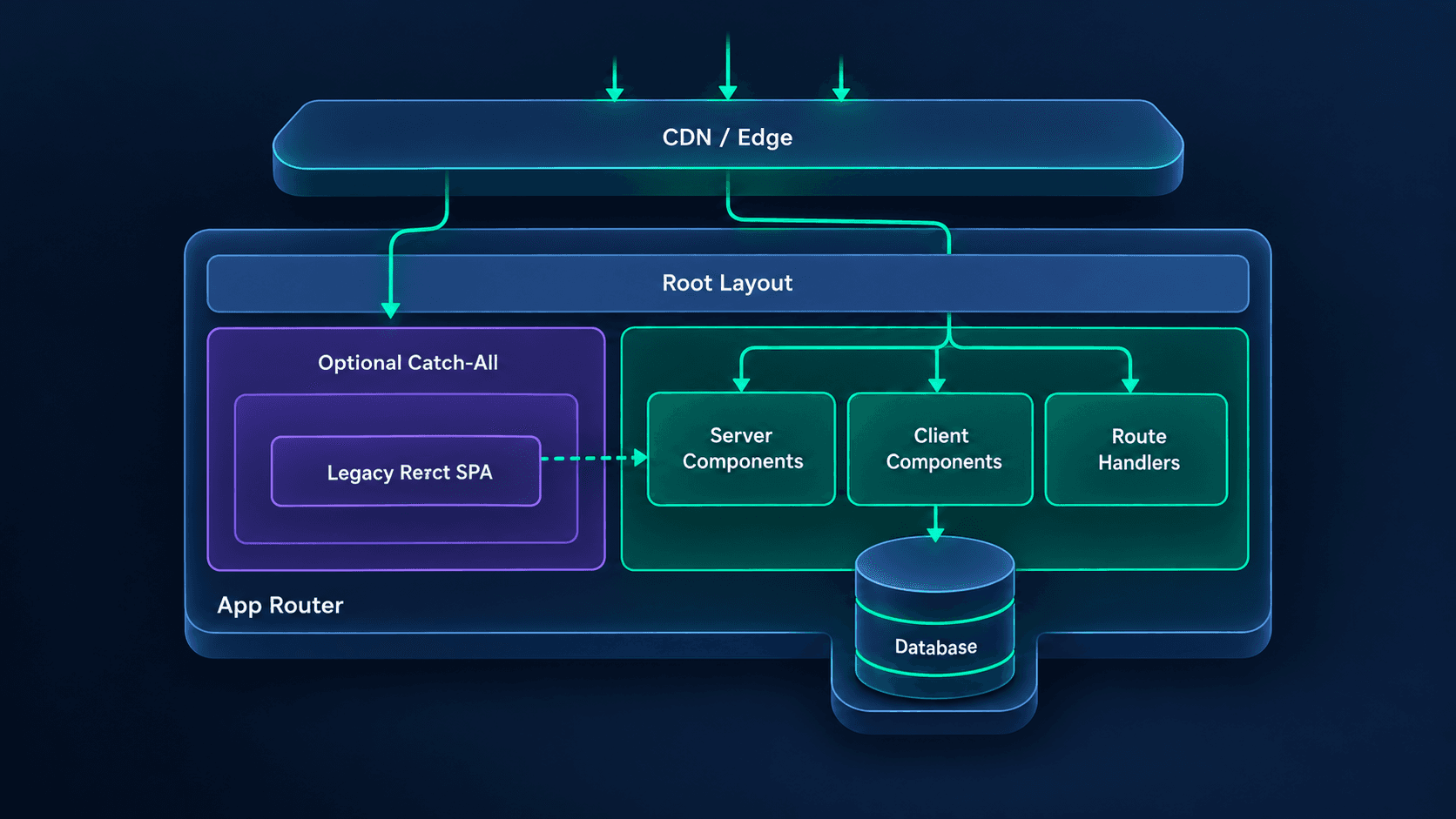 Figure 1: The legacy React SPA stays available through an optional catch-all route while individual routes move into the Next.js App Router as Server and Client Components.
The three migration stages
- Stage 1: Host the SPA in Next.js. Install Next.js, create
app/layout.tsx, mount the existingAppcomponent in a client-only optional catch-all route, and keep React Router. For a clean CRA or Vite app this takes 1-3 days. - Stage 2: Convert routes one by one. Move
/pricing,/blog,/login, and other low-risk routes intoapp/first, then replace their React Router definitions and convert client-side data fetching where it produces a measurable benefit. - Stage 3: Remove the SPA shell. Once every route has a Next.js equivalent, delete the catch-all route, the React Router dependency, and the legacy entry files.
This sequence gives you a deployable application at the end of every week. You are never waiting on a giant branch to become mergeable.
Which migration pattern fits your codebase?
| Approach | First deployable win | Rollback | Risk | Best for |
|---|---|---|---|---|
| Big-bang rewrite branch | 6-10 weeks | Whole release only | High | Tiny apps under 10 routes |
| Optional catch-all, same repo | 1-3 days | Per route | Low | Single-repo SPAs (CRA, Vite) |
| Reverse-proxy "strangler" with rewrites | 1-2 weeks | Per route, via config | Medium | Legacy app that must stay deployed separately |
The times above are my planning estimates, not benchmarks. The catch-all approach wins for most single-repo SPAs because it needs no extra infrastructure. The strangler approach earns its overhead only when the legacy app has its own deployment pipeline you cannot merge yet.
As a certified full-stack engineer, I treat migration scope like a delivery plan: every route gets an owner, an acceptance test, an analytics check, and a rollback path before it enters the migration board. "We'll figure out auth later" is how a two-week project becomes a quarter-long incident.
3. How do you run an existing React SPA inside Next.js?
Run the existing SPA by installing Next.js, creating a root layout, and mounting the old App component inside a client-only optional catch-all route. This is the lowest-risk first step because your routes, state management, and React Router configuration stay untouched.
Install Next.js alongside React
Keep react and react-dom. Remove only the bundler-specific tooling after the Next.js shell works.
# Install Next.js in the existing React project
pnpm add next@latest

# Remove CRA build tooling only after the Next.js shell is validated
pnpm remove react-scripts
One 2026 detail: Next.js 16 uses Turbopack as the default bundler for next dev and next build. If your CRA project relied on a custom webpack setup through craco or react-app-rewired, list those customizations before Stage 1 and check each one against Next.js config.
// next.config.ts
import type { NextConfig } from 'next';

const nextConfig: NextConfig = {
  reactStrictMode: true,

  // Set this only if the legacy app must remain under a sub-path,
  // for example https://example.com/app
  // basePath: '/app',
};

export default nextConfig;
Create the App Router root layout
In practice, this means moving the contents of CRA's public/index.html into a React layout. The <div id="root"> disappears and {children} replaces it.
// app/layout.tsx
import type { Metadata } from 'next';
import './globals.css';

export const metadata: Metadata = {
  title: {
    default: 'Your SaaS Product',
    template: '%s | Your SaaS Product',
  },
  description: 'Product description for search engines and AI answer engines.',
};

export default function RootLayout({
  children,
}: {
  children: React.ReactNode;
}) {
  return (
    <html lang="en" suppressHydrationWarning>
      <body>
        {/* Keep global providers here only while the legacy SPA still needs them */}
        {children}
      </body>
    </html>
  );
}
Mount the legacy SPA safely
The optional catch-all route, app/[[...slug]]/page.tsx, catches every path that does not yet have a dedicated App Router route. The legacy app loads with ssr: false because CRA components often assume window, document, and localStorage exist during render.
// app/[[...slug]]/client.tsx
'use client';

import dynamic from 'next/dynamic';

// Skips server rendering of browser-dependent legacy code.
// Intentionally temporary: it lets the SPA boot unchanged.
const LegacyApp = dynamic(() => import('../../App'), {
  ssr: false,
  loading: () => <div aria-busy="true">Loading application…</div>,
});

export function LegacyAppShell() {
  return <LegacyApp />;
}
Update the scripts and ignore generated output:
{
  "scripts": {
    "dev": "next dev",
    "build": "next build",
    "start": "next start",
    "lint": "eslint ."
  }
}
Note that next lint was removed in Next.js 16, so call ESLint directly.
# .gitignore
.next
next-env.d.ts
The environment-variable trap
CRA exposes browser variables with REACT_APP_ (Vite uses VITE_). Next.js requires NEXT_PUBLIC_ for anything that must reach the browser. A missed rename shows up as undefined in the client, often only in production.
# Before
REACT_APP_API_URL=https://api.example.com
REACT_APP_STRIPE_PUBLISHABLE_KEY=pk_live_xxx

# After
NEXT_PUBLIC_API_URL=https://api.example.com
NEXT_PUBLIC_STRIPE_PUBLISHABLE_KEY=pk_live_xxx
# Rename in code and env files. Review the diff before committing.
# GNU sed shown; on macOS use: sed -i '' 's/REACT_APP_/NEXT_PUBLIC_/g'
grep -rl "REACT_APP_" src .env* | xargs sed -i 's/REACT_APP_/NEXT_PUBLIC_/g'
❌ Do not put a private key into a NEXT_PUBLIC_ variable. That prefix means the value ships in the browser bundle.
✅ Do keep secret keys server-side and read them from Route Handlers, Server Actions, or Server Components.
I have seen a team lose a full day to this exact issue: the app worked locally because an old .env file was still loaded, then failed in CI because the deployment platform only had the new variable names. Add a startup check for required public variables before you call Stage 1 complete.
4. How do you migrate React Router to the Next.js App Router?
Migrate React Router by creating a page.tsx for each route, moving interactive page logic into a Client Component, and replacing React Router hooks and links with next/navigation and next/link. Next.js recommends moving each old page into a Client Component first and importing it from the new App Router page, as covered in the App Router migration guide.
What this costs you if you get it wrong: a route that works visually but behaves differently on redirects, params, or history will pass a quick manual check and fail in production. Budget under an hour for a presentation-only route, and 1-2 days for a route with mutations, permissions, and URL state.
Route mapping
| React Router pattern | Next.js App Router equivalent | Migration note |
|---|---|---|
| Route path="/pricing" | app/pricing/page.tsx | Start with static, public routes |
| Route path="/dashboard" | app/dashboard/page.tsx | Keep auth logic explicit |
| Route path="/projects/:id" | app/projects/[id]/page.tsx | Validate params before any database access |
| Route path="*" | not-found.tsx | Return a real 404 status, not a soft 404 |
| Link to="/billing" | Link href="/billing" | Remove router-specific props |
| useNavigate() | useRouter() from next/navigation | Different API and redirect semantics |
| useLocation() | usePathname() / useSearchParams() | Split location concerns deliberately |
Convert a client-heavy route
Take a billing settings page that reads the current plan, lets the user change seats, and shows invoices. The interactive form stays a Client Component, and the initial plan data moves server-side. This split is the pattern you will repeat for most authenticated routes.
// app/(app)/billing/billing-client.tsx
'use client';

import { useState, useTransition } from 'react';
import { useRouter } from 'next/navigation';
import { toast } from 'sonner';

type Plan = 'starter' | 'growth' | 'scale';

export function BillingClient({
  currentPlan,
  seatCount,
}: {
  currentPlan: Plan;
  seatCount: number;
}) {
  const router = useRouter();
  const [selectedPlan, setSelectedPlan] = useState<Plan>(currentPlan);
  const [isPending, startTransition] = useTransition();

  function changePlan() {
    startTransition(async () => {
      try {
        const response = await fetch('/api/billing/plan', {
          method: 'PATCH',
          headers: { 'Content-Type': 'application/json' },
          body: JSON.stringify({ plan: selectedPlan }),
        });

        if (!response.ok) {
          const body = await response.json().catch(() => null);
          throw new Error(body?.error ?? 'Unable to update plan');
        }

        toast.success('Plan updated');
        // Re-run the server component so seat counts and invoices refresh
        router.refresh();
      } catch (error) {
        toast.error(
          error instanceof Error ? error.message : 'Unable to update plan'
        );
      }
    });
  }

  return (
    <form
      onSubmit={(event) => {
        event.preventDefault();
        changePlan();
      }}
      className="space-y-4"
    >
      <select
        value={selectedPlan}
        onChange={(event) => setSelectedPlan(event.target.value as Plan)}
        className="w-full rounded-lg border p-3"
      >
        <option value="starter">Starter</option>
        <option value="growth">Growth</option>
        <option value="scale">Scale</option>
      </select>

      <p className="text-sm">Current seats: {seatCount}</p>

      <button
        type="submit"
        disabled={isPending}
        className="rounded-lg bg-emerald-600 px-4 py-2 text-white disabled:opacity-60"
      >
        {isPending ? 'Updating…' : 'Update plan'}
      </button>
    </form>
  );
}
// app/(app)/billing/page.tsx
import { redirect } from 'next/navigation';
import { BillingClient } from './billing-client';
import { getCurrentUser } from '@/lib/auth';
import { getBillingSummary } from '@/lib/billing';

export const metadata = {
  title: 'Billing',
};

export default async function BillingPage() {
  const user = await getCurrentUser();

  // Server-side auth: anonymous users never receive the page shell
  if (!user) {
    redirect('/login?next=/billing');
  }

  const billing = await getBillingSummary(user.id);

  return (
    <main className="mx-auto max-w-3xl p-6">
      <h1 className="text-2xl font-bold">Billing</h1>
      <BillingClient
        currentPlan={billing.plan}
        seatCount={billing.seatCount}
      />
    </main>
  );
}
The architectural shift: authentication and billing data load on the server, while plan selection stays client-side. You do not need to make every component a Server Component. You need to put each piece of logic on the correct side of the network boundary.
Common React Router mistakes
- Calling
useSearchParams()without a Suspense boundary. It forces wider client-side rendering than intended and can fail the production build for statically rendered routes. - Copying
useEffectdata fetching into a Server Component. Move the initial read to the server, but keep user-triggered mutations in Client Components or Server Actions. - Treating
redirect()likenavigate().redirect()throws internally and is for server-side flow control, not for a button click handler. - Leaving global providers in the root layout after migration. A provider wrapped around the whole app can turn large subtrees into client-rendered trees.
If you want a second opinion on your route inventory before you start, book a call and we can walk through it in 30 minutes.
5. How do you move data fetching from React to Next.js?
Move data fetching by shifting initial reads into Server Components or Route Handlers while keeping mutations in Client Components or Server Actions. The goal is not to eliminate useEffect. It is to stop using it for the first render of data the server already knows.
A practical decision rule:
- Public or tenant-scoped read at page load: Server Component.
- Search, filters, pagination, and interactive updates: Client Component with
useTransition, React Query, or Server Actions. - Third-party webhook or mobile-app endpoint: Route Handler.
- Form mutation with validation and revalidation: Server Action.
Webhooks show the payoff most clearly. In a React SPA, a Stripe webhook receiver is a separate Express service or serverless function. After migration it lives beside the product code, shares the same TypeScript types and database access, and deploys together with the app. Keep the webhook route minimal and verified:
// app/api/webhooks/stripe/route.ts
import { NextResponse } from 'next/server';
import Stripe from 'stripe';
import { handleSubscriptionChange } from '@/lib/billing';

// Uses the API version pinned by the installed SDK
const stripe = new Stripe(process.env.STRIPE_SECRET_KEY!);

export async function POST(request: Request) {
  const signature = request.headers.get('stripe-signature');

  if (!signature) {
    return NextResponse.json(
      { error: 'Missing Stripe signature' },
      { status: 400 }
    );
  }

  // Signature verification needs the raw body, not parsed JSON
  const payload = await request.text();

  try {
    const event = stripe.webhooks.constructEvent(
      payload,
      signature,
      process.env.STRIPE_WEBHOOK_SECRET!
    );

    if (event.type === 'customer.subscription.updated') {
      await handleSubscriptionChange(event.data.object);
    }

    // Acknowledge quickly; push slow work to a queue
    return NextResponse.json({ received: true });
  } catch (error) {
    console.error('Stripe webhook verification failed', error);

    return NextResponse.json(
      { error: 'Invalid webhook signature' },
      { status: 400 }
    );
  }
}
The same logic applies to your broader stack. If you are rebuilding data access anyway, check it against your Next.js SaaS stack choices so you do not migrate to patterns you will replace in six months.
What does a React-to-Next.js migration cost in developer-days?
The real cost is not the number of files changed. It is the amount of behavior you must preserve while changing the rendering boundary.
E = R × (C + D + T)
Take a 30-route application where 18 routes have unique behavior. In a rewrite, every route gets redesigned, refactored, and retested at once, so assume C = 1.25, D = 1.25, and T = 1.0. With incremental migration, scope per route stays narrow, so assume C = 0.75, D = 0.75, and T = 0.5.
These are planning numbers, not guarantees. A 10-route marketing site can land in under two weeks. A 60-route dashboard with complex permissions, real-time updates, and embedded analytics can run well past the estimates above.
6. Which routes should you migrate first?
Migrate public, low-risk, high-SEO-value routes first: pricing, blog, documentation, legal pages, and marketing landing pages. They have the least client state, give the fastest measurable gains in SEO and Core Web Vitals, and teach the team the App Router patterns before you touch authenticated workflows.
Recommended migration order
- Static public pages:
/,/about,/pricing,/terms,/privacy. Low risk, immediate metadata control. - Content routes:
/blog,/blog/[slug],/docs,/changelog. Use static generation or incremental static regeneration where content changes rarely. - Authentication pages:
/login,/signup,/forgot-password. Test email links, OAuth redirects, and error states carefully. - Read-heavy dashboard routes:
/dashboard,/projects,/settings. Move initial reads server-side, retain interactivity client-side. - Complex transactional routes:
/checkout,/onboarding,/invite/[token]. Migrate last, with the strongest test coverage. - Legacy removal: delete
app/[[...slug]], React Router, and dead CRA files only after every route has a Next.js equivalent.
Route prioritization score
Score each route from 0 to 5 on four dimensions, then migrate in order of high SEO value and traffic with low complexity and low risk.
| Route | SEO value | Traffic | Client complexity | Business risk | Priority |
|---|---|---|---|---|---|
| /pricing | 5 | 4 | 1 | 2 | High |
| /blog/[slug] | 5 | 5 | 1 | 2 | High |
| /dashboard | 1 | 5 | 4 | 4 | Medium |
| /settings/notifications | 0 | 2 | 3 | 2 | Low |
| /checkout | 1 | 4 | 5 | 5 | Last |
The counterintuitive part: your most important product route is rarely your first target. /checkout may drive revenue, but it also carries payment, tax, authentication, analytics, and edge-case risk. Ship visible wins first, build confidence, then take the hard routes with a mature migration pattern.
Certified in building MVPs and having architected SaaS MVPs from idea to launch, I have learned that the first migrated route should be deliberately boring. Pick a page where success is unambiguous: the URL renders, metadata appears, analytics fires once, and no authenticated state changes. That early win buys the organizational patience the harder routes require.
7. How do you avoid breaking SEO, auth, and analytics during a Next.js migration?
Avoid regressions by treating metadata, redirects, status codes, authentication, and analytics as acceptance criteria for every route, not cleanup tasks. A page can render perfectly in a browser and still lose rankings because it returns the wrong status code, drops its canonical tag, or fires analytics twice.
Metadata and canonical URLs
Every migrated public route needs explicit metadata. Do not rely on the legacy SPA's document.title updates.
// app/blog/[slug]/page.tsx
import { notFound } from 'next/navigation';
import { getPostBySlug } from '@/lib/content';

type Props = {
  params: Promise<{ slug: string }>;
};

export async function generateMetadata({ params }: Props) {
  const { slug } = await params;
  const post = await getPostBySlug(slug);

  if (!post) {
    return { title: 'Post not found' };
  }

  return {
    title: post.title,
    description: post.excerpt,
    alternates: {
      canonical: `https://example.com/blog/${post.slug}`,
    },
    openGraph: {
      title: post.title,
      description: post.excerpt,
      type: 'article',
      url: `https://example.com/blog/${post.slug}`,
      images: [{ url: post.coverImage }],
    },
  };
}

export default async function BlogPostPage({ params }: Props) {
  const { slug } = await params;
  const post = await getPostBySlug(slug);

  if (!post) {
    notFound(); // real 404 status, not a soft 404
  }

  return (
    <article>
      <h1>{post.title}</h1>
      {/* renderedHtml must be sanitized at build time before it reaches this point */}
      <div dangerouslySetInnerHTML={{ __html: post.renderedHtml }} />
    </article>
  );
}
Note that params is a Promise in current Next.js versions, so you must await it.
The soft-404 trap in the catch-all
Here is a gotcha that only appears after you ship Stage 1. The optional catch-all returns HTTP 200 for every URL, including typos and deleted pages, because the SPA decides what to render in the browser. Search engines treat those pages as soft 404s. Fix it by allow-listing the paths the legacy app actually owns:
// app/[[...slug]]/page.tsx
import { notFound } from 'next/navigation';
import { LegacyAppShell } from './client';

// Paths still owned by the legacy SPA. Shrink this list as routes migrate.
const LEGACY_ROUTES = [
  /^\/$/,
  /^\/dashboard(\/.*)?$/,
  /^\/projects\/[^/]+$/,
  /^\/settings(\/.*)?$/,
];

export default async function CatchAllPage({
  params,
}: {
  params: Promise<{ slug?: string[] }>;
}) {
  const { slug = [] } = await params;
  const path = '/' + slug.join('/');

  // Unknown URLs now return a real 404 instead of HTTP 200
  if (!LEGACY_ROUTES.some((pattern) => pattern.test(path))) {
    notFound();
  }

  return <LegacyAppShell />;
}
Redirect old URLs safely
If React Router used paths such as /app/dashboard, preserve them with redirects only when the URL change is intentional. Otherwise keep the old path working.
// next.config.ts
import type { NextConfig } from 'next';

const nextConfig: NextConfig = {
  async redirects() {
    return [
      {
        source: '/old-pricing',
        destination: '/pricing',
        permanent: true,
      },
      {
        source: '/app/dashboard',
        destination: '/dashboard',
        permanent: false,
      },
    ];
  },
};

export default nextConfig;
Use permanent: true only when the old URL will never return. If stakeholders may still hold bookmarks, start with temporary redirects, watch Search Console and server logs for 2-4 weeks, then promote stable ones to permanent. Also remember that Next.js 16 renamed the middleware.ts file convention to proxy.ts, so any auth redirect logic you port from older Next.js examples needs the new name.
Verify status codes and canonicals before every release
# Check status codes and redirect targets on staging
for path in /pricing /blog /old-pricing /does-not-exist; do
  echo "== $path"
  curl -s -o /dev/null -w "%{http_code} -> %{redirect_url}\n" "https://staging.example.com$path"
done

# Confirm the canonical tag is in the server-rendered HTML
curl -s https://staging.example.com/pricing | grep -o '<link rel="canonical"[^>]*>'
Expect 200 for pricing, 200 for the blog index, a 307/308 for the redirect, and 404 for the nonexistent path.
Analytics without double counting
A frequent migration bug is duplicate page views: the old router fires an event, then Next.js navigation fires another. Define one navigation-event owner before migration begins, and turn off the tag's automatic page view.
// app/analytics.tsx
'use client';

import { Suspense, useEffect } from 'react';
import Script from 'next/script';
import { usePathname, useSearchParams } from 'next/navigation';

declare global {
  interface Window {
    gtag?: (...args: unknown[]) => void;
  }
}

const GA_ID = process.env.NEXT_PUBLIC_GA_ID;

function PageViewTracker() {
  const pathname = usePathname();
  const searchParams = useSearchParams();

  useEffect(() => {
    if (!GA_ID || typeof window.gtag !== 'function') return;

    const query = searchParams.toString();
    window.gtag('event', 'page_view', {
      page_path: query ? `${pathname}?${query}` : pathname,
    });
  }, [pathname, searchParams]);

  return null;
}

export function Analytics() {
  if (!GA_ID) return null;

  return (
    <>
      <Script
        src={`https://www.googletagmanager.com/gtag/js?id=${GA_ID}`}
        strategy="afterInteractive"
      />
      <Script id="gtag-init" strategy="afterInteractive">
        {`window.dataLayer = window.dataLayer || [];
function gtag(){dataLayer.push(arguments);}
window.gtag = gtag;
gtag('js', new Date());
gtag('config', '${GA_ID}', { send_page_view: false });`}
      </Script>
      {/* useSearchParams requires a Suspense boundary */}
      <Suspense fallback={null}>
        <PageViewTracker />
      </Suspense>
    </>
  );
}
Render <Analytics /> once in app/layout.tsx, and disable the legacy SPA's router-level analytics listener. Otherwise a user moving from a migrated page to a legacy page generates two events for one navigation.
Mid-migration is also the right time to ask whether the frontend architecture will support the next 12 months, including how long the rest of the build will take (see how long it takes to build a SaaS MVP). Hire a SaaS MVP developer if you want an outside review before committing to a migration plan.
8. What are the biggest React-to-Next.js migration risks?
The biggest risks are client-component sprawl, hydration errors, broken authentication redirects, duplicate analytics, SEO regressions, and a "temporary" dual-router state that lasts for months. Each one is preventable with a migration gate and a per-route rollback.
Client-component sprawl
Adding 'use client' to a page file makes that module and everything it imports part of the client bundle. A page-level directive often drags in charts, editors, tables, and form libraries that never needed to ship to the browser.
// app/dashboard/page.tsx
'use client';

import { DashboardCharts } from '@/components/dashboard-charts';
import { RevenueTable } from '@/components/revenue-table';
import { TeamMembers } from '@/components/team-members';

export default function DashboardPage() {
  // The whole dashboard, including heavy charts and tables,
  // ships in the client bundle.
  return (
    <>
      <DashboardCharts />
      <RevenueTable />
      <TeamMembers />
    </>
  );
}
This defeats much of the reason to migrate. Large third-party component trees and data fetching end up in the browser bundle.
// app/dashboard/page.tsx
import { DashboardCharts } from '@/components/dashboard-charts';
import { RevenueTable } from '@/components/revenue-table';
import { TeamMembers } from '@/components/team-members';
import { getDashboardData } from '@/lib/dashboard';

export default async function DashboardPage() {
  const data = await getDashboardData();

  return (
    <>
      {/* Only truly interactive widgets cross the client boundary */}
      <DashboardCharts data={data.charts} />
      <RevenueTable rows={data.revenue} />
      <TeamMembers members={data.team} />
    </>
  );
}
The page stays a Server Component, initial data is fetched on the server, and only components that need browser interactivity become Client Components.
Hydration errors
Hydration errors mean the server HTML and the first client render disagree. Common causes are Date.now(), Math.random(), browser-only feature detection, locale-dependent formatting, and localStorage reads during render.
'use client';

import { useEffect, useState } from 'react';

export function LocalTime() {
  // ❌ new Date().toLocaleTimeString() during render differs between server and client.
  // ✅ Render a stable placeholder first, then fill in after mount.
  const [time, setTime] = useState<string | null>(null);

  useEffect(() => {
    setTime(new Date().toLocaleTimeString());
  }, []);

  return <span suppressHydrationWarning>{time ?? '--:--'}</span>;
}
How do you roll back a single migrated route?
Roll back a route by routing its URL back to the legacy app through configuration, not by reverting a release. This is what separates an incremental migration from a staged rewrite. If the legacy SPA is still deployed (or still reachable inside the catch-all), a rewrite can send a single path back to it:
// next.config.ts
import type { NextConfig } from 'next';

// Comma-separated list, for example ROLLBACK_ROUTES=/pricing,/login
const rolledBack = (process.env.ROLLBACK_ROUTES ?? '')
  .split(',')
  .map((route) => route.trim())
  .filter(Boolean);

const LEGACY_ORIGIN = process.env.LEGACY_SPA_ORIGIN; // for example https://legacy.example.com

const nextConfig: NextConfig = {
  async rewrites() {
    if (!LEGACY_ORIGIN) return [];

    return {
      // beforeFiles runs before App Router pages, so it overrides a migrated route
      beforeFiles: rolledBack.map((route) => ({
        source: route,
        destination: `${LEGACY_ORIGIN}${route}`,
      })),
      afterFiles: [],
      // Anything Next.js cannot match falls back to the legacy app
      fallback: [
        { source: '/:path*', destination: `${LEGACY_ORIGIN}/:path*` },
      ],
    };
  },
};

export default nextConfig;
Rewrites are evaluated from the config, so changing ROLLBACK_ROUTES means a redeploy of the Next.js app. That is still minutes, not a branch revert.
The migration gate
Do not mark a route complete until it passes this checklist:
- The URL returns the expected HTTP status: 200 for valid pages, 404 for missing content, 301/302/307/308 for redirects.
- Title, description, canonical URL, and Open Graph image render correctly.
- Authentication redirects preserve the original destination.
- Analytics fires exactly once per page view.
- The core user flow passes in a clean browser profile.
- No new console errors or hydration warnings appear.
- Lighthouse or WebPageTest shows no LCP or CLS regression.
- The rollback path is documented and tested.
If you cannot roll back a route independently, you do not have an incremental migration. You have a staged rewrite with extra steps.
9. Conclusion and Actionable Roadmap
To migrate React to Next.js successfully, run the existing SPA inside a Next.js optional catch-all route, migrate public and low-risk routes first, then convert authenticated and transactional routes with explicit acceptance tests and per-route rollbacks. For a 20-40 route product, this typically replaces a 2-3 month rewrite with 3-5 weeks of incremental work for a two-engineer team (5-10 weeks for one), while preserving the ability to ship every week.
Start with a one-page migration inventory: every route, its SEO value, client complexity, data dependencies, analytics events, and rollback plan. Then migrate one route per deployment cycle, measure LCP, organic impressions, conversion, and error rates, and delete the legacy shell only when no route depends on it. The outcome is not simply "we use Next.js." It is a faster first load, cleaner server/client boundaries, safer secrets, and a frontend architecture that can carry the next stage of your SaaS product.
Migrate without stalling product delivery: I help founders and technical teams move React applications to Next.js 16 using an incremental App Router plan, production-grade TypeScript, route-level testing, and rollback-safe deployments. Contact me today to book a 30-minute React-to-Next.js migration audit.