The Real Cost of Building a SaaS MVP: A Budgeting Guide for Solo Founders


Written by
Bhalli B
Full-Stack Engineer & SaaS MVP Architect
Certified Full-Stack Developer & MVP Specialist · Lahore, Pakistan
The direct financial cost to build a viable Software-as-a-Service (SaaS) Minimum Viable Product (MVP) in 2026 ranges from $1,000 to $10,000 for a solo founder leveraging modern boilerplate templates and scale-to-zero serverless platforms. Outsourcing development to experienced freelancers increases the cost to $20,000 to $60,000, while partnering with a specialized development agency ranges from $50,000 to $250,000. By establishing a highly targeted functional scope and utilizing global edge computing, founders can limit monthly operational infrastructure costs to under $40.
1. How much does it cost to build a SaaS MVP in 2026?
A viable SaaS MVP in 2026 costs between $1,000 and $120,000 depending on the selected development model, structural complexity, and geographic location of the engineering team. Solo technical founders achieve the most efficient capital allocation by combining automated starter kits with serverless edge compute layers.
The global Software-as-a-Service market is projected to reach $375.57 billion in 2026, growing at a compound annual growth rate (CAGR) of 18.7%. However, historical data indicates that approximately 62% of startup software projects exceed their initial budgets. This discrepancy is rarely caused by standard engineering rates, but rather by structural scope creep, lack of initial feature definition, and unmapped post-launch operational requirements.
To navigate these variables, founders must evaluate the financial characteristics of each development path.
| Development Approach | Initial Cost Range (USD) | Average Timeline | Scalability Level | Target Fit |
|---|---|---|---|---|
| Solo + SaaS Starter Kit | $1,000 – $10,000 | 2 – 6 weeks | High (Modular Core) | Technical founders prioritizing rapid market validation |
| Outsourced Freelancers | $20,000 – $60,000 | 2 – 4 months | Variable (Skill-dependent) | Founders with highly defined specifications |
| Specialized Agency | $50,000 – $250,000 | 3 – 6 months | High (Enterprise-ready) | Well-funded startups requiring rapid execution |
| In-House Engineering Team | $150,000 – $400,000+/yr | 3 – 6 months | Complete Control | Post-funding startups scaling custom IP |
Geographic distribution introduces further variation in outsourced rates. Developers based in North America command between $70 and $200 per hour, reflecting local market overhead. Offshore and nearshore alternatives provide opportunities for cost reduction, with Eastern European engineers averaging $30 to $65 per hour, Latin American teams ranging from $35 to $45 per hour, and South Asian teams averaging $15 to $40 per hour. Outsourcing to these regions can reduce initial development expenditures by 40% to 60%, provided the founder implements rigorous project management controls to mitigate communication barriers and maintain alignment.
2. What are the primary database and infrastructure costs of a serverless SaaS MVP?
The primary database and infrastructure costs of a serverless SaaS MVP range from $0 to $50 per month during the early validation phase. This cost structure is achieved by utilizing serverless, pay-as-you-go architectures that scale down to absolute zero when there is no active user traffic.
Traditional cloud hosting models require persistent virtual private servers (VPS) or dedicated instances that run continuously, incurring base operational charges of $15 to $100 per month regardless of actual system load. Modern serverless architectures instead use an event-driven execution model where compute services only run when triggered by specific actions, such as an HTTP request or a database write.
To understand how technology choices impact operational costs, founders must analyze the relationship between the development stack and ongoing infrastructure overhead.
| Technology Stack | Build Complexity Cost | Early Monthly Infra | Scaling Limit Profile | Best Use Case |
|---|---|---|---|---|
| Next.js + Supabase | $30,000 – $60,000 | $0 – $50 | High (Managed Auth + DB) | Fast-turnaround relational SaaS |
| Next.js + Prisma / Drizzle | $35,000 – $70,000 | $20 – $100 | High (Custom Relational Engine) | Complete schema control with migration histories |
| Laravel + Vue | $35,000 – $70,000 | $20 – $80 | High (Monolithic Scalability) | Rapid CRUD prototyping with built-in tools |
| Django / Fast API + React / Next.js | $40,000 – $80,000 | $30 – $100 | High (Asynchronous Workers) | Data-heavy platforms or AI processing loops |
| Ruby on Rails | $50,000 – $100,000 | $30 – $150 | Moderate (High RAM requirements) | Fast conventional web applications |
By leveraging serverless frameworks, founders align operational expenses directly with user adoption. This eliminates the risk of high structural burn rates while the product is still finding market fit.
3. Why are connectionless database queries essential for serverless performance?
Connectionless database queries are essential for serverless applications because they prevent database connection exhaustion and reduce latency by communicating over lightweight HTTP protocols instead of persistent TCP state channels.
Traditional relational databases, such as PostgreSQL and MySQL, are stateful; they require a client to open a persistent TCP connection and hold it open during application runtime, relying on connection pools to manage concurrent requests. In contrast, serverless functions are stateless and ephemeral, spawning isolated runtimes (such as V8 isolates) in response to incoming traffic and terminating them immediately afterward.
If a serverless function attempts to establish a direct TCP connection with a relational database during every invocation, it introduces two critical bottlenecks:
- Cold Start Latency: Establishing a traditional three-way TCP handshake, negotiating SSL, and initiating database-level authorization can add 250 milliseconds to over 1,000 milliseconds to the total response time.
- Connection Exhaustion: During a sudden spike in traffic, a serverless platform may spawn hundreds of concurrent instances. If each instance opens a direct connection, the database’s connection limits will be quickly exceeded, resulting in database timeouts, service disruption, and application downtime.
To solve these issues, developers utilize connectionless database proxies or HTTP-native drivers, such as Prisma Accelerate, Neon HTTP, or Cloudflare D1. These proxies maintain a persistent connection pool close to the database and expose a secure HTTP endpoint to the serverless application. The serverless function can then execute queries via fast, stateless HTTP POST requests, eliminating connection handshake latency and protecting the database from exhaustion.
Serverless Environment Latency Pathways
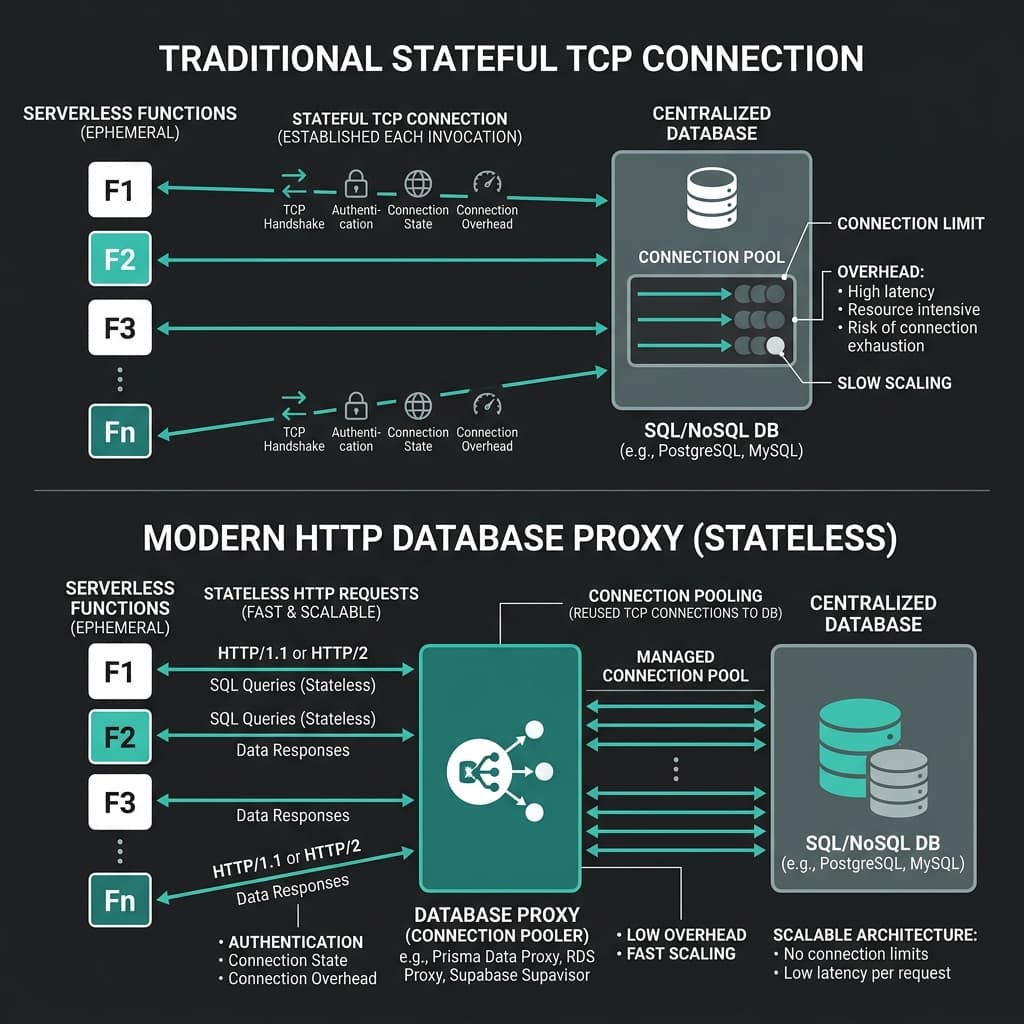 Figure 1: Technical diagram comparing stateful TCP connections with HTTP-native connectionless database pooling in serverless SaaS architectures.
Below is an implementation of a React Server Component executing a connectionless database query in Next.js using an HTTP-based driver to prevent connection pooling issues at the edge.
// app/dashboard/analytics/page.tsx
import React from "react";

interface AnalyticsRecord {
  id: string;
  metricName: string;
  recordedValue: number;
  timestamp: string;
}

// Employs Next.js dynamic fetch caching to preserve static outputs at the edge
async function fetchSystemMetrics(): Promise<AnalyticsRecord[]> {
  const databaseEndpoint = process.env.DATABASE_HTTP_GATEWAY;
  const databaseToken = process.env.DATABASE_ACCESS_TOKEN;

  if (!databaseEndpoint || !databaseToken) {
    throw new Error("Target database environment variables are unresolved.");
  }

  // Execute database query over connectionless HTTP instead of TCP
  const response = await fetch(`${databaseEndpoint}/v1/execute`, {
    method: "POST",
    headers: {
      "Authorization": `Bearer ${databaseToken}`,
      "Content-Type": "application/json",
    },
    body: JSON.stringify({
      sql: "SELECT id, metric_name, recorded_value, timestamp FROM analytics_logs ORDER BY timestamp DESC LIMIT 5",
    }),
    next: {
      revalidate: 300, // Cache results for 5 minutes
      tags: ["system-analytics"],
    },
  });

  if (!response.ok) {
    throw new Error(`Database query failed with status: ${response.status}`);
  }

  const payload = await response.json();
  return payload.data as AnalyticsRecord[];
}

export default async function AnalyticsDashboard() {
  let metrics: AnalyticsRecord[] = [];
  let errorState = false;

  try {
    metrics = await fetchSystemMetrics();
  } catch (error) {
    console.error("Database connectivity fault handled via HTTP gateway:", error);
    errorState = true;
  }

  return (
    <div className="rounded-xl border border-neutral-800 bg-neutral-950 p-6 shadow-md max-w-4xl mx-auto mt-10">
      <div className="flex items-center justify-between border-b border-neutral-800 pb-4 mb-6">
        <div>
          <h2 className="text-xl font-semibold text-white tracking-tight">System Performance Metrics</h2>
          <p className="text-xs text-neutral-400 mt-1">
            Data resolved from an HTTP-multiplexed relational engine running at the edge.
          </p>
        </div>
        <span className="inline-flex items-center rounded-full bg-emerald-500/10 px-2.5 py-0.5 text-xs font-medium text-emerald-400 ring-1 ring-inset ring-emerald-500/20">
          Live Connectionless
        </span>
      </div>

      {errorState ? (
        <div className="rounded-md bg-red-950/20 border border-red-900/50 p-4 text-sm text-red-400">
          An error occurred while communicating with the database. Please refresh to try again.
        </div>
      ) : (
        <div className="overflow-x-auto">
          <table className="w-full text-left text-sm text-neutral-300">
            <thead className="bg-neutral-900 text-xs uppercase text-neutral-400 border-b border-neutral-800">
              <tr>
                <th className="px-6 py-3 font-medium">Metric Identifier</th>
                <th className="px-6 py-3 font-medium">Metric Namespace</th>
                <th className="px-6 py-3 font-medium text-right">Value</th>
                <th className="px-6 py-3 font-medium text-right">Timestamp</th>
              </tr>
            </thead>
            <tbody className="divide-y divide-neutral-900">
              {metrics.map((row) => (
                <tr key={row.id} className="hover:bg-neutral-900/30 transition-colors">
                  <td className="px-6 py-4 font-mono text-xs text-neutral-500">{row.id}</td>
                  <td className="px-6 py-4 font-medium text-white">{row.metricName}</td>
                  <td className="px-6 py-4 text-right font-mono text-emerald-400">{row.recordedValue.toLocaleString()}</td>
                  <td className="px-6 py-4 text-right text-xs text-neutral-400">
                    {new Date(row.timestamp).toLocaleTimeString()}
                  </td>
                </tr>
              ))}
            </tbody>
          </table>
        </div>
      )}
    </div>
  );
}
By decoupling database transactions from stateful connection libraries, the serverless application scales seamlessly, preventing connection exhaustion during traffic spikes.
4. How does a developer configure global rate limiting at the Next.js edge?
Implementing global rate limiting at the Next.js edge requires intercepting incoming HTTP traffic in middleware files and validating client identifiers against an active, connectionless storage engine like Upstash Redis. This setup blocks malicious or automated traffic before it reaches your backend services, protecting your application from billing spikes and resource abuse.
Because Next.js Edge Middleware runs globally within lightweight V8 isolate environments rather than standard Node.js environments, traditional TCP-based libraries are not supported. Instead, developers must use HTTP-based connection libraries to maintain low latency and avoid cold starts.
Below is an implementation of global sliding-window rate limiting deployed via Next.js Edge Middleware.
// middleware.ts
import { NextResponse } from "next/server";
import type { NextRequest } from "next/server";
import { Ratelimit } from "@upstash/ratelimit";
import { Redis } from "@upstash/redis";

// Initialize the Upstash Redis HTTP client for edge execution
const edgeRedisClient = new Redis({
  url: process.env.UPSTASH_REDIS_REST_URL || "",
  token: process.env.UPSTASH_REDIS_REST_TOKEN || "",
});

// Configure a sliding window limiter: 100 requests per 1 minute
const rateLimiter = new Ratelimit({
  redis: edgeRedisClient,
  limiter: Ratelimit.slidingWindow(100, "1 m"),
  analytics: true,
  prefix: "saas_mvp:rate_limiting",
});

export async function middleware(request: NextRequest): Promise<NextResponse> {
  const currentPath = request.nextUrl.pathname;

  // Restrict rate limiting specifically to backend API routes
  if (!currentPath.startsWith("/api/")) {
    return NextResponse.next();
  }

  // Resolve client identifier using IP address fallback mechanisms
  const clientIp = request.ip ?? request.headers.get("x-forwarded-for") ?? "127.0.0.1";

  // Evaluate current limit window
  const { success, limit, remaining, reset } = await rateLimiter.limit(clientIp);

  if (!success) {
    return new NextResponse(
      JSON.stringify({
        error: "Too many requests. Please wait before retrying.",
        suggestedRetry: new Date(reset).toISOString(),
      }),
      {
        status: 429,
        headers: {
          "Content-Type": "application/json",
          "X-RateLimit-Limit": limit.toString(),
          "X-RateLimit-Remaining": remaining.toString(),
          "X-RateLimit-Reset": reset.toString(),
        },
      }
    );
  }

  // Inject rate limit state headers into client response
  const response = NextResponse.next();
  response.headers.set("X-RateLimit-Limit", limit.toString());
  response.headers.set("X-RateLimit-Remaining", remaining.toString());
  response.headers.set("X-RateLimit-Reset", reset.toString());

  return response;
}

export const config = {
  matcher: "/api/:path*",
};
This configuration intercepts API requests before they reach your serverless routes. This approach saves on compute costs by blocking unauthorized or excessive traffic at the edge, closest to the user.
5. What are the hidden costs and compliance taxes solo founders overlook?
The hidden costs and compliance taxes solo founders frequently overlook include regulatory data compliance auditing, ongoing code maintenance, and subscription integration fees. These line items can add 40% to 60% in unexpected costs on top of the base build budget.
GDPR, CCPA, and Regulatory Compliance Audits
If a SaaS platform collects, stores, or processes personal data from users in Europe or California, it must comply with GDPR and CCPA requirements. Implementing custom database deletion routines, cookie management networks, and data export features from scratch can add $20,000 to $50,000 to your development costs.
Similarly, if your application processes healthcare data (HIPAA) or handles financial records, compliance overhead can make it difficult to launch even a lean MVP for under $75,000. Founders can manage these costs by offloading authentication to compliant identity providers (such as Clerk or Auth.js) and using dynamic, automated legal templates (like Termly or Iubenda) for less than $20 a month.
Long-Term Post-Launch Operational Costs
Operating budgets extend beyond development into hosting, analytics, bug fixes, and user feedback systems.
The table below breaks down typical post-launch expenses to help solo founders estimate their ongoing monthly operational costs.
| Operational Cost Component | Early Stage (0–100 users) | Growth Stage (100–1,000 users) | Primary Cost Mitigation Strategy |
|---|---|---|---|
| Server & Edge Hosting | $0 (Vercel/CF Free Tiers) | $20 – $100 / mo | Optimize bundle sizes and static page output |
| Serverless Database Reads/Writes | $0 (Neon/Supabase Free Tiers) | $15 – $50 / mo | Implement application-level cache headers |
| Global Analytics & Tracking | $0 (Umami / Google Analytics) | $19 – $49 / mo | Monitor only high-intent page conversion funnels |
| Error Logging (Sentry) | $0 (Developer Free Tier) | $29 – $79 / mo | Filter out non-critical client UI logging events |
| Transactional Email / Auth | $0 (Resend / Clerk Free Tier) | $15 – $45 / mo | Consolidate notifications into digest emails |
| Third-Party API Integrations | $0 – $50 / mo | $100 – $500 / mo | Limit the use of premium endpoints during validation |
| Software Maintenance & Bug Fixes | $0 (Founder Time commitment) | $500 – $2,000 / mo | Maintain a modular codebase and write integration tests |
Overlooking these post-launch costs is a common mistake. System maintenance alone typically consumes 15% to 25% of the initial development cost annually. For example, a custom MVP built with an agency for $80,000 will generally require $12,000 to $20,000 per year in ongoing updates, hosting optimization, and dependency management. Solo founders can limit this overhead by choosing a modern web stack that minimizes dependencies and relies on managed, serverless infrastructure.
6. How can a solo founder launch a verified MVP using the 30-day PM timeline?
A solo founder can launch a verified SaaS MVP within a 30-day timeline by following a disciplined project management schedule that limits initial development to a single, high-value core workflow.
Strategic 30-Day SaaS MVP Delivery Pathway
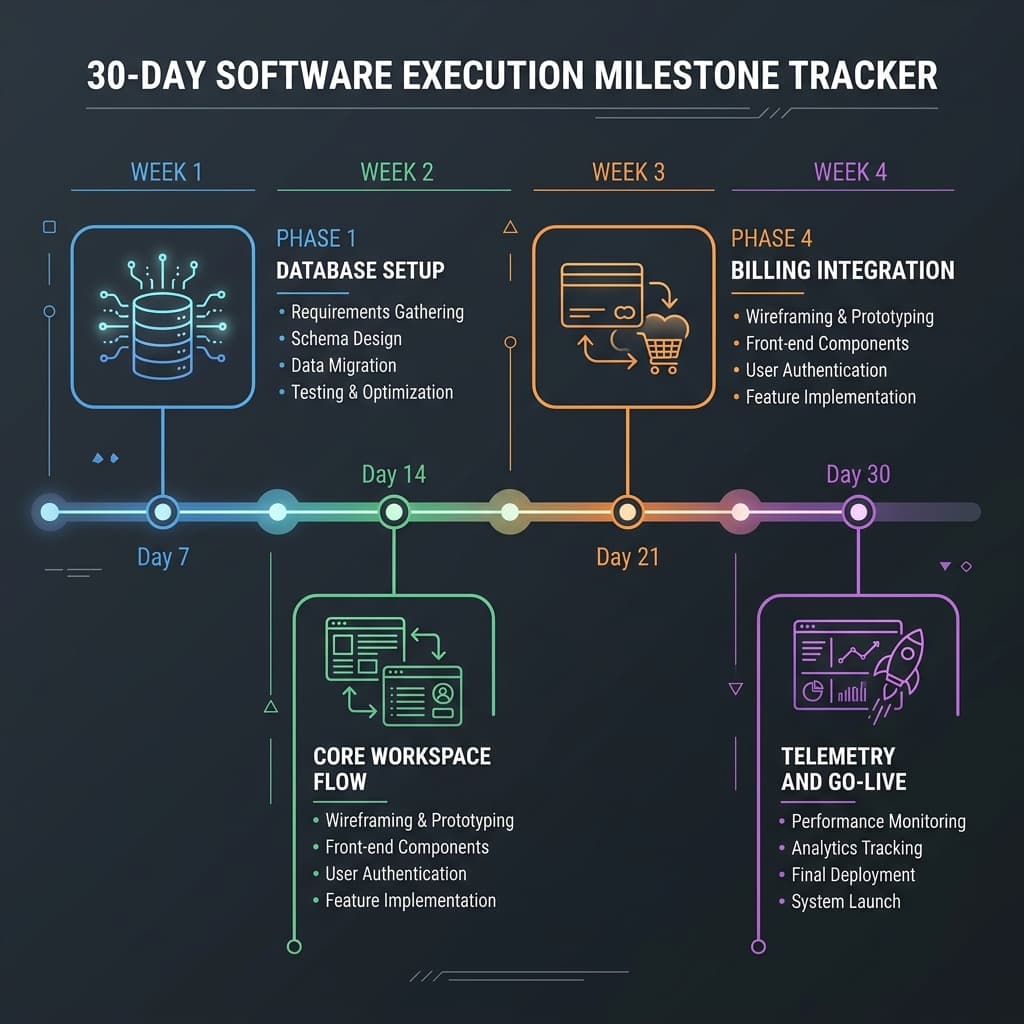 Figure 2: 30-day project management roadmap for a solo founder building and launching a SaaS MVP.
Week 1: Core Architecture & Relational Schema Setup (Days 1–7)
The first week focuses on establishing the application's foundational codebase and deployment pipeline.
- Initialize the Next.js App Router repository using Tailwind CSS and your preferred ORM (such as Drizzle or Prisma).
- Configure the database schema to handle core relationships, such as user identities, transaction statuses, and primary workflow items.
- Configure continuous deployment pipelines targeting Vercel or Cloudflare Pages, ensuring that every main-branch commit automatically triggers a production-ready preview deployment.
Week 2: User Workspace & Core Workflow Polish (Days 8–15)
Week two focuses on implementing user authentication and building out the primary workflow of the application.
- Integrate Auth.js or Clerk to handle user login, registration, and role-based access control (RBAC).
- Construct the core dashboard interface using pre-built Tailwind UI layouts to avoid custom design bottlenecks.
- Implement the application's primary feature, such as a scheduling loop or a data parsing tool. Non-essential views, such as user customization pages or advanced security dashboard themes, should be postponed to future iterations.
Week 3: Billing Integrations and Webhook Receivers (Days 16–22)
Week three focuses on setting up user monetization and subscription management.
- Configure Stripe or Lemon Squeezy integration, and build endpoints to redirect users to payment collection interfaces.
- Implement webhook API routes inside your Next.js application to process asynchronous billing events, such as subscription activations, plan changes, or payment failures.
- Test subscription lifecycles using simulated sandbox accounts to ensure database access matches subscription states.
Week 4: Telemetry Integration, QA Testing, and Go-Live (Days 23–30)
The final week is dedicated to setting up system analytics, testing for edge-case errors, and launching the application.
- Integrate error-logging tools like Sentry and deploy privacy-friendly analytics services like Umami to track user behavior.
- Invite 50 to 100 beta testers to use the application to identify integration issues, handle edge-case bugs, and gather initial feedback.
- Map your production domain in DNS, submit your generated
sitemap.xmldirectly to Google Search Console, and launch your application.
Project Management Modeling: Runway Dynamics and Customer Value
To ensure long-term viability, solo founders must treat energy and capital as constrained resources. This is particularly true given the 54% burnout rate observed among solo founders.
We can evaluate a startup's operational runway (Trunway) using the following formula:
Where Cburn represents your monthly cash burn rate. By utilizing a scale-to-zero serverless footprint that limits Cburn to roughly $300 a month, a solo founder can maintain an extended runway to run pricing experiments and find product-market fit.
Additionally, pricing models should be designed to support unit economic validation early in the product lifecycle.
A high-performing MVP should focus on validating this ratio quickly, ensuring customer lifetime value comfortably exceeds acquisition costs:
LTV > 3 × CAC
Result: Healthy unit economic viability indicator.
By launching a functional, monetization-ready product in 30 days, founders can gather real payment data to validate value hypotheses, rather than relying on uncommitted survey responses.
7. What is the final verdict on SaaS MVP development in 2026?
The final verdict on SaaS MVP development is that while modern tools, serverless architectures, and boilerplates have significantly reduced the cost of building software, the primary risk has shifted from product development to market distribution and positioning.
Because technology is no longer a major barrier to entry, building a successful SaaS requires focusing on distribution, customer feedback, and clear product positioning. To remain competitive, technical founders should use managed serverless stacks to launch quickly, keep ongoing operating costs low, and focus their efforts on marketing, sales, and user validation.
High-Performance MVP Engineering: Let's Build Your Vision
Solo founders looking to launch a production-ready, scale-to-zero SaaS application can leverage professional full-stack expertise to fast-track their development. Partner with a developer specializing in highly optimized Next.js frameworks, serverless database design, and structured project management methodologies to turn your product vision into a validated market asset.
Through a disciplined approach that avoids common technical pitfalls, your SaaS MVP can be deployed with enterprise-grade security and a lean, scalable architecture.
Book an MVP Strategy Consultation: Map your product roadmap, define your core feature scope, and optimize your hosting budget for a fast, secure launch.