Scaling the MERN Stack: Designing a Robust Database for Your First 1,000 Users

Written by
Bhalli B
Full-Stack Engineer & SaaS MVP Architect
Certified Full-Stack Developer & MVP Specialist · Lahore, Pakistan
To scale your MERN stack database to your first 1,000 active users, you must design a denormalized NoSQL schema based on application read paths, enforce indexes on query-heavy fields via the MongoDB explain() utility, implement strict connection pooling designed to reuse connections across serverless and containerized runtimes, and aggressively eliminate the performance-killing N+1 query pattern using eager loading or MongoDB aggregation pipelines. This technical blueprint guarantees sub-100ms response times while maintaining a predictable database hosting budget of less than $30/month.
1. NoSQL Schema Design: Why Relational Thinking Destroys MERN Scalability
The single most common mistake backend developers make when deploying MongoDB is treating it like a relational database. Coming from PostgreSQL or MySQL, developers often normalize their NoSQL database, creating thin, hyper-segmented collections linked together by manual string IDs or DBRefs.
In a SQL database, the query planner handles joins efficiently using foreign keys and indexed b-trees. In MongoDB, there is no native engine-level join. While the $lookup operator exists, it performs an in-memory left outer join on the database server, which consumes massive CPU cycles and degrades dramatically as your data volume grows.
The Golden Rule of NoSQL Modeling
To scale a document database, you must embrace a fundamental shift in perspective: Data that is viewed together should be stored together.
{
"_id": ObjectId("111"),
"title": "Setup Stripe",
"assigneeId": "999" // Reference
}{
"_id": ObjectId("999"),
"name": "Alice",
"email": "alice@saas.com"
}Requires N+1 queries or intensive in-memory joins ($lookup) to paint a single dashboard view. Degrades linearly as user count increases.
{
"_id": ObjectId("111"),
"title": "Setup Stripe",
"assignee": {
  "_id": "999",
  "name": "Alice",
  "email": "alice@saas.com"
}, // Embedded Document
"comments": [
  { "text": "Stripe webhook configured", "author": "Alice" }
] // Embedded Array
}
Fetches the task, assignee details, and initial comments in a single fast indexed query. Zero server-side lookup or join lag!
Deciding Between Embedding and Referencing
When designing your collections for 1,000+ highly active users, use these project management decision rules:
- Embed when you have a 1-to-Few relationship: If parent data has child components that never exceed the 16MB document size limit (e.g., product features, dashboard widgets, or system configurations), embed them directly as subdocuments.
- Reference when you have a 1-to-Many or Many-to-Many relationship: If child arrays grow indefinitely (e.g., a collaborative board with thousands of task comments, or audit logs), store them in a separate collection and query them using indexed keys.
Normalized vs. Denormalized Database Topology
To help visualize the difference in network calls and logical boundaries between a relational-style NoSQL setup and a highly optimized, denormalized MERN schema, review the diagram below:
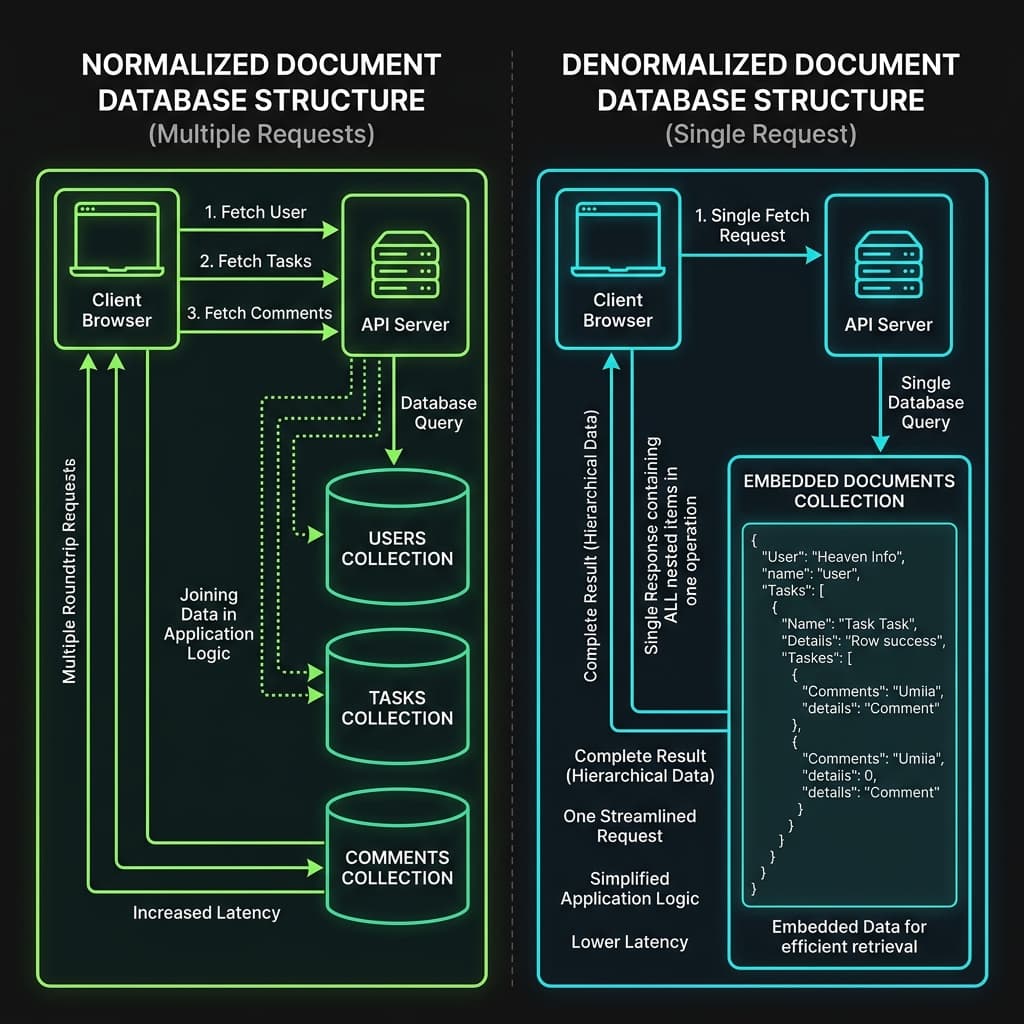 Figure 1: Architectural diagram showing the difference between multiple collection queries in a normalized schema and a single embedded retrieval in a denormalized MongoDB database.
2. Eliminating the N+1 Query Storm: Eager Aggregation
The "N+1 query problem" is a silent killer of application throughput. It occurs when your application fetches a parent list (1 query) and then executes a separate query for every single child item returned (N queries) to grab related data.
To calculate the impact of this performance anti-pattern on your application latency, we can model total database execution latency as a function of connection startup/handshake overhead, number of queries, database processing engine time, and network round-trip time:
Ltotal: Total Latency
C: Connection Startup
N: Number of Queries
D: Database Processing
Rtt: Network Round-Trip Time
Where R_tt represents the network round-trip time between your backend server and your MongoDB cluster.
If your dashboard queries 100 tasks and performs a separate query for each task's assignee, the number of queries is N = 101. Assuming an edge hosting setup where R_tt = 30ms and database processing D = 2ms:
Ltotal ≈ 0 + 101 × (2ms + 30ms) = 3,232ms
Result: Over 3.2 seconds of database round-trip delay.
Over 3.2 seconds of blank loading spinners for your users! By rewriting the query into a single eager aggregation pipeline (N = 1):
Ltotal = 1 × (10ms + 30ms) = 40ms
Result: 98.7% reduction in user-facing response lag.
This results in a 98.7% reduction in user-facing latency.
The Technical Solution: MongoDB Aggregation Pipelines
Instead of utilizing Mongoose .populate(), which often executes separate queries under the hood, you should write native MongoDB aggregation pipelines using $lookup with strict projections to only return required fields. This minimizes payload sizes and avoids large in-memory sorting bottlenecks on your database cluster.
Here is a production-grade Express controller demonstrating how to eagerly fetch collaborative tasks and join their creator profile information in a single database round-trip:
// controllers/taskController.ts
import { Request, Response } from "express";
import mongoose from "mongoose";

// Mongoose schema declaration for strict collection mapping
const TaskSchema = new mongoose.Schema({
  title: { type: String, required: true },
  description: { type: String, required: true },
  status: { type: String, required: true, index: true }, // Index for fast status grouping
  creatorId: { type: mongoose.Schema.Types.ObjectId, required: true, index: true },
  createdAt: { type: Date, default: Date.now }
});

const Task = mongoose.models.Task || mongoose.model("Task", TaskSchema);

export async function getDashboardTasks(req: Request, res: Response) {
  try {
    const { status } = req.query;

    // Construct aggregation pipeline to eager-load and join data in 1 query
    const tasksWithCreators = await Task.aggregate([
      {
        $match: {
          status: status || "active"
        }
      },
      {
        $lookup: {
          from: "users", // Target users collection name
          localField: "creatorId",
          foreignField: "_id",
          as: "creatorInfo"
        }
      },
      {
        $unwind: "$creatorInfo"
      },
      {
        $project: {
          title: 1,
          status: 1,
          createdAt: 1,
          "creator.name": "$creatorInfo.name",
          "creator.email": "$creatorInfo.email"
        }
      }
    ]);

    return res.status(200).json({ success: true, count: tasksWithCreators.length, data: tasksWithCreators });
  } catch (error) {
    console.error("Dashboard Aggregation Failed:", error);
    return res.status(500).json({ success: false, message: "Internal server error during data retrieval." });
  }
}
3. Connection Pooling in Modern Serverless & Container Environments
In a traditional long-running Express server, managing database connections is simple: you open a single global connection pool on server startup, and keep it active indefinitely.
However, modern startups deploy to serverless hosting (e.g., Vercel, AWS Lambda) or auto-scaling container configurations (e.g., Render, Railway). In these environments, every cold start or concurrent request spins up a brand-new, isolated environment instance.
The Connection Exhaustion Trap
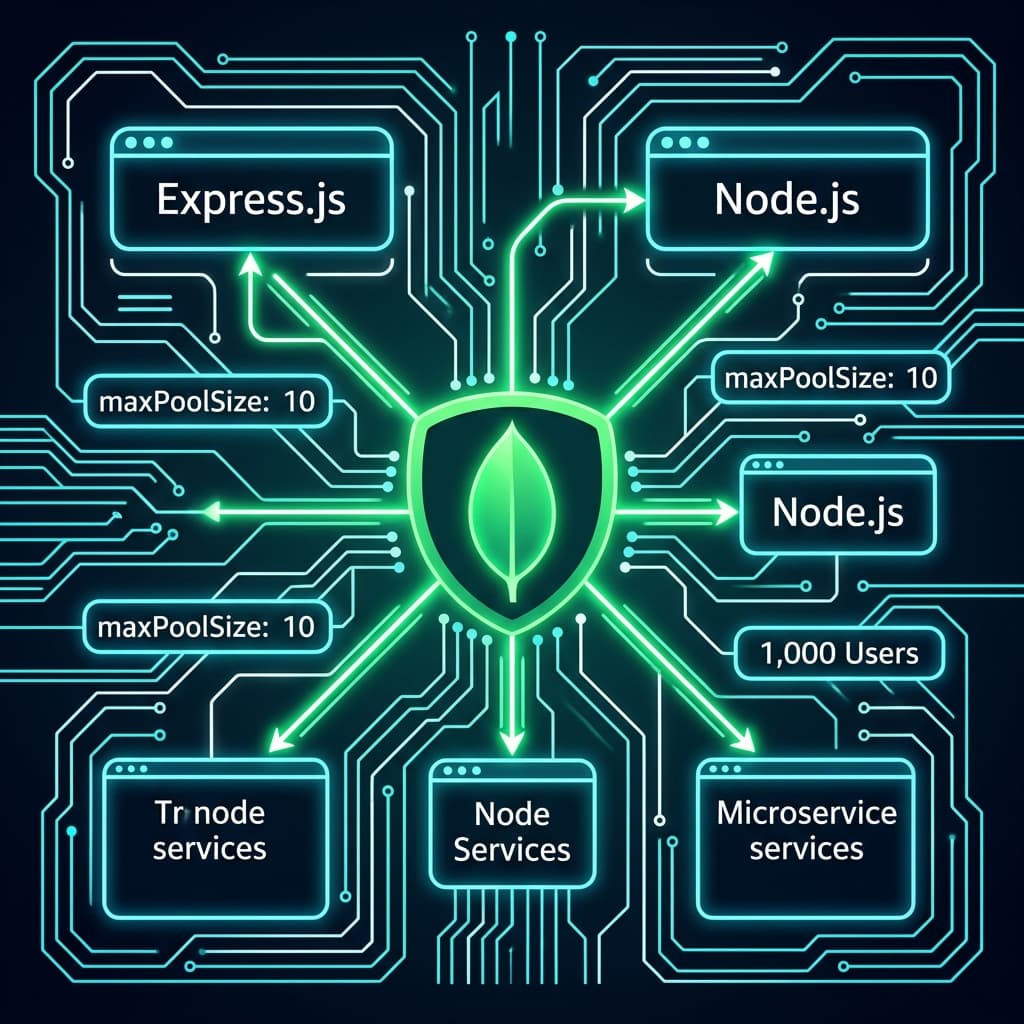
If your Mongoose setup is unoptimized, every single instance will establish its own connection pool. If you leave Mongoose at its default configuration (maxPoolSize: 100), a sudden spike in concurrent traffic can cause 100 container instances to open up to 10,000 TCP connections. This will immediately exhaust MongoDB Atlas's connection limits (which range from 500 connections on lower-tier clusters to limits on dedicated instances), causing your system to crash and drop incoming customer requests.
As a Certified Project Manager, I emphasize setting strict connection budgets to protect your system from scaling crashes:
- Keep your client-side pool size small (
maxPoolSize: 10). - Prevent Mongoose command buffering (
bufferCommands: false) so queries fail fast if the connection is dropped, rather than hanging indefinitely and locking resources.
// lib/mongodb.ts
import mongoose from "mongoose";

const MONGODB_URI = process.env.MONGODB_URI;

if (!MONGODB_URI) {
  throw new Error("Missing MONGODB_URI environment variable.");
}

// Global cache variable to persist database state across warm serverless container invocations
let cached = (global as any).mongoose;

if (!cached) {
  cached = (global as any).mongoose = { conn: null, promise: null };
}

export async function connectToDatabase() {
  if (cached.conn) {
    console.log("Reusing cached MongoDB connection");
    return cached.conn;
  }

  if (!cached.promise) {
    const opts = {
      bufferCommands: false, // Turn off command buffering to prevent memory leaks
      maxPoolSize: 10,       // Strict connection pool limit per serverless/container instance
      minPoolSize: 2,        // Warm socket count maintained to prevent cold start delays
      serverSelectionTimeoutMS: 5000, // Timeout fast instead of hanging when cluster is unresponsive
      socketTimeoutMS: 45000,         // Clean up idle sockets gracefully
    };

    console.log("Establishing new MongoDB connection...");
    cached.promise = mongoose.connect(MONGODB_URI!, opts).then((m) => {
      return m.connection;
    });
  }

  try {
    cached.conn = await cached.promise;
  } catch (e) {
    cached.promise = null;
    console.error("Database connection failed:", e);
    throw e;
  }

  return cached.conn;
}
4. Financial Engineering: MongoDB Atlas Cost Optimization for Startups
Scaling your startup does not mean you have to overpay for database resources. Many founders mistakenly upgrade to expensive, dedicated tiers long before they need to, depleting their cash runway prematurely.
Demystifying Atlas Tiers & Pricing
MongoDB Atlas provides three primary scaling paths, each with distinct budget implications:
- Free Tier (M0): Excellent for prototype validation, but capped at 512MB storage and shared CPU cycles. It lacks backup automation and SLA guarantees, making it unsuitable for production environments.
- Atlas Flex Tier ($8 - $30/month): The recommended production entry point for startups. It provides predictable, capped pricing based on operations-per-second, automatically scaling up to $30/month. It features automated backups and scales up to 5GB storage, making it ideal for launching your MVP.
- Dedicated Clusters (M10+): Starting at $57.60/month, these clusters run on dedicated instances with a 99.95% uptime SLA, Point-In-Time recovery, and auto-scaling.
| Cluster Tier | Storage Limit | Base Monthly Cost | Best For | Backups & Support |
|---|---|---|---|---|
| M0 Free | 512 MB | $0.00 | Prototypes, sandbox validation | No auto backups, basic community support |
| Flex Tier | 5 GB | $8.00 - $30.00 | Live SaaS MVP launches, first 1,000 users | Automated continuous backups, developer support available |
| M10 Dedicated | 10 GB | $57.60 | Growing user bases, stable production | Point-in-time recovery, dedicated vCPU resources |
| M20 Dedicated | 20 GB | $144.00 | Multi-region deployments, enterprise B2B | High availability replica sets, production-grade SLA |
The Hidden Trap: Cross-Region Data Egress
The most common hidden cost in database hosting is data transfer (egress). If your backend API is hosted in a Vercel region (e.g., us-east-1 in North Virginia) but your MongoDB Atlas cluster is hosted in an AWS region in Europe (e.g., eu-west-1 in Ireland), you will pay egress costs on every single byte transferred.
To protect your budget, always deploy your database cluster and your application server in the exact same cloud provider region.
5. PM Checklist: The 1,000-User Scale-Ready Audit
As a Certified Project Manager, I use a structured verification framework to audit our data layers before launching any client product to the public:
1. Perform Index Audits
Ensure that every query in your codebase uses an index. Run the MongoDB database profiler or append .explain("executionStats") to your queries in staging to verify that no operations perform a "Collection Scan" (COLLSCAN), which forces the engine to read every document in your database.
// Example audit check inside your server initialization logs
async function verifyDatabaseIndexes() {
  const dbConnection = await connectToDatabase();
  const indexStats = await dbConnection.db.collection("tasks_table").indexInformation();
  console.log("Verified database indexes currently active:", indexStats);
}
2. Implement Slow Query Budgets
Set up slow-query logging in MongoDB Atlas. Turn on the profiler and configure alerts for any database query that takes longer than 100 milliseconds to resolve, so you can address performance issues before they impact users.
3. Track Active Connection Metrics
Expose a clean connection-monitoring endpoint to log active, available, and pending sockets across your backend nodes. This helps you spot socket leaks early during high-traffic periods.
4. Build Graceful Shutdown Triggers
When your backend nodes scale down or restart, ensure you close existing database connections gracefully using SIGINT/SIGTERM handlers. This prevents stale, dangling connections from clogging up your database slots.
MERN Stack Scaled Production Topology
To visualize the layout of your scaled production architecture, review the target infrastructure diagram below:
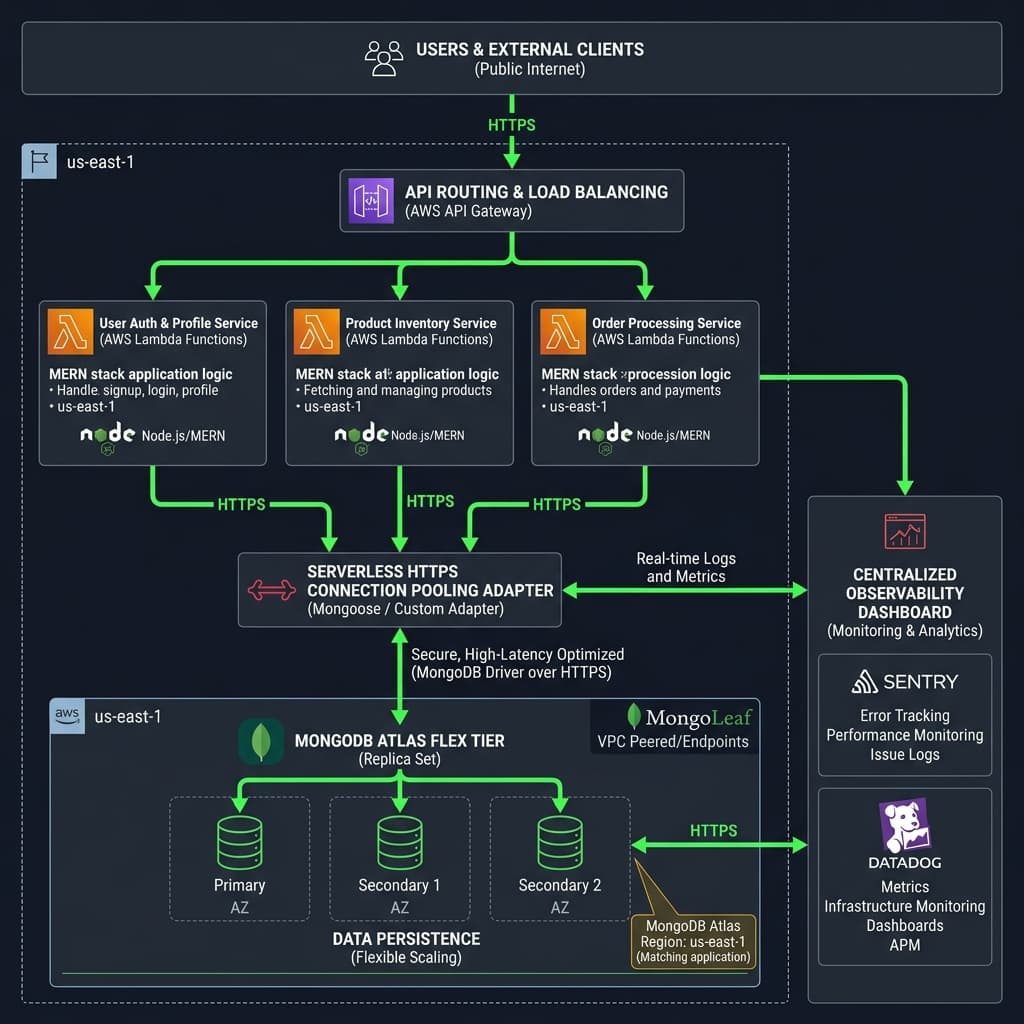 Figure 2: High-availability MERN stack database infrastructure diagram showing region-matched serverless runtimes and connection pool metrics.
6. Conclusion and Actionable Roadmap
Scaling your MERN stack database to your first 1,000 users is a strategic engineering task. By avoiding normalized schema designs, eagerly fetching data through aggregation pipelines, reusing connection pools, and optimizing your hosting tiers, you ensure a performant user experience without bloating your startup's budget.
Building a reliable, highly performant SaaS MVP requires balancing development velocity with architectural best practices. Don't spend valuable engineering hours debugging database crashes and connection leaks.
Let’s Scale Your Database: I specialize in designing and launching secure, high-performance web applications using modern, scale-ready architectures (Next.js, Node.js, Express, and MongoDB). Contact me today to book a 30-minute database and architecture audit.