Stripe Agentic Commerce Suite: A SaaS Integration Guide


Written by
Bhalli B
Full-Stack Engineer & SaaS MVP Architect
Certified Full-Stack Developer & MVP Specialist · Lahore, Pakistan
Stripe's Agentic Commerce Suite (ACS) lets AI agents like ChatGPT discover your SaaS product's catalog and complete a purchase on a user's behalf through the Agentic Commerce Protocol (ACP), Stripe's open specification for agent-to-seller checkout - and integrating it means building three distinct pieces: a product catalog feed agents can read, a checkout path that accepts a Shared Payment Token instead of a card form, and a fulfillment pipeline that treats agent-initiated orders as first-class events. This post walks through all three with real API calls, so by the end you have a working integration path instead of a marketing overview.
1. What Is Stripe's Agentic Commerce Suite, and Why Integrate It Now?
ACS is Stripe's single-integration layer for making your existing commerce stack sellable through AI agents, built on top of the Agentic Commerce Protocol - an open specification that defines how an agent initiates a checkout, updates a cart, and completes payment without your business ever handing over its role as merchant of record. As of mid-2026, ACS is available to businesses in the US, Canada, and a set of European countries, with a handful of fields (agent-level order attribution, GTIN/MPN product identifiers) still gated behind private preview.
The reason to integrate now rather than wait: brands including Etsy, Wix, and Squarespace merchants are already onboarding, and the entities most likely to route purchase intent through an agent first are exactly the early-adopter users a new SaaS product is trying to reach. That said, this isn't free - the third-party services bucket in a realistic SaaS MVP budget needs its own line item for ACS integration work, since it's a genuinely new integration surface, not a checkbox inside your existing Stripe setup.
2. How Do You Make Your Products Discoverable to AI Agents?
Discoverability runs through a CSV-based catalog feed uploaded via Stripe's ProductCatalogImport API, not a live query Stripe makes against your database - agents read from Stripe's indexed copy of your catalog, which means feed freshness directly determines what an agent believes you have in stock.
Stripe defines four feed types with different required cadences: product data (titles, descriptions, categories) needs refreshing once per day, inventory and pricing need refreshing every 15 minutes to prevent checkout failures, and promotions get pushed as needed.
// lib/stripe-catalog-sync.ts
// Creates a ProductCatalogImport, uploads the CSV to the presigned
// URL Stripe returns, then polls until the import reaches a
// terminal state - mirrors what a nightly cron or inventory
// webhook handler needs to do in production.
import Stripe from "stripe";

const stripe = new Stripe(process.env.STRIPE_SECRET_KEY!, {
  apiVersion: "2026-07-29.preview" as any, // agentic commerce endpoints are still preview-versioned
});

export async function syncCatalogFeed(csvBuffer: Buffer, feedType: "product" | "inventory" | "pricing") {
  // Step 1: create the import, which returns a presigned upload URL.
  // Only "product" feeds support replace mode - inventory and pricing
  // are upsert-only, so a full re-upload never wipes untouched rows.
  const feedImport = await stripe.v2.commerce.productCatalog.imports.create({
    feed_type: feedType,
    mode: "upsert",
    metadata: { file_name: `${feedType}-${new Date().toISOString()}.csv` },
  });

  const uploadUrl = (feedImport.status_details as any).awaiting_upload.upload_url.url;

  // Step 2: the presigned URL expires in 5 minutes - upload immediately,
  // don't queue this behind other work.
  await fetch(uploadUrl, {
    method: "PUT",
    headers: { "Content-Type": "text/csv" },
    body: csvBuffer,
  });

  // Step 3: poll for terminal status instead of assuming success -
  // a structurally valid CSV can still land in succeeded_with_errors
  // if individual rows fail Stripe's validation.
  let current = feedImport;
  while (!["succeeded", "succeeded_with_errors", "failed"].includes(current.status)) {
    await new Promise((r) => setTimeout(r, 2000));
    current = await stripe.v2.commerce.productCatalog.imports.retrieve(feedImport.id);
  }

  if (current.status === "succeeded_with_errors") {
    // Row-level failures don't fail the whole import - but silently
    // ignoring them means specific SKUs quietly stop being sellable.
    console.warn(`Feed sync completed with row errors: ${feedImport.id}`);
  }

  return current;
}
3. How Does an Agent-Initiated Checkout Actually Work?
The checkout lifecycle under ACP has four steps that don't exist in a traditional Stripe Checkout flow: the agent sends a CreateCheckoutRequest when the customer expresses purchase intent, your integration responds with cart state, the agent and seller exchange UpdateCheckoutRequest calls as the customer adjusts quantities or shipping, and payment completes when the agent passes Stripe a Shared Payment Token (SPT) instead of raw card details.
The SPT matters architecturally because it means you never directly handle the buyer's payment credentials - the agent holds the relationship with the buyer's saved payment method, and Stripe Radar's fraud signals (card-testing likelihood, stolen-card indicators) travel with the token rather than being recomputed from scratch on your end. You remain the merchant of record throughout, which is the detail that determines your tax and dispute liability doesn't shift to the agent platform.
4. How Do You Prevent Checkout Failures From Stale Price and Inventory Data?
Price mismatches - where the price an agent quotes a customer doesn't match what Stripe actually charges - are the most common cause of failed agentic checkouts, and the fix is entirely about how tight your feed refresh window is relative to how often your prices or stock actually change.
W = T_refresh
// One cron job, once a day, no incremental updates
cron.schedule("0 3 * * *", () => syncCatalogFeed(fullCatalogCsv, "product"));
Flash sales, out-of-stock events, and manual price overrides are all invisible to agents until the next 3am run - every checkout in between risks failing on a price or availability mismatch.
// Daily full product feed, 15-min incremental price/inventory,
// AND a real-time price/availability hook as the final source of truth
cron.schedule("0 3 * * *", () => syncCatalogFeed(fullCatalogCsv, "product"));
cron.schedule("*/15 * * * *", () => syncCatalogFeed(deltaPricingCsv, "pricing"));
cron.schedule("*/15 * * * *", () => syncCatalogFeed(deltaInventoryCsv, "inventory"));
Three layers of freshness stacked - daily catalog, 15-minute deltas, and a live hook as the tiebreaker - means a checkout only fails on genuinely out-of-stock items, not stale data.
| Integration Depth | Freshness Window | Build Effort | Best For |
|---|---|---|---|
| Feed-only (daily) | Up to 24 hours | Low - one scheduled job | Static catalogs with rarely-changing prices |
| Feed + 15-min incrementals | Up to 15 minutes | Medium - delta-tracking logic required | Most SaaS products with subscription or seat-based pricing |
| Feed + incrementals + price/availability hook | Near real-time | Highest - live endpoint Stripe calls synchronously | High-volatility pricing (usage-based billing, dynamic discounts) |
As a Certified Full Stack Engineer & a Project Manager, I scope this as two phases for a first MVP integration, not one: ship the feed-only path first to get the catalog live and agent-discoverable, then add the price/availability hook as a fast-follow once you have real checkout-failure data telling you whether stale pricing is actually costing you conversions.
5. How Do You Fulfill Orders Agents Place on a Customer's Behalf?
Fulfillment runs through the same checkout.session.completed webhook you'd already use for a standard Stripe Checkout integration - agent-initiated orders aren't a separate event type, they're regular CheckoutSession objects the Dashboard tags with the originating agent's name.
// app/api/webhooks/stripe/route.ts
// Signature verification is non-negotiable here - this endpoint
// triggers real fulfillment, and an unverified payload is an
// open door for someone to fake a completed order.
import Stripe from "stripe";
import { NextRequest, NextResponse } from "next/server";

const stripe = new Stripe(process.env.STRIPE_SECRET_KEY!);
const endpointSecret = process.env.STRIPE_WEBHOOK_SECRET!;

export async function POST(req: NextRequest) {
  const body = await req.text();
  const sig = req.headers.get("stripe-signature")!;

  let event: Stripe.Event;
  try {
    event = stripe.webhooks.constructEvent(body, sig, endpointSecret);
  } catch (err) {
    return NextResponse.json({ error: "Invalid signature" }, { status: 400 });
  }

  if (event.type === "checkout.session.completed") {
    const session = event.data.object as Stripe.Checkout.Session;

    // Expand in the retrieval call rather than trusting the webhook
    // payload alone - the webhook doesn't include line items or
    // payment details by default, and fulfillment needs both.
    const fullSession = await stripe.checkout.sessions.retrieve(session.id, {
      expand: ["line_items.data.price.product", "payment_intent.latest_charge"],
    });

    // agent_details is a private-preview field - guard for its absence
    // rather than assuming every session includes it.
    const agentName = (fullSession.payment_intent as any)?.agent_details?.name ?? "direct";

    await fulfillOrder(fullSession, agentName);
  }

  return NextResponse.json({ received: true });
}
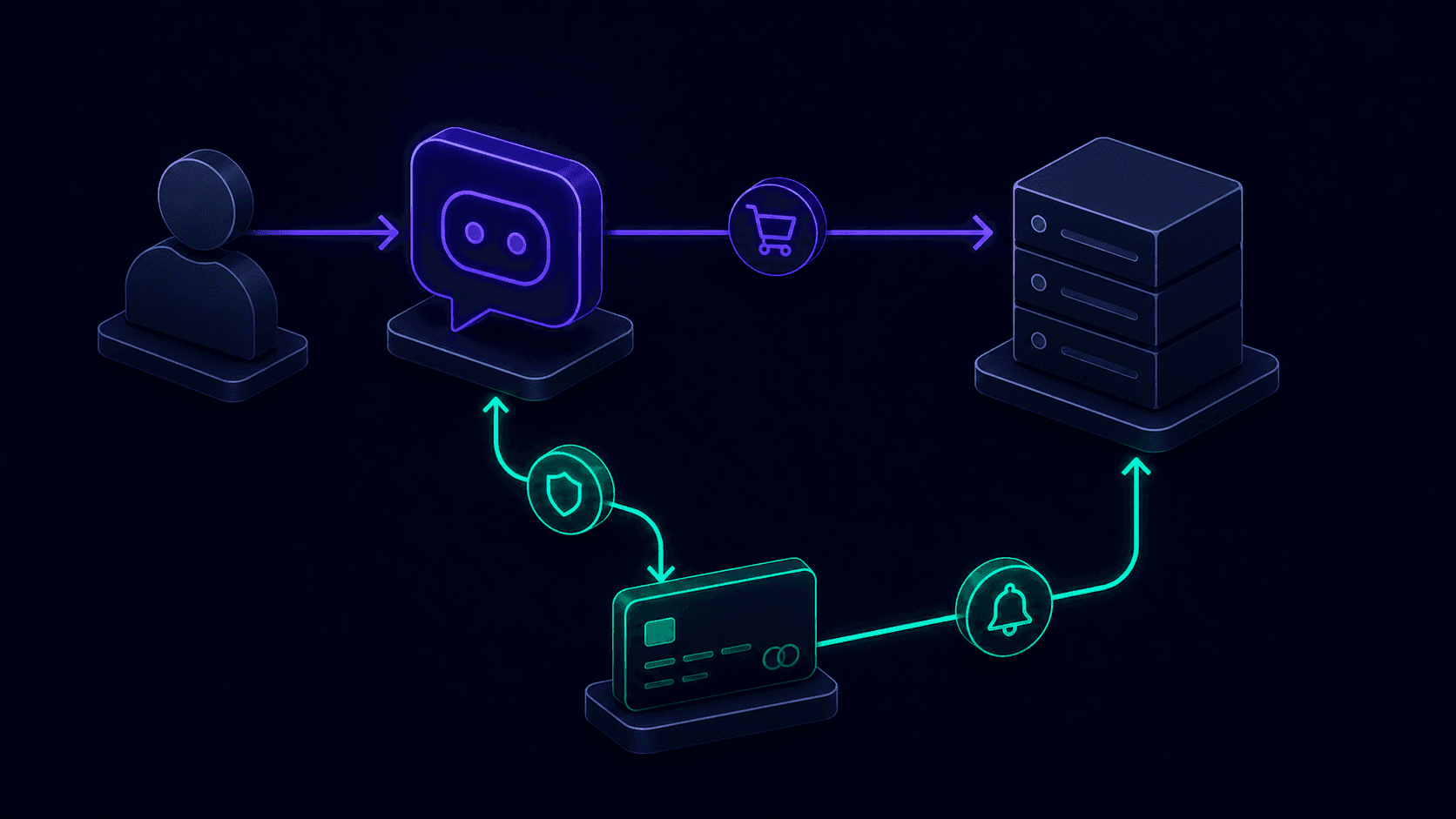 Figure 1: The ACP checkout lifecycle - an agent's CreateCheckoutRequest and UpdateCheckoutRequest exchange cart state with the seller, payment completes via a Shared Payment Token, and Stripe notifies the seller through the same checkout.session.completed webhook used for standard checkouts.
6. Conclusion and Actionable Roadmap
Integrating Stripe's Agentic Commerce Suite comes down to three concrete deliverables: a catalog feed refreshed on Stripe's required cadence, a checkout path built around Shared Payment Tokens instead of raw card collection, and a fulfillment webhook that treats agent orders as first-class CheckoutSession events with an extra attribution field. Ship the feed-only path first, measure real checkout-failure data, and add the price/availability hook only once staleness is a measured problem rather than a hypothetical one.
Ready to make your SaaS product discoverable and purchasable through AI agents? I integrate Stripe's Agentic Commerce Suite and the broader Agentic Commerce Protocol into production Next.js and Node.js SaaS MVPs, with the same webhook-verification and caching discipline behind everything else I ship. Contact me today to book a 30-minute agentic commerce integration audit.