TypeScript 7.0 Guide: What SaaS Founders Need to Know


Written by
Bhalli B
Full-Stack Engineer & SaaS MVP Architect
Certified Full-Stack Developer & MVP Specialist · Lahore, Pakistan
If your engineering team's biggest daily complaint is waiting on the type-checker instead of shipping features, Microsoft's July 8, 2026 release of TypeScript 7.0 is the fix, and it's not a marginal one: it's a full rewrite of the compiler in Go that delivers 8-12x faster full builds on real production codebases, according to Microsoft's own published benchmarks. This isn't a "your mileage may vary" performance claim either - it's measured on named open-source projects and confirmed by engineering teams at Slack, Vanta, and inside Microsoft itself, and by the end of this post you'll know exactly what changed, what it costs to migrate, and roughly how many CI minutes - and dollars - this can save your team every month.
1. What Actually Changed in TypeScript 7.0?
TypeScript 7.0 replaces the compiler's JavaScript-based engine with a native port written in Go, while deliberately preserving the exact type-checking logic and command-line behavior of TypeScript 6.0. The port was done as faithfully as possible, writing new code while maintaining the structure and logic of the original codebase to keep results consistent and compatible between the two compilers. In practice, this means: your existing TypeScript code doesn't need to be rewritten to benefit - you install the new tsc, and the same type errors you'd see in TypeScript 6.0 show up in TypeScript 7.0, just far faster, because the compiler is now running as compiled Go code with genuine multi-core parallelism instead of interpreted JavaScript on a single thread.
The speed gain isn't limited to the command line. On the same computer, opening a file with an error in the VS Code codebase would previously take about 17.5 seconds from the time you opened the editor to the time you saw the first error. With TypeScript 7, it's under 1.3 seconds - a change your developers will notice within the first five minutes of using it, not something buried in a changelog.
2. How Much Does This Actually Save in CI Time and Cost?
CTC = B × M × r
Slack engineers have told us that TypeScript 7 eliminated 40% of their merge queue time and brought type-checking time in CI from about 7.5 minutes to 1.25 minutes - that's Microsoft's own published figure, not an estimate. Applying that ratio to a mid-size team's build volume, using a typical Linux CI runner rate as an illustrative reference point:
The dollar figure above is illustrative - your actual runner rate and build volume will differ - but the 7.5-to-1.25-minute ratio and the 400-hour figure are Microsoft's reported numbers, not projections.
3. Does Adding More CPU Cores Actually Help, or Is There a Ceiling?
| Configuration | VS Code Codebase Build Time | Speedup vs. TS 6.0 | Memory Trade-Off |
|---|---|---|---|
| TypeScript 6.0 (baseline) | 125.7s | 1x | 5.2GB peak |
TypeScript 7.0, default (--checkers 4) | 10.6s | 11.9x | 4.2GB peak (-18%) |
TypeScript 7.0, --checkers 8 | 7.51s | 16.7x | Higher - more parallel workers duplicate some shared type work |
The default number of type-checking workers is 4, but it can be configured with the new --checkers flag. You may find that increasing this number can further speed up builds on larger codebases where typical machines have more CPU cores, but will typically come at the cost of increased memory usage. There's a real ceiling here, and it's not just memory - --checkers and --builders have a multiplicative effect, so building with --checkers 4 --builders 4 allows up to 16 type-checkers to run at once, which may be excessive on a standard CI runner, so the flag is a tuning knob, not a "set it to the max and walk away" setting.
As a Certified Project Manager, I put a single line item on the migration checklist for this: benchmark --checkers at your default, then at your CI runner's actual core count, before merging the upgrade - a five-minute test that prevents a team from either leaving speed on the table or provisioning bigger (more expensive) CI runners they didn't need.
4. What's the Real Migration Risk Founders Should Ask About Before Upgrading?
What this costs you if you get it wrong: TypeScript 7.0 doesn't just add new defaults - it turns several previously-deprecated patterns into hard build errors with no warning period, and the two changes that catch the most teams off guard are quiet ones: where your project root is assumed to be, and which global type packages get loaded automatically.
// tsconfig.json sits at the repo root; source lives in ./src
{
  "compilerOptions": {
    "strict": true
    // rootDir and types left unset, relying on old implicit defaults
  },
  "include": ["./src"]
}
rootDir now defaults to ./ instead of inferring your source directory, and types now defaults to an empty array instead of loading every @types package automatically - this build will either restructure your output directories unexpectedly or fail with missing global type errors from packages like node or jest that used to load silently.
{
  "compilerOptions": {
    "strict": true,
    "rootDir": "./src",         // preserves your previous directory structure
    "types": ["node", "jest"]   // explicitly list the globals you actually need
  },
  "include": ["./src"]
}
Two explicit lines and the upgrade behaves identically to your TypeScript 6.0 output - this is a five-minute fix per project, but it's invisible until the build breaks, which is exactly the kind of thing that should be on a migration checklist rather than discovered mid-deploy.
Also worth flagging directly, since it's easy to assume from a skim of the release notes: module now defaults to esnext, but target does not - it defaults to whatever the current stable ECMAScript edition is, one step behind esnext, not esnext itself. Conflating the two is a small but common misread of the changelog.
5. Can You Run TypeScript 7.0 and 6.0 Side by Side During Migration?
Yes, and Microsoft built this in deliberately, because TypeScript 7.0 is here, it does not ship with an API yet - tools like typescript-eslint that need programmatic access still depend on the 6.0 API. The pattern is an npm alias, not a second package install:
{
  "devDependencies": {
    "@typescript/native": "npm:typescript@^7.0.2",
    "typescript": "npm:@typescript/typescript6@^6.0.2"
  }
}
This gives your team the new tsc binary from TypeScript 7 for actual compilation, while anything importing the typescript package programmatically - ESLint plugins, custom build scripts - keeps resolving to the TypeScript 6.0 API underneath. For teams on Vue, Astro, Svelte, or Angular specifically, this isn't optional yet: tools (such as Volar) which embed TypeScript into their own compilers and language services can only currently rely on TypeScript 6.0, so those projects should plan to run tsc from TypeScript 7 at the CLI for fast error detection while keeping TypeScript 6.0 wired into the editor/framework tooling until those integrations catch up.
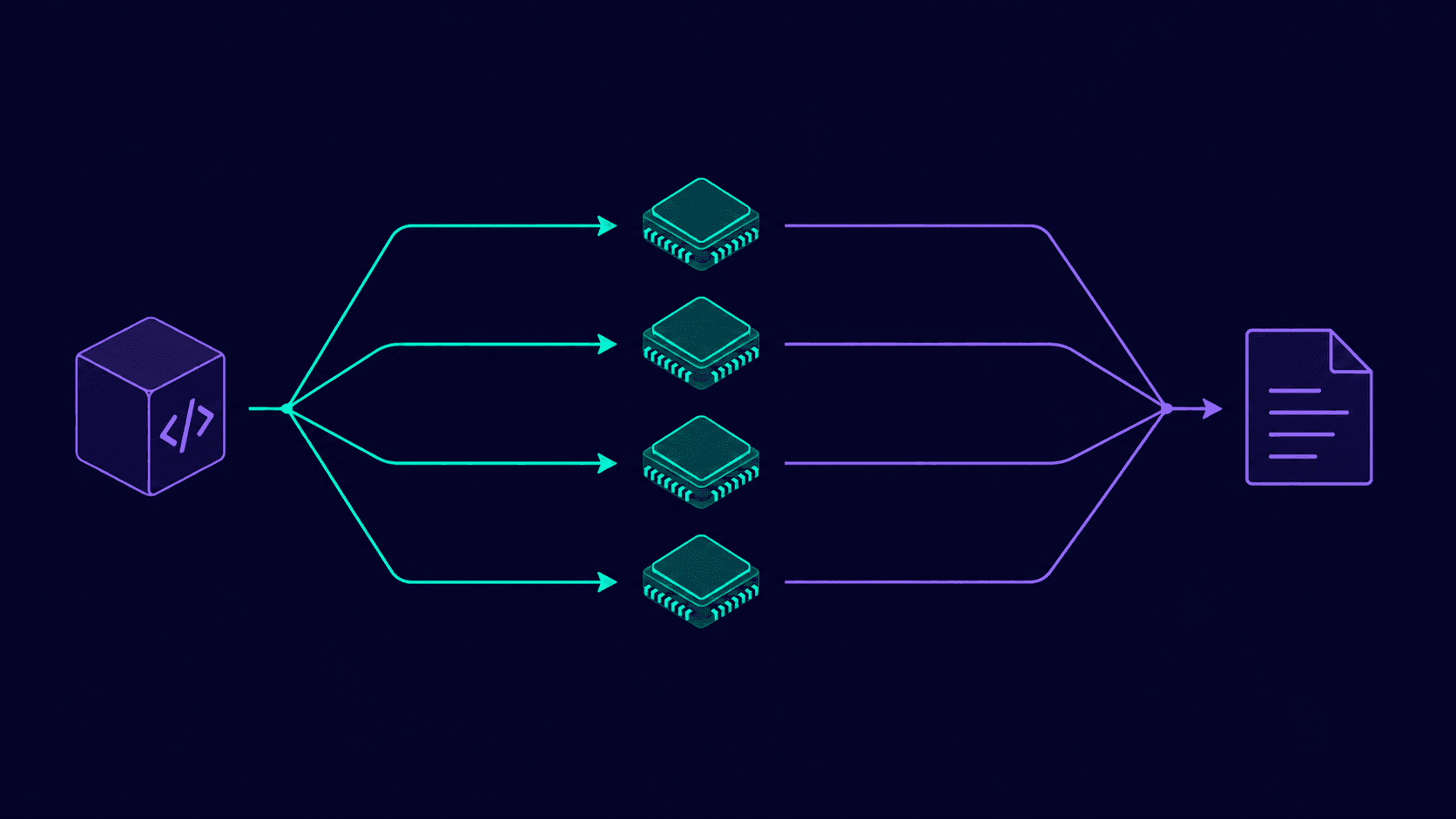 Figure 1: How TypeScript 7.0's default four type-checking workers divide a codebase, run independently, and reconverge into one consistent build result.
6. Conclusion and Actionable Roadmap
TypeScript 7.0 is the rare infrastructure upgrade where the marketing claim and the measured reality actually line up: an 8-12x build speedup, a 13x drop in editor time-to-first-error, and CI type-checking costs that can realistically fall by 80%+ on teams with Slack's build profile - all while your existing TypeScript code keeps type-checking the same way it did under 6.0. The risk isn't in the compiler's correctness; it's in the handful of default changes (rootDir, types, the deprecated flag removals) that fail loudly if skipped and cost almost nothing to handle if you scope them before you upgrade.
Get your TypeScript 7.0 migration scoped, not surprised: I audit Next.js and Node codebases for the rootDir/types/deprecated-flag changes before touching the upgrade, and tune --checkers/--builders against your actual CI runner specs. Contact me today to book a 30-minute migration audit.