Next.js 16 Hosting Costs: Vercel vs Self-Hosted (2026)


Written by
Bhalli B
Full-Stack Engineer & SaaS MVP Architect
Certified Full-Stack Developer & MVP Specialist · Lahore, Pakistan
Next.js 16 Server Components (RSC) impact hosting costs by shifting compute processing from the user's browser directly onto your hosting server. This architectural shift means that instead of a one-time static file delivery, your hosting costs will scale dynamically with user traffic, database queries, and server-side execution complexity. To control these costs without sacrificing developer speed, startup founders must choose their infrastructure strategically: starting on Vercel's managed serverless network for rapid pre-revenue validation, then migrating to a flat-rate self-hosted Virtual Private Server (VPS) via Coolify or Railway when scaling to reduce production infrastructure bills by up to 90%.
1. The Architectural Shift: Client-Side Processing vs. Server-Side Execution
Traditional React single-page applications (SPAs) operate on a client-side execution model. The user's browser downloads a monolithic JavaScript bundle, parses the code, constructs the DOM, and executes raw data fetching asynchronously. Because the rendering compute load is offloaded to the user's machine, the startup's hosting obligations are minimal: you only pay for static asset delivery. This model is highly cost-effective and can scale to millions of page loads on cheap or free static hosts.
Next.js Server Components (RSC) turn this paradigm on its head. By default, components execute on the server. The server queries databases directly, processes application logic, and renders semantic layout structures before streaming a pre-rendered payload to the client. While this improves page load speed, layout shifts, and search engine visibility, it shifts the operational load from the user's browser to your application server.
Consequently, your hosting infrastructure must provide active, reliable compute power. Under a serverless model, every page view triggers serverless function executions. Under a containerized model, always-on servers must handle concurrent user requests. Founders who treat Next.js as a simple static frontend framework are often surprised when their hosting bills scale with traffic rather than developer seats.
2. Next.js 16’s New Caching Engine: Cache Components and use cache
In Next.js 16, the default rendering and performance behavior has been updated. Legacy route-level Partial Prerendering (PPR) options have been replaced by explicit "Cache Components" and the 'use cache' directive.
This feature allows technical teams to selectively cache expensive data requests, external API calls, or layout blocks. When cached, subsequent page requests bypass the server's database queries and recalculations. This reduces CPU and memory usage, helping to lower serverless execution fees and container resource requirements.
To show how this is configured in a production-ready application, review the Server Component below. It uses the modern 'use cache' directive to isolate and cache a resource-intensive business intelligence dashboard, with custom lifespans and invalidation tags:
// app/components/StartupMetricsDashboard.tsx
import { unstable_cacheLife as cacheLife } from 'next/cache';

interface KPIReport {
  monthlyRecurringRevenue: number;
  churnPercentage: number;
  activeSubscribers: number;
}

// Complex server-side data extraction function
async function calculateStartupKPIs(): Promise<KPIReport> {
  // Simulates a heavy analytical query across database rows
  const response = await fetch(`${process.env.INTERNAL_DB_URL}/analytics/kpis`, {
    headers: { 'Authorization': `Bearer ${process.env.INTERNAL_SECRET_TOKEN}` }
  });

  if (!response.ok) {
    throw new Error('Database connection failed');
  }

  return response.json();
}

export default async function StartupMetricsDashboard() {
  // Opt-in to Next.js 16 Cache Components
  'use cache';
  cacheLife('hours'); // Restricts compute execution to once per hour

  const metrics = await calculateStartupKPIs();

  return (
    <div className="metrics-grid">
      <div className="metric-card">
        <h3>Monthly Recurring Revenue</h3>
        <p className="text-xl font-bold">${metrics.monthlyRecurringRevenue}</p>
      </div>
      <div className="metric-card">
        <h3>Churn Rate</h3>
        <p className="text-xl font-bold">{metrics.churnPercentage}%</p>
      </div>
      <div className="metric-card">
        <h3>Active Subscribers</h3>
        <p className="text-xl font-bold">{metrics.activeSubscribers}</p>
      </div>
    </div>
  );
}
3. Deciphering Vercel's Restructured Pricing Model (The "Vercel Tax")
Vercel is the creator and maintainer of Next.js. Their hosting platform is highly optimized for the framework, offering zero-configuration deployments, automatic custom domain mapping, and seamless preview environments for pull requests.
However, this convenience comes with a premium known as the "Vercel tax". This term describes the difference in cost between Vercel's managed serverless network and the raw virtual machine resources required to host the same application.
The basic equation for Vercel's dynamic Pro billing is modeled below:
Where:
N_seatsis the number of developer seats ($20 per user/month).B_overagerepresents bandwidth usage exceeding the 1TB plan inclusion, billed at $40 per 100GB.F_overagerepresents serverless function compute overages past the baseline plan limits.I_overagerepresents image optimization overages billed at $5 per 1,000 images over the 5,000 baseline.
The Danger of Serverless Runaways
In serverless environments, unexpected events like a distributed denial-of-service (DDoS) attack, an unoptimized recursive loop inside an dynamic server route, or a brute-force web crawler scraping your pages can rapidly generate millions of serverless function executions. On a raw virtual machine, this traffic spike simply maxes out the CPU, resulting in temporary downtime. On a serverless platform, the platform scales to handle the load, which can lead to unexpected usage charges on your next invoice.
4. The Flat-Rate Paradigm: Self-Hosting Next.js 16 with Coolify on VPS
As a startup matures and traffic grows, predictable hosting costs become a priority. Fortunately, Next.js compiles into a highly optimized standalone Node.js server container.
To do this, enable the standalone output setting in your configuration file:
// next.config.ts
/** @type {import('next').NextConfig} */
const nextConfig = {
  output: 'standalone', // Generates a minimal node bundle excluding unnecessary dependencies
};

export default nextConfig;
With a standalone build, you can self-host the application using an open-source Platform-as-a-Service (PaaS) like Coolify on a standard Virtual Private Server (VPS). This setup provides a managed, Heroku-like development experience while keeping hosting costs flat.
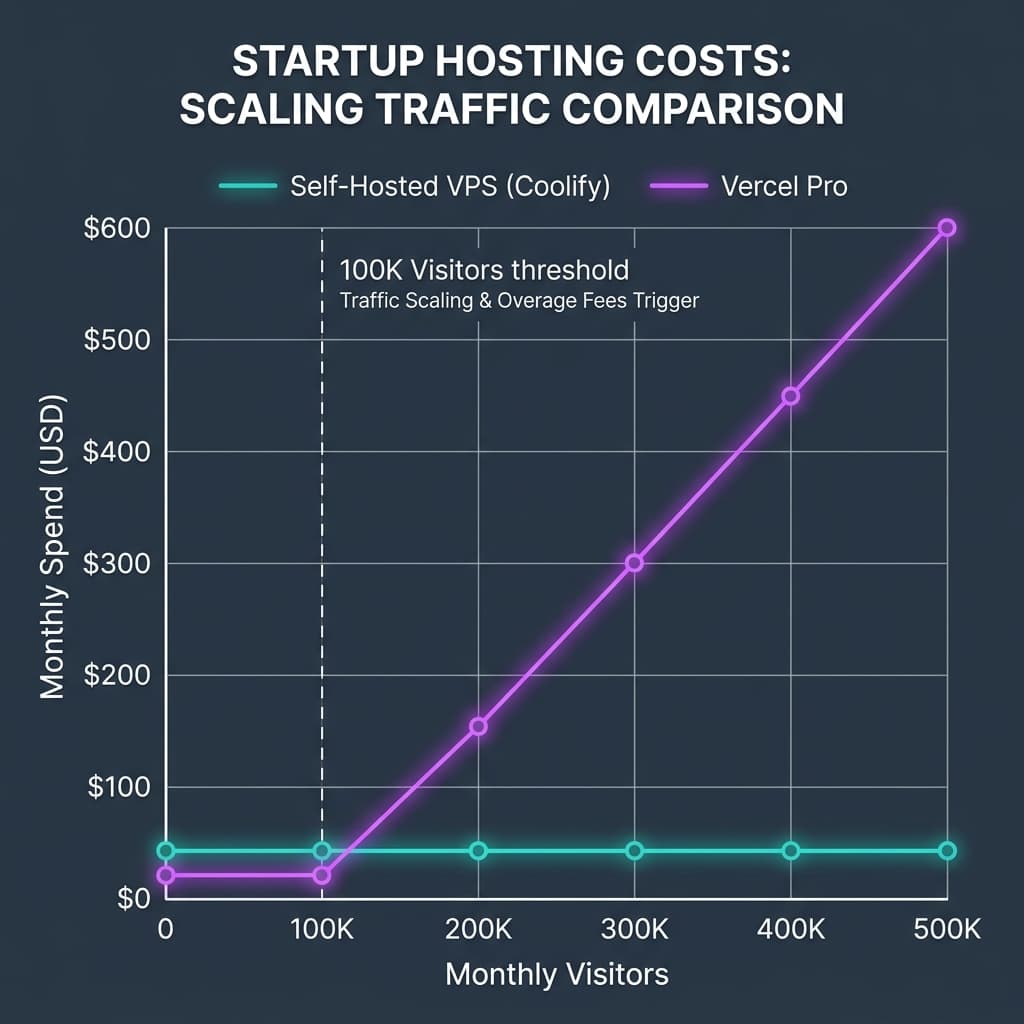 Figure 1: Projections comparing Vercel usage scaling vs. flat-rate self-hosted VPS environments.
This table models the hosting costs for a growing startup team of 3 developers, 500,000 monthly visitors, and 1.5TB of bandwidth:
| Infrastructure Cost Component | Vercel Pro Tier | Self-Hosted VPS (Coolify on DanubeData/Hetzner) | Managed Container Platform (Railway) |
|---|---|---|---|
| Developer Seat Cost | $60.00 (3 developers) | $0 (Coolify is free & open-source) | $60.00 (3 developer seats) |
| Bandwidth Allocation | $75.00 (1.5 TB usage) | $0 (VPS plans include up to 20 TB) | $140.00 (1.5 TB usage) |
| Serverless Compute | $180.00 (~2,000 GB-hours) | $0 (Always-on compute; flat hardware rate) | $55.00 (Flat compute allocation) |
| Image Optimization | $225.00 (50k transform requests) | $0 (Processed locally on VPS hardware) | $0 (Processed in container limits) |
| Build Run Time | $60.00 (Overage build limits) | $0 (Runs on the VPS or in GitHub Actions) | $0 (CI compute included in base fees) |
| Estimated Monthly Spend | $600.00 / month | $16.99 - $89.99 / month | $255.00 / month |
5. The Total Cost of Ownership (TCO) Equation
While self-hosting offers clear infrastructure savings, founders must also factor in operational overhead. Managing your own servers requires developer time for configuration, system updates, and deployment pipelines.
The actual Total Cost of Ownership is calculated as:
Where:
C_infrais your flat-rate hardware cost.H_DevOpsis the monthly hours your developers spend managing the server.R_engineeris their hourly internal rate.
If your team does not have server management experience, spending several hours each month troubleshooting deployment scripts or managing firewalls can quickly cancel out the hosting savings.
Server Capacity Requirements
If you choose to self-host, your hardware specifications must match Next.js's compilation needs. Next.js production builds are resource-intensive, peaking at 1.5GB to 3GB of RAM during build processes.
- 2GB RAM VPS: The minimum required to compile and host basic static sites.
- 4GB RAM VPS: The realistic baseline for standard applications running active client databases.
- 8GB RAM VPS: The recommended setup when running Next.js alongside your database (e.g., PostgreSQL) and caching layer (e.g., Redis) on the same machine.
6. Resolving Common MVP Pitfalls and Code Limits
When transitioning from client-side React code to the Next.js App Router, developers often encounter framework-level limitations. Understanding how to handle these constraints is essential for maintaining product stability.
Pitfall 1: The 1MB Server Action Payload Limit
By default, Next.js limits Server Action request bodies to 1MB to protect servers from memory overflow and denial-of-service (DoS) attacks. If an application tries to send a larger payload—such as an image upload or bulk file import—it will trigger a 413 Body Exceeded 1MB Limit error.
To resolve this, you can increase this limit in next.config.ts. However, a better approach for large file uploads is to retrieve a pre-signed cloud storage URL via a Server Action, allowing the client to upload the file directly to cloud storage. This keeps your application server's memory usage low and avoids resource bottlenecks.
This example demonstrates how to implement this architecture pattern:
// next.config.ts
import type { NextConfig } from "next";

const nextConfig: NextConfig = {
  experimental: {
    serverActions: {
      bodySizeLimit: '4mb', // Raises limit for small JSON transactions
    },
  },
};

export default nextConfig;
// app/actions/upload.ts
'use server';

import { S3Client, PutObjectCommand } from '@aws-sdk/client-s3';
import { getSignedUrl } from '@aws-sdk/s3-request-presigner';

const s3 = new S3Client({
  region: process.env.AWS_REGION!,
  credentials: {
    accessKeyId: process.env.AWS_ACCESS_KEY_ID!,
    secretAccessKey: process.env.AWS_SECRET_ACCESS_KEY!,
  },
});

// Retrieves a pre-signed URL to allow direct uploads to cloud storage
export async function getPresignedUploadUrl(filename: string, fileType: string) {
  const fileKey = `uploads/${Date.now()}-${filename}`;
  const command = new PutObjectCommand({
    Bucket: process.env.AWS_S3_BUCKET_NAME!,
    Key: fileKey,
    ContentType: fileType,
  });

  try {
    const uploadUrl = await getSignedUrl(s3, command, { expiresIn: 300 });
    return { uploadUrl, fileKey };
  } catch (error) {
    console.error('Failed to generate pre-signed URL:', error);
    throw new Error('Pre-signed URL generation failed');
  }
}
Pitfall 2: The 4MB API Route Response Limit
A similar 4MB limit applies to Next.js API route responses to ensure fast API execution. For non-serverless environments handling heavy data exports, you can adjust or disable this limit directly in the route configuration:
// pages/api/export-analytics.js
export const config = {
  api: {
    responseLimit: '10mb', // Can also be set to false to disable limits
  },
};

export default function handler(req, res) {
  // Processes and returns larger data exports safely
  res.status(200).json({ data: "Target analytical content" });
}
7. Optimizing Deployment Speed: CI/CD Pipeline and Build Caching
Next.js production builds compile page routes, optimize dynamic styles, and pre-render assets. This process is highly compute-intensive.
In clean virtual environments like GitHub Actions, the runner VM is destroyed after each run. Without build caching, Next.js must compile every file from scratch. This extends build times and consumes more pipeline minutes.
To avoid this, configure the pipeline to cache the project's dependency tree and the .next/cache directory. This preserves Turbopack's compiler state across runs, reducing build times.
Additionally, you can integrate performance budgets into your pipeline. The size-limit action checks build sizes on every pull request and fails the build if a developer introduces a heavy dependency that exceeds your budget, helping to prevent bundle size creep.
# .github/workflows/production-deployment.yml
name: Production Deployment Quality Gates

on:
  push:
    branches: [ main ]
  pull_request:
    branches: [ main ]

jobs:
  validate-and-deploy:
    name: Build & Deploy
    runs-on: ubuntu-latest
    steps:
      - name: Checkout Code Base
        uses: actions/checkout@v4

      - name: Setup Node.js Environment
        uses: actions/setup-node@v4
        with:
          node-version: 20
          cache: 'npm' // Automatically caches global npm package registries

      - name: Restore Next.js Compiler Cache
        uses: actions/cache@v4
        with:
          path: |
            ${{ github.workspace }}/.next/cache
          key: ${{ runner.os }}-nextjs-${{ hashFiles('**/package-lock.json') }}-${{ github.sha }}
          restore-keys: |
            ${{ runner.os }}-nextjs-${{ hashFiles('**/package-lock.json') }}-

      - name: Install Project Dependencies
        run: npm ci

      - name: Run Static Code Linters
        run: npm run lint

      - name: Execute Jest Test Suites
        run: npm run test -- --ci

      - name: Verify Bundle Size Limits
        uses: andresz1/size-limit-action@v2
        with:
          github_token: ${{ secrets.GITHUB_TOKEN }}

      - name: Compile Standalone Next.js Application
        run: npm run build
8. Strategic Project Management Roadmap for Founders
Choosing the right infrastructure involves balancing hosting costs with developer productivity. Founders can guide their planning using this framework:
                  ┌─────────────────────────────────────────┐
                  │          VALIDATION PHASE               │
                  │          (Pre-Seed / MVP)               │
                  └────────────────────┬────────────────────┘
                                       │
                                       ▼ Focus: Developer Velocity
                  ┌─────────────────────────────────────────┐
                  │            Host on Vercel               │
                  │  (Serverless, automatic preview URLs)   │
                  └────────────────────┬────────────────────┘
                                       │
                                       ▼ Overage Warning Signals:
                                       │  - Traffic > 100K users
                                       │  - High egress bills
                                       │  - High dynamic compute costs
                                       │
                                       ▼ Focus: Cost Control & Scale
                  ┌─────────────────────────────────────────┐
                  │          SELF-HOSTED PHASE              │
                  │          (Seed & Beyond)                │
                  └────────────────────┬────────────────────┘
                                       │
                                       ▼ Action Plan:
                                       │  - Enable standalone output
                                       │  - Deploy on VPS via Coolify
                                       │  - Host local Postgres / Redis
                  ┌────────────────────┴────────────────────┐
                  │       Flat-Rate Monthly Hosting         │
                  │         (Up to 90% savings)             │
                  └─────────────────────────────────────────┘
Stage 1: Validation Phase (Pre-Seed / MVP)
- Goal: Ship features and iterate on user feedback as fast as possible.
- Recommendation: Host on Vercel. The platform's automated preview URLs, zero-configuration setup, and managed environments allow a lean product team to deploy updates without DevOps friction. At this stage, developer speed is more critical than optimizing hosting costs.
Stage 2: Scaling and Cost Optimization (Seed and Beyond)
- Goal: Establish a predictable hosting budget and scale the application.
- Recommendation: Keep a close eye on your Vercel bill. When traffic passes 100,000 monthly visitors, or bandwidth and image optimization fees begin to accumulate, evaluate a transition to self-hosting. Moving a standalone Next.js container to a flat-rate VPS managed via Coolify can significantly reduce monthly infrastructure bills while maintaining a clean, automated deployment workflow.
9. Build a Scalable, Cost-Optimized Next.js MVP
Successfully scaling a SaaS product requires both clean engineering and smart project management. As a Full-Stack Architect and Certified Project Manager, I help early-stage startups and tech leaders build secure, performant Next.js applications with automated deployment workflows and optimized hosting budgets.
Whether you need to build a high-performance Minimum Viable Product (MVP) or want to migrate an existing application to a more cost-effective hosting setup, I can help your team execute a clean, structured transition.
Schedule a Technical Consultation
Get in touch to review your current technical setup:
- MVP Strategy & System Architecture: Design a secure, performant, and search-optimized Next.js application tailored to your business needs.
- DevOps & Infrastructure Auditing: Optimize your Vercel setup or build custom, flat-rate VPS deployment pipelines using Coolify to control hosting costs.
- Build Optimization: Set up automated caching, test validation gates, and bundle size monitoring to keep your development pipeline running fast.