Next.js 16 Caching Strategies: Speed vs. Freshness


Written by
Bhalli B
Full-Stack Engineer & SaaS MVP Architect
Certified Full-Stack Developer & MVP Specialist · Lahore, Pakistan
Every dollar your Next.js hosting bill saves from caching is freshness you're trading away somewhere else, and the wrong trade on a single route doesn't just show a user stale numbers - cache a page that contains one customer's account data without isolating it correctly, and you can serve that cached page to a different customer entirely. That's not a hypothetical: it's the exact class of bug Next.js 16 restructured its entire caching model around preventing, by making every route dynamic by default and requiring you to explicitly opt into caching per route, per component, or per function. Get the opt-in right and a typical SaaS dashboard can cut database read load by 70-90% on its high-traffic pages without a single customer ever seeing another customer's data or numbers that are meaningfully out of date.
1. Why Did Next.js 16 Make Caching Opt-In Instead of Automatic?
Next.js 16 made caching fully opt-in because the previous implicit model - where fetch calls were cached by default unless you explicitly opted out - was the single most common source of "why is this page showing old data" tickets on client projects, and it was silently caching things developers never intended to cache, including request-specific data. What this costs you if you get it wrong: under the old model, a developer could add a new fetch call to a page, forget the framework would cache it by default, and ship a bug where a customer's updated profile doesn't reflect for minutes or hours with zero code signaling why. Next.js 16 flips this: nothing is cached unless a route, component, or function is explicitly marked with the 'use cache' directive, and the framework throws a build-time error if you access truly dynamic data (like a session cookie) inside a cached scope instead of silently caching it anyway.
This shift is called Cache Components, and it requires one line in next.config.ts (cacheComponents: true) before any 'use cache' directive does anything - a config-file gotcha that's caught out more than one team mid-migration, including on a client rebuild where three 'use cache' directives sat inert for a day before anyone noticed the flag was missing.
2. How Much Database Load Does Caching Actually Remove?
ORR = 1 − (R / V)
Take a product catalog page getting 20,000 pageviews a day - a realistic number for a mid-size SaaS marketing or storefront section:
The number that actually matters here isn't the percentage - it's whether an hour of staleness is acceptable for that specific route. That's a product decision, not a technical one, which is exactly why it belongs on your scope sheet, not buried in a pull request.
3. Which Caching Strategy Fits Which Kind of Page?
| Strategy | Freshness Guarantee | DB Load | Best Fit |
|---|---|---|---|
| No cache (dynamic by default, Next.js 16 baseline) | Always live | Highest - every request | Account balances, live session data |
'use cache' + cacheLife('hours'/'days') | Stale up to the cacheLife window | Very low | Marketing pages, product catalogs, blog posts |
'use cache' + revalidateTag(tag, 'max') on mutation | Fresh immediately after the write that matters | Low - cached until explicitly invalidated | Anything edited through your own app (posts, listings, settings) |
'use cache: private' (per-user cache scope) | Fresh per user, not shared | Moderate - one cache entry per user | Personalized dashboards that are expensive to compute but not truly live |
As a Certified Project Manager, I add a "staleness tolerance" column to the page inventory during scoping - for every route, we write down in plain English how old the data on that page is allowed to be before it's a problem. That one column drives which of the four rows above gets used, and skipping it is how teams end up either caching things they shouldn't or leaving easy performance wins on the table.
4. What's the Actual Anti-Pattern That Leaks Data Between Users?
// app/account/page.tsx
'use cache'; // dangerous here
import { cookies } from 'next/headers';
import { db } from '@/lib/db';

export default async function AccountPage() {
  const sessionId = (await cookies()).get('session')?.value;
  const account = await db.account.findFirst({ where: { sessionId } });
  return <AccountSummary account={account} />;
}
Next.js 16 will actually throw a build error here - reading cookies() inside a shared 'use cache' scope is blocked precisely because the first request's result would otherwise be cached and served to every subsequent visitor, regardless of who they are.
// app/account/page.tsx - no directive: dynamic by default in Next.js 16
import { cookies } from 'next/headers';
import { db } from '@/lib/db';
import { AccountLayoutShell } from './shell'; // cached, no auth read

export default async function AccountPage() {
  const sessionId = (await cookies()).get('session')?.value;
  const account = await db.account.findFirst({ where: { sessionId } });
  return (
    <AccountLayoutShell> {/* static nav, logo, footer - safe to cache */}
      <AccountSummary account={account} /> {/* stays dynamic, per-user */}
    </AccountLayoutShell>
  );
}
The layout chrome that's identical for every user gets its own cached component, while the account-specific data stays in the dynamic part of the tree - you get the speed benefit on the shell without ever putting session-scoped data at risk.
5. What Does Correct Cache Invalidation Look Like in a Server Action?
The mutation side is where most caching bugs actually surface - not in the read, but in forgetting to tell Next.js that a write just made a cached read stale. Next.js 16 changed revalidateTag to require a second argument, which trips up anyone copying pre-16 examples:
// app/actions/update-listing.ts
'use server';

import { revalidateTag } from 'next/cache';
import { db } from '@/lib/db';

export async function updateListing(listingId: string, formData: FormData) {
  const title = formData.get('title');
  if (typeof title !== 'string' || title.length === 0) {
    // fail fast on the server; never trust client-side validation alone
    throw new Error('Listing title cannot be empty');
  }

  await db.listing.update({ where: { id: listingId }, data: { title } });

  // Next.js 16 requires a cacheLife profile as the 2nd argument now -
  // omitting it is a TypeScript error, not a silent no-op like before.
  revalidateTag(`listing-${listingId}`, 'max');
}
And the cached read it invalidates, tagged so only that one listing's cache entry is cleared instead of the whole listings section:
// app/listings/[id]/page.tsx
import { cacheLife, cacheTag } from 'next/cache';
import { db } from '@/lib/db';

async function getListing(id: string) {
  'use cache';
  cacheLife('days'); // safe default lifetime if no mutation ever happens
  cacheTag(`listing-${id}`); // lets updateListing() target this exact entry
  return db.listing.findUnique({ where: { id } });
}

export default async function ListingPage({ params }: { params: Promise<{ id: string }> }) {
  const { id } = await params;
  const listing = await getListing(id);
  if (!listing) return <div>Listing not found</div>;
  return <ListingDetail listing={listing} />;
}
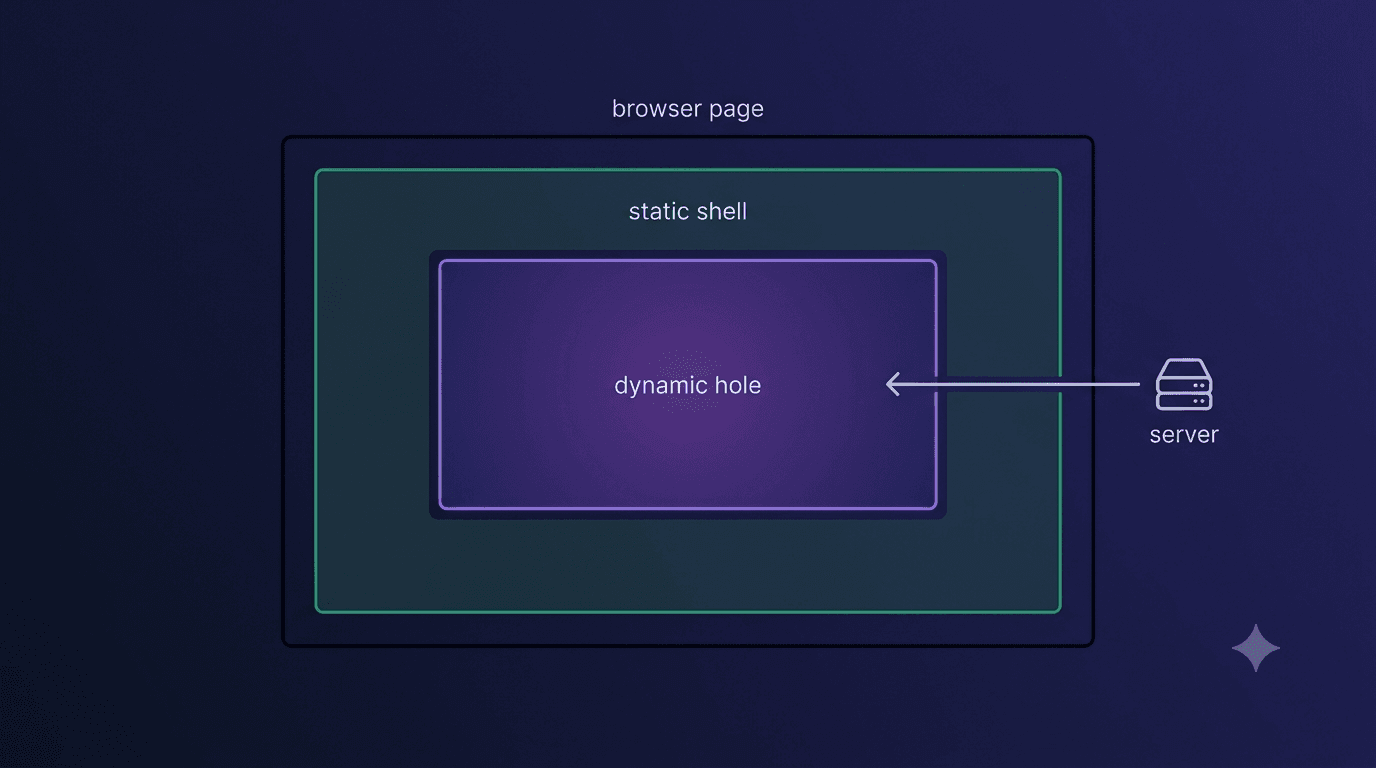 Figure 1: A single route rendered as a prerendered static shell (cached) surrounding a dynamic hole (uncached, resolved per request) under Next.js 16's Cache Components model.
6. Conclusion and Actionable Roadmap
The right caching strategy for a Next.js 16 SaaS app isn't "cache everything" or "cache nothing" - it's a per-route decision about how stale each specific piece of data is allowed to get, enforced through 'use cache', cacheLife, and cacheTag instead of left to an implicit default that used to cache things nobody asked it to. Done correctly, that decision can strip 70-90% of database read load off your highest-traffic pages while guaranteeing the routes that genuinely need live data - and the routes that must never leak between users - stay dynamic on purpose, not by accident.
Stop guessing which pages should be cached: I build Next.js 16 SaaS MVPs with a route-by-route staleness plan mapped before the caching code gets written, using Cache Components, revalidateTag, and Prisma-backed data layers. Contact me today to book a 30-minute caching audit.