PHP2Shell Incident: Impact, Severity and How to Stay Safe

Written by
Bhalli B
Full-Stack Engineer & SaaS MVP Architect
Certified Full-Stack Developer & MVP Specialist · Lahore, Pakistan
The PHP2Shell incident is a pair of critical memory-corruption vulnerabilities in the PHP core runtime, CVE-2026-109618 and CVE-2026-109619, that can allow an unauthenticated attacker to execute code on an internet-facing PHP server. Both flaws carry a CVSS v4.0 score of 9.2 out of 10, and PHP released emergency fixes on October 21, 2026.
The risk sits below your application code. This is not a vulnerable Laravel package, a WordPress plugin or a sloppy controller: an HTTP request can reach the PHP engine before your middleware, login system or framework has done anything useful. This guide covers what happened, what a 9.2 rating means in business terms, how far the exposure reached, and a patch-and-verify sequence that puts every PHP runtime in a production SaaS on a fixed build (8.2.35, 8.3.36, 8.4.27 or 8.5.12) inside one working day, with copy-paste checks, a CI gate and an incident checklist.
1. What Is the PHP2Shell Incident?
PHP2Shell is the name security agencies use for two critical PHP runtime vulnerabilities, CVE-2026-109618 and CVE-2026-109619, which the PHP project fixed on October 21, 2026. Both are rated CVSS v4.0 9.2, and both can let an unauthenticated remote attacker run arbitrary code on a server that serves PHP over HTTP, according to the official PHP security advisory.
The name is blunt and accurate. The worst outcome is not a crashed page or a leaked error message; it is a path from a PHP web request to a shell on your server. In practice, this means the machine holding your database password and your customers' data can be taken over by a stranger who never logged in.
What are the two CVEs?
The two flaws are different bugs with the same destination. One abuses what happens when PHP runs out of memory halfway through building a request; the other abuses internal state that outlives the memory behind it.
| CVE | Failure class | What goes wrong | Fixed in |
|---|---|---|---|
| CVE-2026-109618 | RCE via out-of-memory corruption | An allocation failure interrupts PHP while request data is only partly initialized; cleanup then treats the invalid data as valid. | 8.2.35, 8.3.36, 8.4.27, 8.5.12 |
| CVE-2026-109619 | RCE via stale global state | Request-owned state survives after its memory is freed; a later request on the same worker can use it before normal initialization resets it. | 8.2.35, 8.3.36, 8.4.27, 8.5.12 |
The Canadian Centre for Cyber Security classifies both as use-after-free vulnerabilities (CWE-416) in its AL26-026 alert. A use-after-free means the program releases a piece of memory but keeps a pointer to it, and an attacker who can shape what lands in that memory next can steer what the program does.
Who was exposed?
PHP's advisory says all PHP installations serving web requests were at risk, including PHP-FPM, Apache with mod_php, php-cgi, FrankenPHP and LiteSpeed. The PHP team rated mod_php highest because a demonstrated exploit triggers the flaw before any application code runs. Singapore's Cyber Security Agency goes further and lists the affected product simply as all versions of PHP.
The practical split is clean. Four supported branches received fixes on October 21: PHP 8.2.35, 8.3.36, 8.4.27 and 8.5.12. PHP 8.1 and older no longer receive upstream updates, though the PHP security team published minimal source backports for 7.4, 8.0 and 8.1 for people building from source.
One update matters before you read further: on October 23, PHP disclosed a separate vulnerability, CVE-2026-115560, that the October 21 releases do not fix. It changes how long you should keep one mitigation in place, and section 6 covers it.
2. What Does CVSS 9.2 Mean for a Non-Technical Founder?
A CVSS v4.0 score of 9.2 means critical: the flaw is reachable over the network, needs no valid user account, and can lead to high impact on confidentiality, integrity and availability. For a founder, that translates to a possible full takeover of the application server, not a bug in one feature.
What this costs you if you get it wrong: an attacker running code as your PHP worker can read anything that worker can read. Trend Micro's advisory describes exploitation as code execution as the web worker account, with potential for stolen data, tampered data and planted backdoors. A SaaS app server is exactly the machine where that account can reach the most valuable secrets.
How should you read a CVSS number?
CVSS measures severity, not the likelihood that you were breached. It describes the worst realistic outcome if the flaw is exploited; your own risk depends on whether you run PHP, which version, whether the server faces the internet, and how fast you patched. These are the response targets I put in SaaS runbooks:
- 9.0 to 10.0, Critical: patch and verify within 24 hours, internet-facing hosts first.
- 7.0 to 8.9, High: patch within 7 days.
- 4.0 to 6.9, Medium: patch within 30 days.
- 0.1 to 3.9, Low: fold into the next maintenance window.
PHP2Shell earns its 9.2 for three reasons: no authentication is required, exploitation happens over ordinary HTTP, and the impact reaches every part of the server the worker account can touch.
Which three questions should a founder ask the team today?
- Where do we run PHP, including the WordPress marketing site, the admin panel, the legacy API and any vendor tool installed on our servers?
- Which exact version does each of those report, and who confirmed it today?
- Who restarted the workers after the update, and how do we know?
As a certified full-stack engineer who has shipped SaaS MVPs to production, I treat a confirmed critical runtime RCE like a production outage with a compliance tail: contain and verify the patch first, write the post-mortem second.
3. How Did the PHP2Shell Vulnerabilities Work?
Both flaws live in the boundary between PHP's request lifecycle and its memory manager, the C-level code that parses an incoming request, allocates memory for it and cleans up afterward. The application framework is not the vulnerable layer; the runtime underneath it is.
How does the out-of-memory flaw (CVE-2026-109618) work?
PHP lets you set a memory_limit, and a stock configuration ships with 128M. When a request exceeds the limit, PHP normally aborts that request safely. The flaw appears when an allocation fails while PHP is still building its internal picture of the request: the cleanup path can then operate on data that was never fully constructed and treat it as valid, which can become memory corruption and, in the worst case, code execution.
In plain language: PHP starts assembling a request, runs out of memory halfway, then tries to tidy up a half-built object using code that assumes the object is complete.
How does the stale-state flaw (CVE-2026-109619) work?
PHP-FPM and similar servers keep long-lived worker processes that handle many requests one after another. The second flaw involves request-owned internal state that remains referenced after its memory has been freed. A later request handled by the same worker can hit that stale state before normal initialization resets it, which is the classic shape of a use-after-free.
What this costs you if you get it wrong: because workers are reused, an attacker does not need one perfect request. Poking at a worker repeatedly is a normal HTTP pattern that blends into traffic.
Why could middleware not stop it?
Laravel middleware, WordPress authentication, API tokens, rate limiters and route guards all run after PHP has accepted and started processing the request. PHP2Shell targets the layer beneath that line. An authentication check cannot protect you from a bug that fires before authentication code exists in memory.
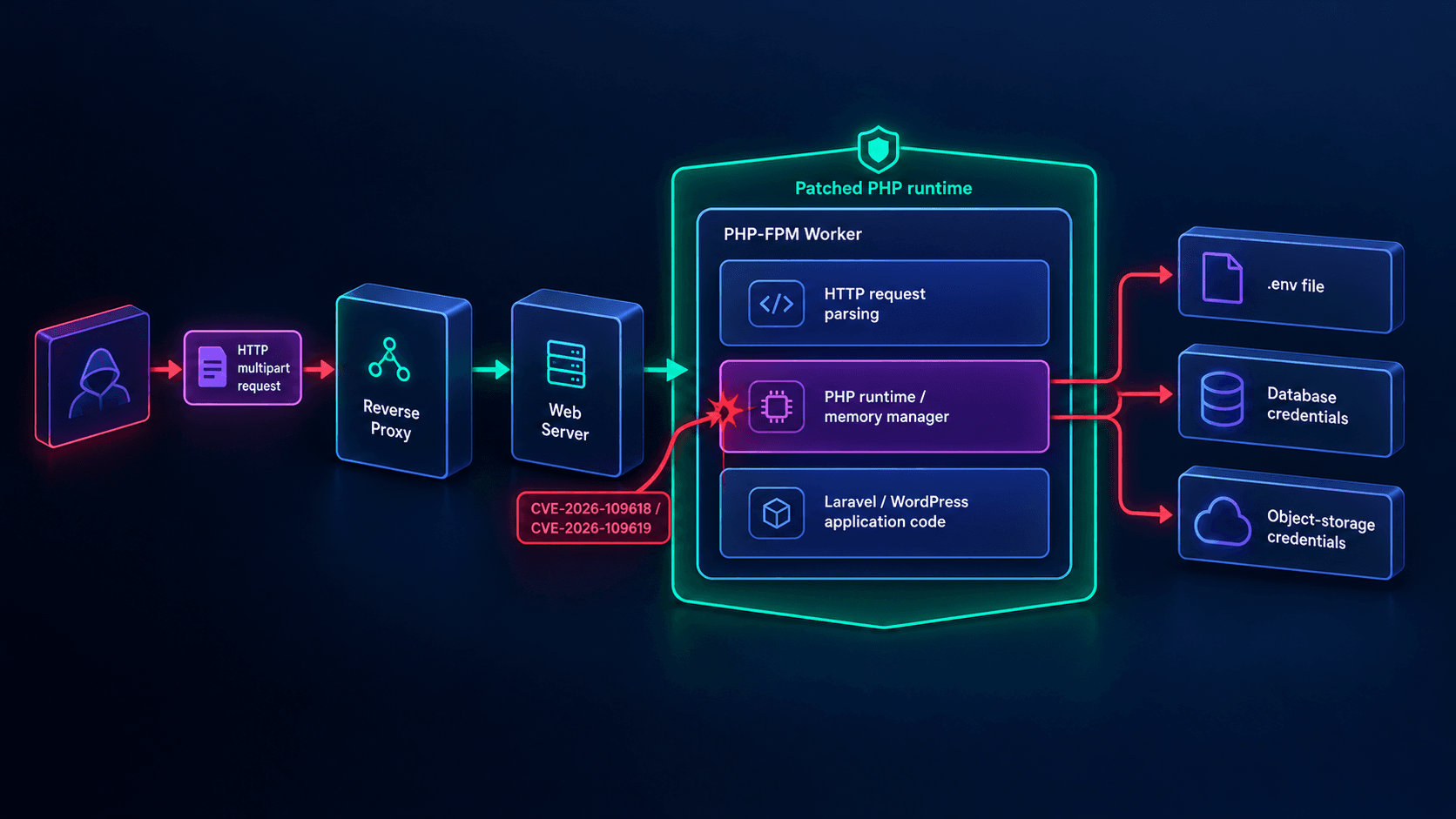 Figure 1: The request passes the proxy and web server, then hits the PHP runtime layer directly, so application-level controls such as middleware and login checks sit above the vulnerable code.
4. How Much Damage Did PHP2Shell Cause, and What Is the SaaS Blast Radius?
The potential exposure was enormous, but no verified public figure exists for how many servers were actually compromised. What is confirmed is that essentially every web-serving PHP installation on an unfixed build was in scope, and that agencies reported exploitation pressure within days of the October 21 release.
The public reporting is not perfectly uniform, which is itself useful information. Singapore's CSA reported widespread exploitation attempts and multiple proof-of-concept exploits in its update dated October 23. The Canadian Cyber Centre's alert noted open-source reporting of a proof of concept while stating that no active exploitation had been identified at that point, and added that this can change quickly. Treat the two as signals of a fast-moving window rather than a contradiction.
What is public, and what should you not assume?
| Measure | What public sources support | What not to assume |
|---|---|---|
| Vulnerable install base | All web-serving PHP on unfixed builds: PHP-FPM, mod_php, php-cgi, FrankenPHP, LiteSpeed. | That every installation was exploited. |
| Exploitation activity | Widespread attempts and multiple PoCs reported by CSA on October 23; a public PoC noted by the Canadian Cyber Centre. | That every attempt succeeded, or that no confirmation means safety. |
| Severity | CVSS v4.0 9.2 for both CVEs. | That the score alone proves a breach. |
| Remediation status | Fixed releases shipped on October 21, 2026. | That every host applied them at once. |
The responsible framing is massive potential blast radius, active exploitation pressure and an unknown but non-zero number of real compromises. If you ran an unpatched, internet-facing PHP server after October 21, treat compromise as plausible until logs, process history, credentials and file integrity say otherwise.
What gets exposed first in a SaaS?
A compromised PHP worker runs with the permissions of the account that serves your app. In most SaaS deployments that account can read the files the application needs to boot, which usually means:
- The environment file with APP_KEY, database URLs, Redis URLs and third-party API keys.
- Database credentials, especially if the database accepts connections from the whole application subnet.
- Object-storage keys for S3, R2, GCS or similar, plus the customer files behind them.
- Queue credentials, webhook signing secrets and OAuth client secrets.
- Session data and anything else stored on the same host.
The most expensive mistake is treating the web server as the asset. In a SaaS the server is a stepping stone; the database, object store, payment provider and customer data are the targets. A single worker can hand an attacker the credentials to pivot into all of them.
How long were you exposed?
The measurement that matters is not how long ago the CVE was published. It is how long a vulnerable binary kept serving requests after the fix existed.
Window = Verified − Released
Two illustrative teams make the difference concrete. Both merged the update on the same day; only one confirmed what was actually running.
If you are not sure which of those two teams you are, book a call and I will treat it as an incident triage rather than a generic security audit.
5. How Do You Patch PHP2Shell Correctly?
Patch the PHP runtime first and restart every worker; redeploying your application code does not fix this. PHP states that updating is the only complete solution, and that no mitigation fully protects an unpatched installation.
Which PHP version do you need?
| Your PHP branch | Minimum safe version | Notes |
|---|---|---|
| PHP 8.5.x | 8.5.12 | Newest supported branch; use it if your dependencies allow. |
| PHP 8.4.x | 8.4.27 | Strong default for current production PHP. |
| PHP 8.3.x | 8.3.36 | Patch now; do not wait for a routine release. |
| PHP 8.2.x | 8.2.35 | End of life on December 31, 2026; plan the next upgrade now. |
| PHP 8.1 and older | Vendor backport or upgrade | No upstream updates. Ask your distribution or LTS vendor; the PHP team also published source backports for 7.4, 8.0 and 8.1. |
What is the correct patch sequence?
- Inventory every PHP runtime: application servers, cron hosts, queue workers, CI runners, staging, admin panels and old "temporary" servers.
- Update the PHP package or container image to the fixed release for your branch.
- Restart PHP-FPM, Apache, FrankenPHP or LiteSpeed so no old worker keeps serving traffic.
- Verify the running version on each host, per server API, not from the deployment log.
- Rotate every secret the worker could read if the host was unpatched and internet-facing.
- Review logs and process history for signs of earlier exploitation.
The detail that separates a real response from a checkbox is the restart. A package upgrade can land on disk while old FPM children keep serving from the previous binary. The commands below upgrade, restart explicitly and prove the master process started after the upgrade.
# 1. Check what each server API binary reports. The CLI and FPM can be different installs.
php -v | head -n1
php-fpm8.3 -v | head -n1          # Debian/Ubuntu (Sury) binary name; use `php-fpm -v` elsewhere

# 2. Upgrade the packages (Debian/Ubuntu example).
sudo apt update
sudo apt install --only-upgrade php8.3-fpm php8.3-cli php8.3-common

# 3. Restart explicitly. A package upgrade does not guarantee every worker was replaced.
sudo systemctl restart php8.3-fpm

# 4. Verify the master process started AFTER the upgrade.
systemctl show php8.3-fpm --property=ActiveEnterTimestamp
ps -eo pid,lstart,cmd | grep '[p]hp-fpm'
For containers, the equivalent is rebuilding from a fixed base image and replacing the running containers, then checking inside the new one.
# Rebuild from a fixed base image and replace running containers.
docker build --pull --no-cache -t myapp:php-fix .
docker compose up -d --force-recreate        # Kubernetes: kubectl rollout restart deployment/myapp
docker compose exec app php -v | head -n1    # confirm 8.2.35 / 8.3.36 / 8.4.27 / 8.5.12 or later
Why can php -v lie on distro packages?
Debian, Ubuntu and RHEL-family packages usually backport security fixes without bumping the upstream version number. A patched package can report a version string below 8.3.36 and still carry the fix, which means a naive version gate will fail healthy hosts. For distro packages, check the package changelog for the CVE instead:
# Debian/Ubuntu: look for the CVE in the package changelog.
apt changelog php8.3-fpm | grep -i 'CVE-2026-109618'

# RHEL/Rocky/Alma: same idea.
rpm -q --changelog php-fpm | grep -i 'CVE-2026-109618'
For upstream-versioned installs (official Docker images, source builds, most Windows deployments), a version comparison is the right gate. This script fails a deployment or container start when PHP is below the fixed release for its branch. It strips distro suffixes before comparing and stops on the first error.
#!/usr/bin/env bash
# php2shell-gate.sh: fail CI or container start if upstream PHP is below a fixed release.
# Distro packages backport fixes without bumping the upstream version; check their changelog instead.
set -euo pipefail

# Strip distro suffixes such as "-1ubuntu2.14" or "+deb.sury.org" before comparing.
RAW_VERSION="$(php -r 'echo PHP_VERSION;')"
PHP_VERSION="${RAW_VERSION%%[-+~]*}"

case "${PHP_VERSION%.*}" in
  8.5) REQUIRED="8.5.12" ;;
  8.4) REQUIRED="8.4.27" ;;
  8.3) REQUIRED="8.3.36" ;;
  8.2) REQUIRED="8.2.35" ;;
  *)
    echo "PHP2Shell gate: unsupported or unmanaged branch ($RAW_VERSION). Upgrade or verify the vendor backport." >&2
    exit 1 ;;
esac

# sort -V puts the lowest version first; the check passes only when REQUIRED is the lowest.
LOWEST="$(printf '%s\n%s\n' "$PHP_VERSION" "$REQUIRED" | sort -V | head -n1)"
if [ "$LOWEST" != "$REQUIRED" ]; then
  echo "PHP2Shell gate FAILED: $PHP_VERSION is below $REQUIRED" >&2
  exit 1
fi

echo "PHP2Shell gate passed: $PHP_VERSION >= $REQUIRED"
Run it in CI and in the container entrypoint. It turns "we think we patched it" into a binary pass or fail.
What about Laravel, WordPress and bundled PHP?
Composer and WordPress updates manage packages and plugins, not the interpreter, so neither fixes PHP2Shell. Shared and managed hosting needs a control-panel check of the selected PHP version, and a ticket to the host if the version is below the fixed build. The Canadian Cyber Centre also tells teams to identify third-party products, appliances and containers that bundle PHP, because those get patched on the vendor's schedule, not yours.
6. Which Mitigations Actually Help, and What About CVE-2026-115560?
Mitigations reduce exposure to specific attack paths; they do not make an unpatched server safe, and PHP says plainly that updating is the only complete fix. Use them to buy hours on hosts you cannot patch yet, never as the finish line.
What are the official mitigations for CVE-2026-109618?
For the out-of-memory path, PHP recommends setting memory_limit to -1 in a way applications cannot override, such as php_admin_value in the FPM pool or Apache configuration, and checking that no pool, directory or application setting puts a finite limit back. PHP also recommends a low post_max_size (8M for apps that do not need uploads, 32M for apps that do), keeping upload_max_filesize below it, and enforcing request-size, field-count, multipart-part, header-count and nesting-depth limits at the proxy or web server.
Pair that with a container or cgroup memory limit as an availability boundary, preferably one that kills only the affected worker. PHP warns not to use RLIMIT_AS or RLIMIT_DATA for this, because those can themselves cause the vulnerable allocation failure.
What are the official mitigations for CVE-2026-109619?
Set session.upload_progress.enabled to 0 and restart every worker, using php.ini, an FPM pool or server configuration that applies before request parsing. PHP says not to rely on ini_set() or FPM .user.ini for this. On PHP 8.5, also set fatal_error_backtraces to 0. PHP states that both measures block only the confirmed paths, not every variant.
// public/index.php: too late, request parsing already happened.
ini_set('session.upload_progress.enabled', '0');
; public/.user.ini: per-directory settings do not apply before parsing.
session.upload_progress.enabled=0
PHP says not to rely on ini_set() or .user.ini for this setting. The vulnerable code path can stay reachable while the team believes it is covered.
; /etc/php/8.3/fpm/pool.d/www.conf
; php_admin_value cannot be overridden by ini_set() or .user.ini.
php_admin_value[session.upload_progress.enabled] = 0
php_admin_value[memory_limit] = -1
php_admin_value[post_max_size] = 32M
php_admin_value[upload_max_filesize] = 16M
Applied before request parsing and not overridable by the app. Restart every worker, and still upgrade PHP: the setting removes paths, the patched runtime removes the root cause.
memory_limit set to -1 removes one trigger but also removes a safety net, so a runaway request can now consume the host. That is why PHP pairs it with a cgroup or container limit. A systemd drop-in is one way to do it on a VM; size the number from your measured peak plus headroom, not from this example.
# /etc/systemd/system/php8.3-fpm.service.d/memory.conf
# Example value: size MemoryMax from your own peak usage plus headroom.
[Service]
MemoryMax=2G
# Keep the service running if the kernel OOM-kills one runaway worker.
OOMPolicy=continue
Why should you keep session upload progress off after patching?
On October 23, PHP published an informational advisory for CVE-2026-115560, a separate RCE vector that the October 21 releases do not fix. PHP is handling it in the regular release cycle and will publish a full advisory with the next release. The Canadian Cyber Centre and Trend Micro both repeat the same instruction: disable session upload progress until a fix ships.
The conditions are unusual. An application must set session.serialize_handler to php_binary or php_serialize in configuration, then switch it to php at runtime with ini_set() before calling session_start(), while upload progress is still enabled. Apps that never change the serialize handler at runtime are not exposed to that vector, but disabling the feature costs almost nothing for most apps, so I leave it off everywhere.
The decision rule: patch PHP, restart workers, and keep session.upload_progress.enabled at 0 until the next regular PHP release is installed. If you applied the setting on October 21, no further action is needed.
7. How Should a SaaS Team Respond Now?
Run a 60-minute triage, then a 24-hour hardening pass: the first hour decides whether you have an emergency or a near miss. Everything below assumes at least one PHP host was internet-facing and unpatched for some period after October 21.
What should you do in the first 60 minutes?
- Identify every PHP runtime. Search cloud accounts, container registries, staging, cron hosts and forgotten VPS instances. Include products that bundle PHP.
- Check versions. Record the exact version per host, per server API.
- Patch internet-facing systems first. The Canadian Cyber Centre and CSA both prioritize internet-facing hosts because exploitation needs HTTP reachability.
- Restart workers and confirm they started after the upgrade.
- Where patching must wait, apply the official mitigations from section 6 and consider isolating the application from public networks until the fix lands, as the Cyber Centre suggests.
- Preserve evidence. Snapshot disks or containers before cleanup if compromise is plausible.
What should you do in the next 24 hours?
- Rotate database passwords, cloud keys, environment secrets, OAuth secrets, queue credentials and signing keys on any host that was unpatched and internet-facing.
- Review authentication logs for unfamiliar sessions, password resets and administrative actions.
- Inspect process history for PHP workers spawning shells or network tools.
- Check outbound traffic for connections to unfamiliar IP addresses or domains.
- Validate the integrity of deployed code, cron entries and startup scripts.
- Rebuild suspect hosts from known-good images instead of trying to clean them.
How do you detect execution, not just errors?
A successful runtime exploit does not always produce an HTTP 500. The useful signal sits at the operating-system layer: a PHP worker spawning a shell, downloading a payload or opening an unexpected outbound connection. Trend Micro's detection content includes a rule for exactly that pattern, a PHP worker process spawning a shell or command interpreter. This script is a quick snapshot check for the same thing on a single host.
#!/usr/bin/env bash
# Snapshot check: do PHP or web workers have shells or download tools as direct children?
# This is point-in-time only. Use the auditd rule below for continuous coverage.
set -uo pipefail

WORKER_USER="${1:-www-data}"      # adjust to your pool user
SUSPICIOUS_RE='^(sh|bash|dash|zsh|python[0-9.]*|perl|curl|wget|nc|ncat|socat)$'
found=0

# Match PHP-FPM, php-cgi, FrankenPHP and Apache (mod_php) workers owned by the pool user.
for pid in $(pgrep -u "$WORKER_USER" -f 'php-fpm|php-cgi|frankenphp|apache2|httpd' || true); do
  # comm= prints only the executable name of each direct child process.
  while read -r child_pid child_name; do
    if [[ "$child_name" =~ $SUSPICIOUS_RE ]]; then
      echo "SUSPICIOUS: worker PID $pid spawned $child_name (PID $child_pid)"
      found=1
    fi
  done < <(ps -o pid=,comm= --ppid "$pid" 2>/dev/null || true)
done

exit "$found"
Short-lived children vanish between polls, so pair it with an audit rule that records every program the worker account executes. Put the rule in a file under /etc/audit/rules.d/ to survive reboots, and expect noise from legitimate tools such as image processors or mail binaries.
# Log every program executed by the PHP worker user (uid 33 is www-data on Debian/Ubuntu; check with `id www-data`).
sudo auditctl -a always,exit -F arch=b64 -S execve -F euid=33 -k php_worker_exec

# Review today's hits for shells and download tools.
sudo ausearch -k php_worker_exec --start today -i | grep -E 'exe=/(usr/)?bin/(sh|bash|dash|curl|wget|nc)'
One curl is not proof of compromise, because legitimate apps sometimes call external tools. Repeated shell spawns, unknown binaries, outbound connections to fresh infrastructure or new persistence entries are incident evidence.
Having architected SaaS MVPs from idea to launch, I have learned that the gap between a contained incident and a customer-data breach is rarely the vulnerability itself. It is whether credentials, network boundaries and detection were designed before the incident.
Which defense-in-depth layers limit the next runtime bug?
A patched runtime is the mandatory control. These layers limit what an attacker can do when the next runtime-level vulnerability appears:
- Run PHP workers as a dedicated non-root user with no write access to application code or configuration.
- Keep databases, Redis and storage control planes in private subnets; never expose them publicly.
- Use short-lived, least-privilege cloud credentials instead of long-lived static keys in the environment file.
- Enforce egress rules so a compromised worker cannot freely scan or exfiltrate.
- Use immutable container images and replace compromised instances instead of repairing them.
- Alert on workers spawning shells, unexpected cron changes and new outbound destinations.
For a baseline to pair with this response, see the production-ready SaaS MVP checklist and the technical due-diligence checklist for startups . If you handle regulated data, the same isolation principles apply to Express.js HIPAA backend security. If you want someone to own the response and the hardening afterwards, you can hire a SaaS MVP developer who has done both.
8. What Are the Common Mistakes to Avoid?
The most common mistake is treating a mitigation as a patch. The second is checking only the main application server, when PHP2Shell affects any PHP installation serving web requests: queue dashboards, admin panels, legacy API hosts and forgotten staging machines count too.
| Mistake | Why it fails | Correct action |
|---|---|---|
| Disabling upload progress and stopping | It blocks the confirmed session paths only, not other variants. | Apply it, then upgrade PHP. |
| Redeploying Laravel or WordPress | The defect is in PHP core, not the framework. | Upgrade the runtime and restart workers. |
| Checking only composer.json | Composer manages packages, not the PHP interpreter. | Check the version on each running server API. |
| Trusting the CLI version | The CLI binary can differ from the FPM or Apache binary serving traffic. | Check php-fpm or Apache directly and compare process start times. |
| memory_limit -1 with no capacity plan | It removes a trigger but lets a runaway request exhaust the host. | Pair it with a cgroup or container limit and load-test it. |
| Removing the upload-progress setting after patching | CVE-2026-115560 is not fixed by the October 21 releases. | Keep it at 0 until the next regular PHP release is installed. |
Another frequent error is panic-rotating every credential before preserving evidence. If you have reason to believe exploitation succeeded, snapshot first; then rotate and rebuild. Rotating a secret that is still exposed on a live, compromised host just hands the attacker the new value.
9. Conclusion and Actionable Roadmap
The PHP2Shell incident matters because it showed that a SaaS can have clean application code, valid authentication and disciplined middleware, and still be exposed through the language runtime beneath all of it. CVE-2026-109618 and CVE-2026-109619 were rated CVSS v4.0 9.2, affected web-serving PHP broadly, and were fixed in PHP 8.2.35, 8.3.36, 8.4.27 and 8.5.12 on October 21, 2026.
The roadmap is short: inventory every PHP runtime, upgrade to the fixed release for your branch, restart every worker, verify the running version per server API, keep session.upload_progress.enabled at 0 until PHP ships its next regular release, and rotate credentials if an unpatched internet-facing server was running during the exposure window. Then make runtime verification a CI gate so the next critical PHP advisory does not depend on someone remembering to check a server.
Patch the runtime, verify the workers, shrink the blast radius: I help founders and technical teams turn incidents like PHP2Shell into hardened, production-ready SaaS architectures using PHP, Laravel, Node.js, Next.js and cloud infrastructure. Contact me today to book a 30-minute PHP2Shell exposure audit.