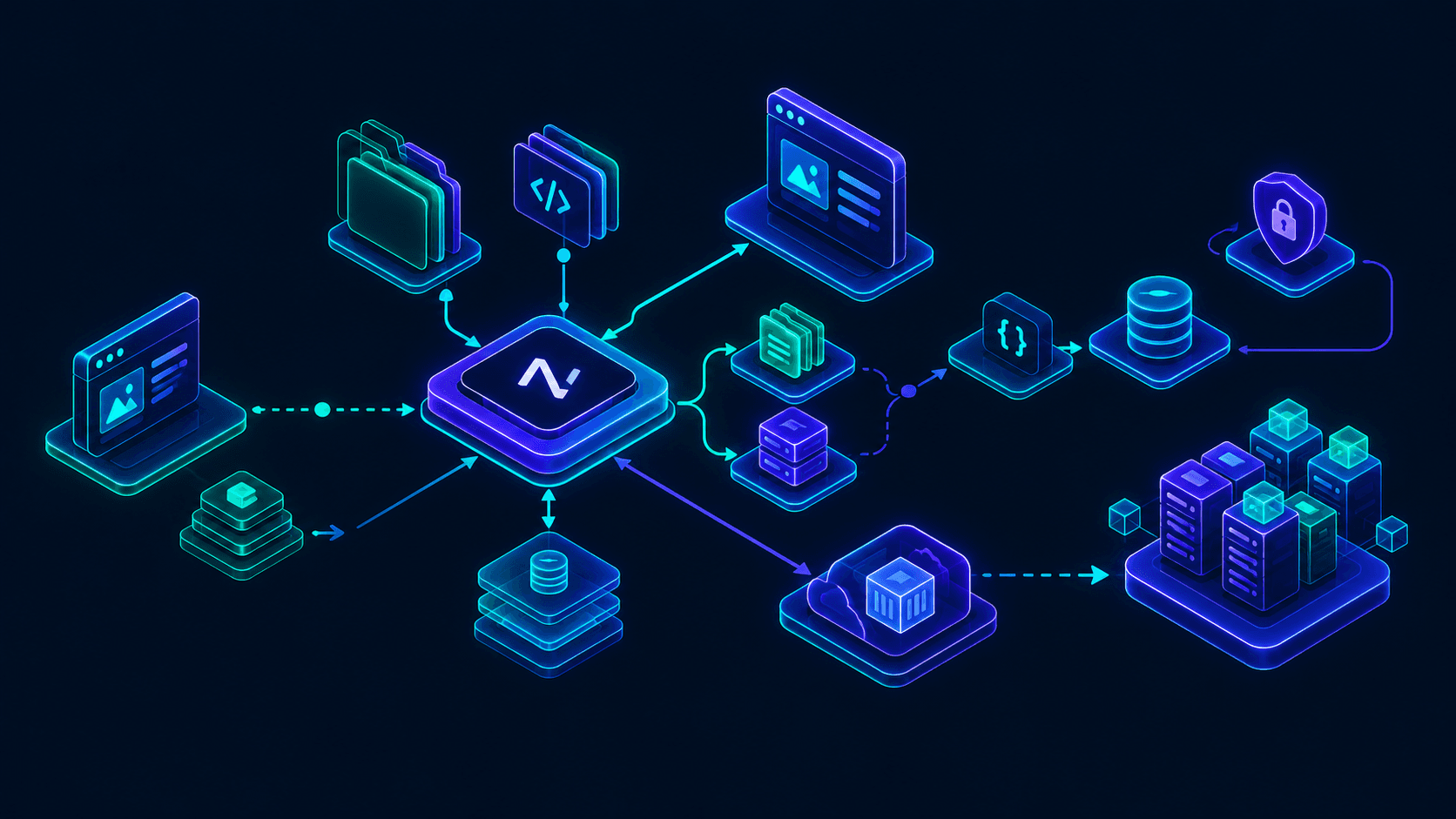
Building a Multi-Tenant SaaS Frontend with Next.js Middleware

Written by
Bhalli B
Full-Stack Engineer & SaaS MVP Architect
Certified Full-Stack Developer & MVP Specialist · Lahore, Pakistan
To build a scalable and cost-effective multi-tenant SaaS frontend, software organizations leverage the Next.js edge routing layer (proxy.ts or middleware.ts) to intercept incoming host headers and rewrite them to dynamic, tenant-specific route directories internally. This architectural pattern resolves the business context of a request at the CDN edge before server-side rendering or static generation occurs. By decoupling hostnames from physical files, a single deployed Next.js build dynamically serves millions of isolated, white-labeled tenant portals. This approach ensures sub-millisecond routing speeds, eliminates server cold starts, and prevents the overhead of tenant-specific application instances.
Edge Routing and Dynamic Hostname Resolution
At the core of multi-tenant Software as a Service (SaaS) architecture is the dynamic resolution of incoming requests. In traditional single-tenant deployments, requests map directly to a static set of public pages. A multi-tenant platform, however, must inspect the domain of every inbound request, identify which database tenant maps to that hostname, and serve custom styles, assets, and databases without altering the URL shown in the client's browser.
Next.js offers three primary routing patterns for multi-tenancy:
- Path-Based Routing (
platform.com/tenant-slug): Simplest to implement but lacks brand isolation and professional SEO characteristics. - Subdomain-Based Routing (
tenant.platform.com): Balances ease of deployment with distinct namespace isolation. - Custom Domain-Based Routing (
customtenantdomain.com): The standard for enterprise B2B SaaS, offering white-labeled identity and optimal localized SEO profiles.
Implementing Subdomain and Custom Domain Rewrites in Next.js
In Next.js, the proxy.ts (or proxy.js) file serves as the system gateway. It executes at the edge, intercepting incoming HTTP requests prior to cache lookup and route generation. This allows developers to read the Host header, verify the tenant mapping, and perform an invisible internal route rewrite.
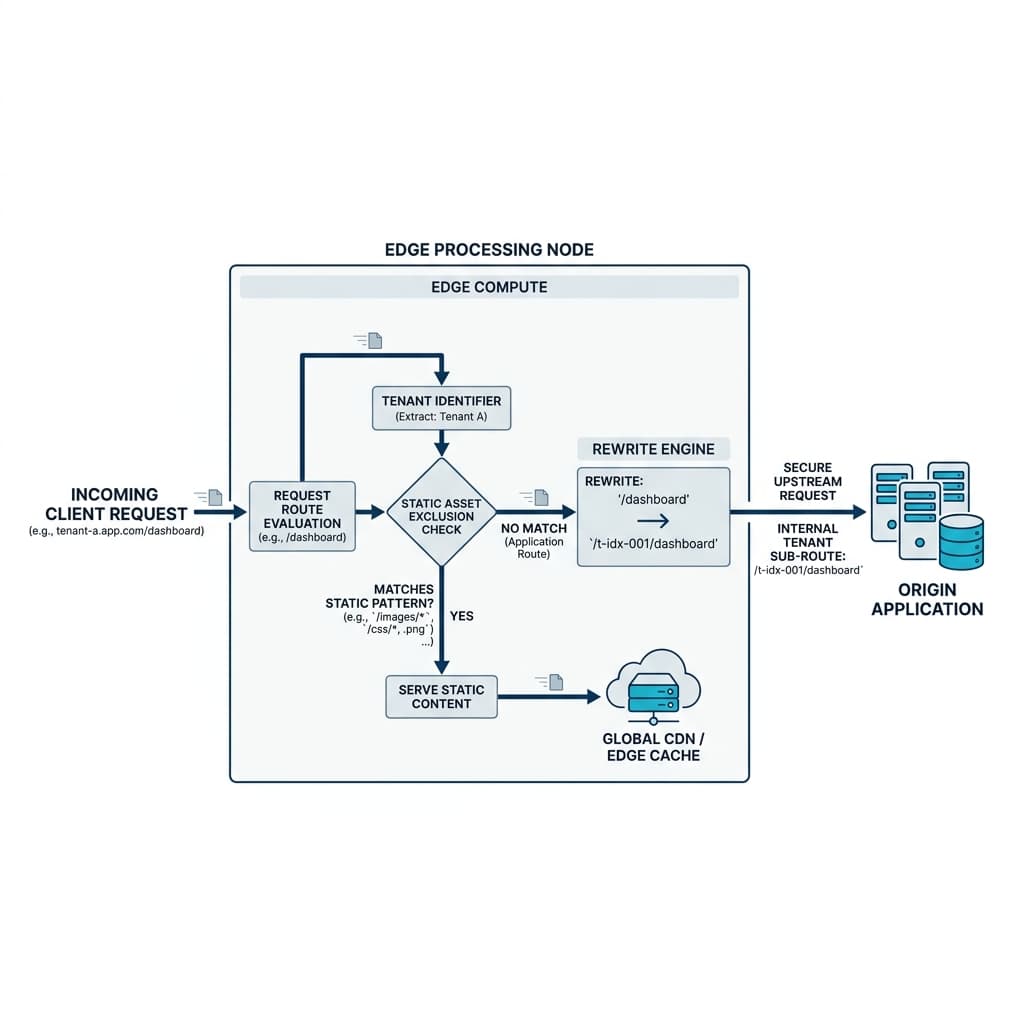 Figure 1: Edge Proxy Routing Pipeline. A detailed visual schematic of an incoming multi-tenant request being processed at the edge, evaluated against static asset exclusions, and rewritten to the hidden tenant sub-route.
This routing architecture requires a robust configuration file that filters out system static resources, public media directories, and internal Next.js API endpoints while preserving custom host mappings:
// proxy.ts
import { NextResponse } from 'next/server';
import type { NextRequest } from 'next/server';

// Configure the matcher to exclude public assets, API paths, and internal dev bundles
export const config = {
  matcher: [
    '/((?!api/|_next/static/|_next/image|assets/|favicon.ico|sw.js|site.webmanifest).*)',
  ],
};

export function proxy(request: NextRequest) {
  const url = request.nextUrl.clone();
  const hostname = request.headers.get('host') || '';

  // Retrieve the application's base marketing domain from environment configurations
  const baseDomain = process.env.NEXT_PUBLIC_BASE_DOMAIN || 'saasplatform.com';

  // Normalize and parse the incoming host to determine tenant scope
  let tenantHost = '';

  if (hostname.includes(baseDomain)) {
    const subdomain = hostname.replace(`.${baseDomain}`, '').trim();

    // Evaluate if the user is reaching the root marketing site or admin control panel
    if (subdomain === 'www' || subdomain === baseDomain || subdomain === '') {
      tenantHost = 'root';
    } else {
      tenantHost = subdomain;
    }
  } else {
    // Incoming request originates from a custom third-party domain (e.g., enterprise-client.com)
    tenantHost = hostname;
  }

  // Defend against directory traversal attacks trying to access the tenant routing folder directly
  if (url.pathname.startsWith('/_tenants')) {
    return NextResponse.rewrite(new URL('/404', request.url));
  }

  // Pass-through traffic destined for the root marketing site or general landing page
  if (tenantHost === 'root') {
    return NextResponse.next();
  }

  // Execute internal rewrite to redirect traffic to the dynamic tenant directory
  // The client's address bar remains exactly as requested: https://tenantHost/pathname
  url.pathname = `/_tenants/${tenantHost}${url.pathname}`;

  return NextResponse.rewrite(url);
}
Wildcard Domains and Programmatic SSL Management on Vercel
When deploying a multi-tenant platform on Vercel, scaling to thousands of subdomains requires zero-configuration wildcard routing. To implement wildcard subdomains (*.yourdomain.com), the apex domain must point to Vercel's nameservers (ns1.vercel-dns.com and ns2.vercel-dns.com). This delegation allows Vercel's automated DNS platform to solve Let's Encrypt DNS-01 challenges, generating secure, globally distributed wildcard SSL certificates programmatically.
| Domain Configuration | CNAME Target | SSL Challenge | Limits (Pro vs. Enterprise) |
|---|---|---|---|
| Wildcard Subdomain | cname.vercel-dns.com | DNS-01 (Managed by Vercel) | Soft Limit: 100k (Pro) / 1M (Enterprise) |
| Custom Tenant Domain | 76.76.21.21 (A Record) | HTTP-01 (Autonomous Challenge) | Programmatic Add/Verify APIs via SDK |
Preventing Cross-Request Pollution and SSR Hydration Mismatches
Deploying a multi-tenant application in a Server-Side Rendering (SSR) context introduces a critical security risk: cross-request state pollution.
In traditional Single Page Applications (SPAs) operating solely on the client, state managers like Redux or Zustand operate as global singletons. Because the browser sandbox runs a single application instance for one user, global singletons do not leak data across distinct accounts. For a complete comparison of global vs context-bounded state management patterns, refer to our deep dive on Zustand vs. Redux for SaaS MVPs.
However, in a Next.js App Router environment, requests execute on a shared Node.js or Edge runner. These server instances handle thousands of concurrent requests from different users across different tenants. If a developer instantiates a global store instance at the file module scope (outside the React component lifecycle), that store persists across requests.
When multiple users hit the same container simultaneously, a store mutated by User A will pollute User B's rendering execution, leaking sensitive tenant metadata.
Contextual Store Isolation and Server-to-Client Hydration
To prevent state leakage, state stores must be created dynamically per request inside a React Context Provider and scoped using a stable reference useRef.
Furthermore, when utilizing client-side state persistence (e.g., reading from localStorage inside Zustand), a discrepancy can occur between the static server-rendered HTML and the client's local state, resulting in Next.js hydration mismatches. The application must delay client-side state access until hydration completes to ensure consistent HTML rendering.
// providers/TenantStoreProvider.tsx
'use client';

import { createContext, useContext, useRef, useState, useEffect } from 'react';
import { createStore, useStore } from 'zustand';

interface TenantState {
  tenantId: string;
  theme: 'light' | 'dark';
  tenantName: string;
  setTheme: (theme: 'light' | 'dark') => void;
}

type TenantStoreType = ReturnType<typeof createTenantStore>;

// Instantiates a isolated store configuration per incoming request
const createTenantStore = (initProps: Partial<TenantState>) => {
  return createStore<TenantState>((set) => ({
    tenantId: initProps.tenantId || '',
    tenantName: initProps.tenantName || 'Standard Tenant',
    theme: initProps.theme || 'light',
    setTheme: (theme) => set({ theme }),
  }));
};

const TenantStoreContext = createContext<TenantStoreType | null>(null);

interface TenantProviderProps {
  children: React.ReactNode;
  initialState: Partial<TenantState>;
}

export function TenantStoreProvider({ children, initialState }: TenantProviderProps) {
  // Use useRef to bind the isolated store instance permanently to this component branch
  const storeRef = useRef<TenantStoreType | null>(null);

  if (!storeRef.current) {
    storeRef.current = createTenantStore(initialState);
  }

  return (
    <TenantStoreContext.Provider value={storeRef.current}>
      {children}
    </TenantStoreContext.Provider>
  );
}

// Hook that forces safe state subscription and isolates components from rendering leaks
export function useTenantStore<T>(selector: (state: TenantState) => T): T {
  const context = useContext(TenantStoreContext);
  if (!context) {
    throw new Error('useTenantStore must be consumed within a TenantStoreProvider');
  }
  return useStore(context, selector);
}

// Client-Side Hydration Guard Component to eliminate rendering mismatches
export function TenantHydrationGuard({ children, fallback }: { children: React.ReactNode; fallback: React.ReactNode }) {
  const [isHydrated, setIsHydrated] = useState(false);

  useEffect(() => {
    setIsHydrated(true);
  }, []);

  if (!isHydrated) {
    return <>{fallback}</>;
  }

  return <>{children}</>;
}
This isolated state pattern ensures that the initial layout of the page loads without mismatch warnings, while preventing cross-request data leaks on the backend container node.
Architectural Pitfalls: Payload and API Limits in Next.js
As SaaS applications evolve to handle enterprise data operations, technical leaders frequently encounter framework-level safety limits that trigger production errors if unconfigured.
Server Actions Body Size Limit (413 Payload Too Large)
Next.js Server Actions enforce a default upload payload cap of 1 MB to protect serverless functions from resource starvation and denial-of-service (DoS) attacks. When clients attempt to submit payloads such as file imports or media uploads, the system throws a 413 Payload Too Large error.
To resolve this on platforms handling intensive media or data streams, architects must override the global limit in next.config.js:
// next.config.js
/** @type {import('next').NextConfig} */
const nextConfig = {
  experimental: {
    serverActions: {
      bodySizeLimit: '100mb', // Configures a 100MB ceiling for server-side endpoints
    },
  },
};

module.exports = nextConfig;
For workloads exceeding 100 MB, routing raw files through serverless compute layers degrades API performance and incurs high latency costs. The recommended architecture involves using Server Actions to generate secure, pre-signed upload URLs from direct cloud storage systems (such as AWS S3 or Google Cloud Storage) and executing direct client-to-bucket uploads.
API Route Response Size Limits (4MB Ceiling)
For standard Next.js API Routes (located inside /pages/api), the framework caps the maximum response body size at 4 MB to maintain responsive execution threads in serverless environments. To bypass this limit for large PDF generation or data exports, developers can disable the response limit manually within the specific route configuration:
// pages/api/export-data.ts
export const config = {
  api: {
    responseLimit: false, // Disables the 4MB limit for this endpoint
  },
};

export default function handler(req, res) {
  // Generate and return larger datasets safely
  const heavyPayload = getSerializedData();
  res.status(200).json(heavyPayload);
}
The Financial Realities of Scale: Vercel vs. Self-Hosted PaaS
Choosing where to deploy a SaaS frontend involves balancing immediate developer velocity against long-term hosting costs. For a detailed breakdown of serverless infrastructure limits and hosting math, see our analysis on Next.js 16 Server Components Hosting Costs.
Vercel provides a streamlined developer experience (DX), featuring instantaneous preview deployments, global edge middleware distribution, and automated certificate management. However, as platforms scale past initial validation and attract substantial user traffic, Vercel's metered pricing model can lead to high hosting bills. This cost disparity is commonly referred to as the "Vercel Tax".
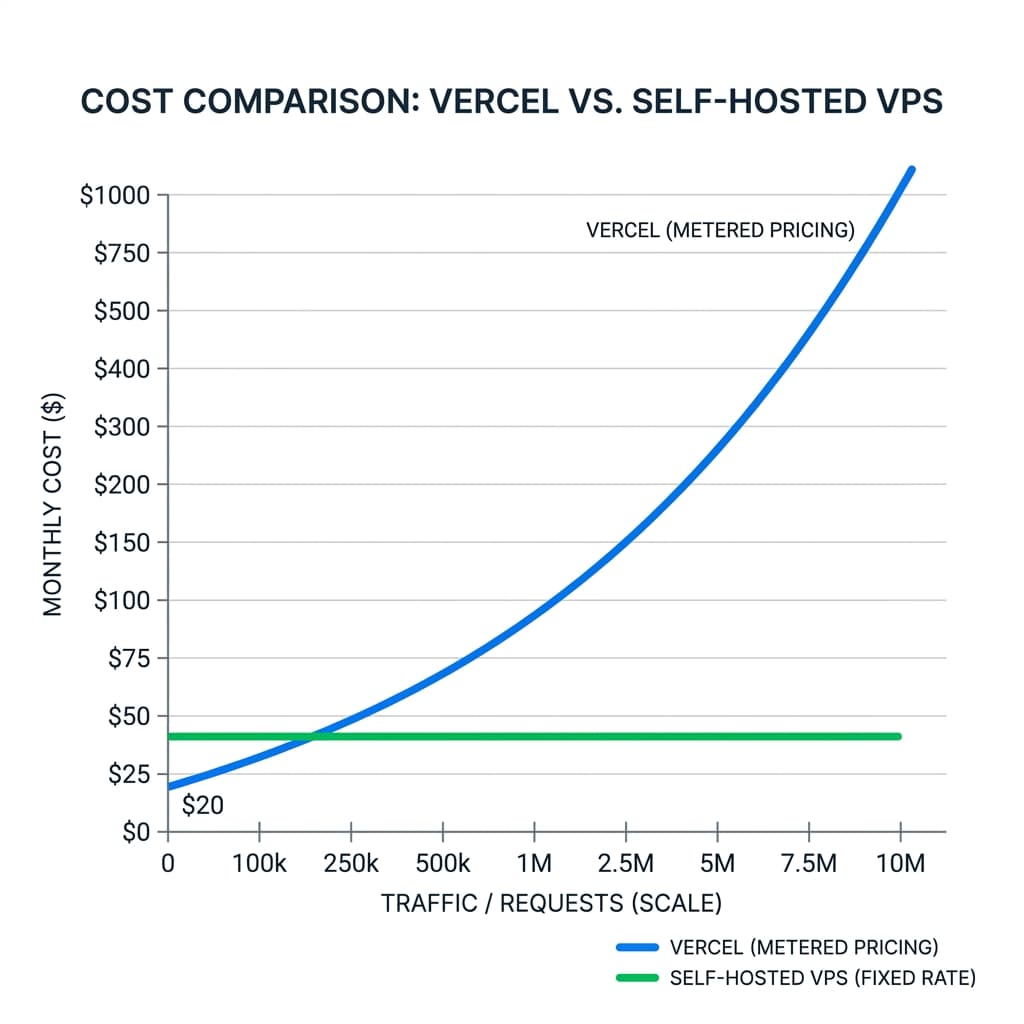 Figure 2: Cost Breakpoints: Vercel vs. Self-Hosted VPS. A line chart visualizing the intersection where metered usage fees on Vercel surpass the flat rates of virtual private servers as monthly traffic grows.
Quantifying the "Vercel Tax" with Overage Metrics
To analyze this financial transition, let us evaluate a medium-sized SaaS application with 500,000 monthly pageviews, 3 developer seats, 1.5 TB of data transfer, and active image transformation requirements.
| Cost Category | Vercel Pro Plan Metric | Self-Hosted VPS + Coolify Platform |
|---|---|---|
| Subscription / Seat Cost | $60.00 / month (3 Seats @ $20) | $16.99 / month (Flat Compute Rate) |
| Bandwidth Allocation | 1 TB Included | 20 TB Included (Hetzner / DanubeData) |
| Bandwidth Overages | $75.00 (500 GB @ $40 per 100 GB) | $0.00 (No overage penalties) |
| Serverless Execution | $180.00 (2,000 GB-hours) | $0.00 (Bound to flat node CPU limits) |
| Image Optimization | $225.00 (50,000 requests @ $5 per 1k) | Unlimited (Native Node.js sharp execution) |
| Build Optimization | $60.00 (Overage build minutes) | Unlimited (Prebuilt on local development or CI) |
| Preview Deployments | Frontend-Only Serverless Previews | Isolated Full-Stack Previews (Dockerized DBs) |
| Total Monthly Spend | $601.30 / month | $16.99 / month |
The "Self-Hosting Tax": Time-to-Market vs. Operational Expenses
While the raw infrastructure savings of self-hosting are compelling, engineering leaders must account for the corresponding "Self-Hosting Tax". This represents the engineering time spent configuring, maintaining, and monitoring custom infrastructures:
- Vercel DX Advantage: Minimal operational overhead. Startups can iterate rapidly without dedicated infrastructure engineers.
- Self-Hosted PaaS (Coolify/Dokku): Requires an initial investment of 4 to 8 engineering hours to set up CI/CD pipelines, automated testing, and secure backups, followed by an ongoing maintenance overhead of approximately 10 to 20 hours per year.
A common project management path is deploying early-stage MVPs on Vercel to maximize iteration speed, then migrating to a flat-rate self-hosted VPS as traffic scales and hosting costs become a primary financial metric.
Next-Generation Tooling: TypeScript 7.0 and Turbopack
To support expanding SaaS applications, web development toolchains are transitioning toward high-performance systems-level implementations. Key drivers of this shift include the stabilization of the Turbopack compiler and the launch of TypeScript 7.0 (Project Corsa).
TypeScript 7.0 (Project Corsa): The Go-Native Compiler
Microsoft's TypeScript 7.0 release under the codename Project Corsa ports the core compiler (tsc) file-by-file from JavaScript to Go, removing the Node.js runtime dependency during compilation. By leveraging native binary speeds and concurrent worker threads (--checkers), TypeScript 7.0 achieves up to 10x faster type-checking on complex enterprise codebases. To learn how to configure and execute this Go-native compiler within your deployment pipelines, review my guide on TypeScript 7.0 in the Build Pipeline.
| Codebase Scale | TS 6.0 Type-Check (JS) | TS 7.0 Type-Check (Go/Corsa) | Speedup Factor |
|---|---|---|---|
| TypeORM (270k LOC) | 17.5 seconds | 1.3 seconds | 13.5x |
| Playwright (356k LOC) | 11.1 seconds | 1.1 seconds | 10.1x |
| VS Code (1.5M LOC) | 77.8 seconds | 7.5 seconds | 10.4x |
This performance upgrade reduces verification bottlenecks within development workflows and CI/CD pipelines. However, the compiler transition introduces a few key configuration changes in tsconfig.json:
{
  "compilerOptions": {
    "target": "ES2022",
    "module": "NodeNext",
    // Project Corsa requires rootDir defaults to preserve file directory patterns
    "rootDir": "./src",
    // types array now defaults to empty; explicitly declare required ambient globals
    "types": ["node", "jest"]
  },
  "include": ["src/**/*"]
}
Bundle Size Analysis in Next.js 16 with Turbopack
Because Next.js 16 uses Turbopack as its default development bundler, legacy Webpack-based analysis plugins are incompatible and generate warnings. Next.js 16 includes a native, experimental Bundle Analyzer integrated with Turbopack's module graph to provide visual import tracing directly within the development runtime:
# Analyze compilation assets and output a visual dependency map using Turbopack
pnpm next experimental-analyze
Technical Visualizations: Architecture Layout
To understand how a multi-tenant Next.js SaaS frontend integrates with edge layers, state managers, and CI pipelines, evaluate the following structural model:
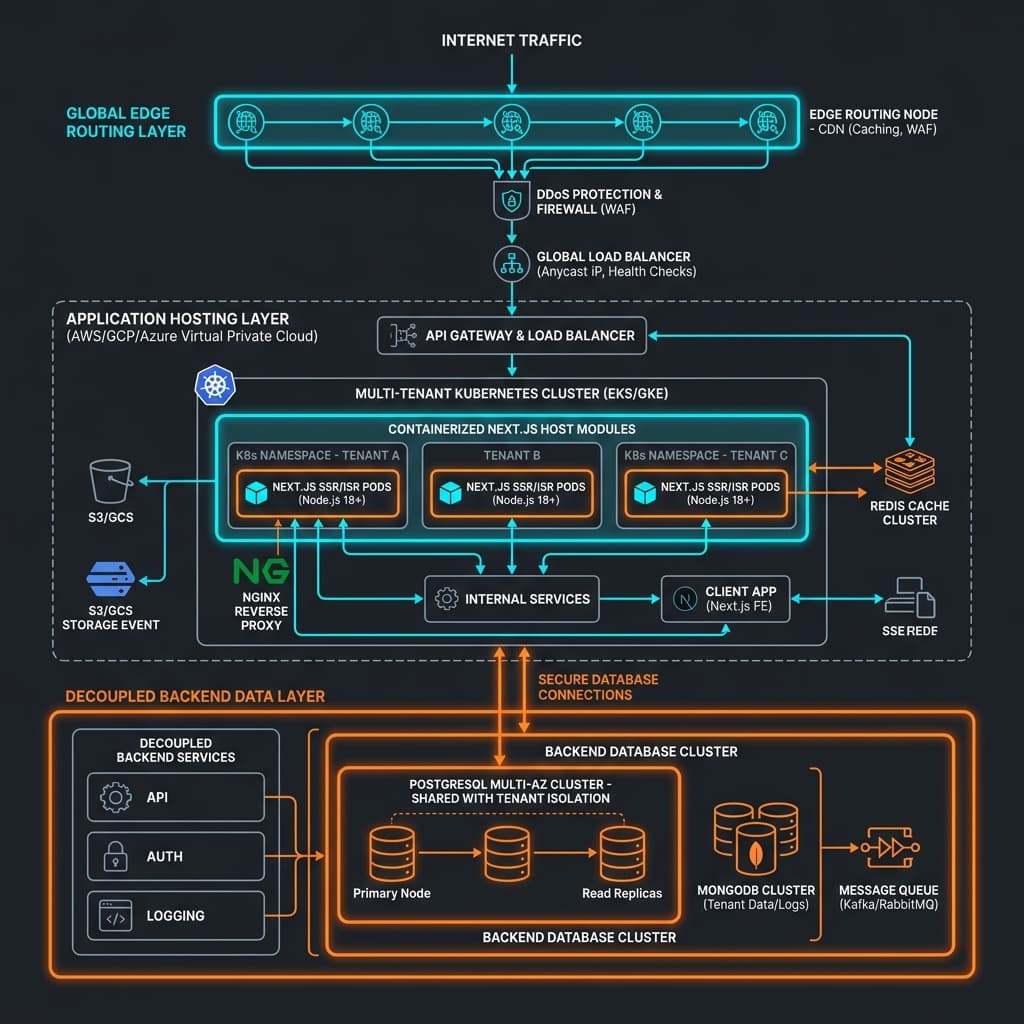
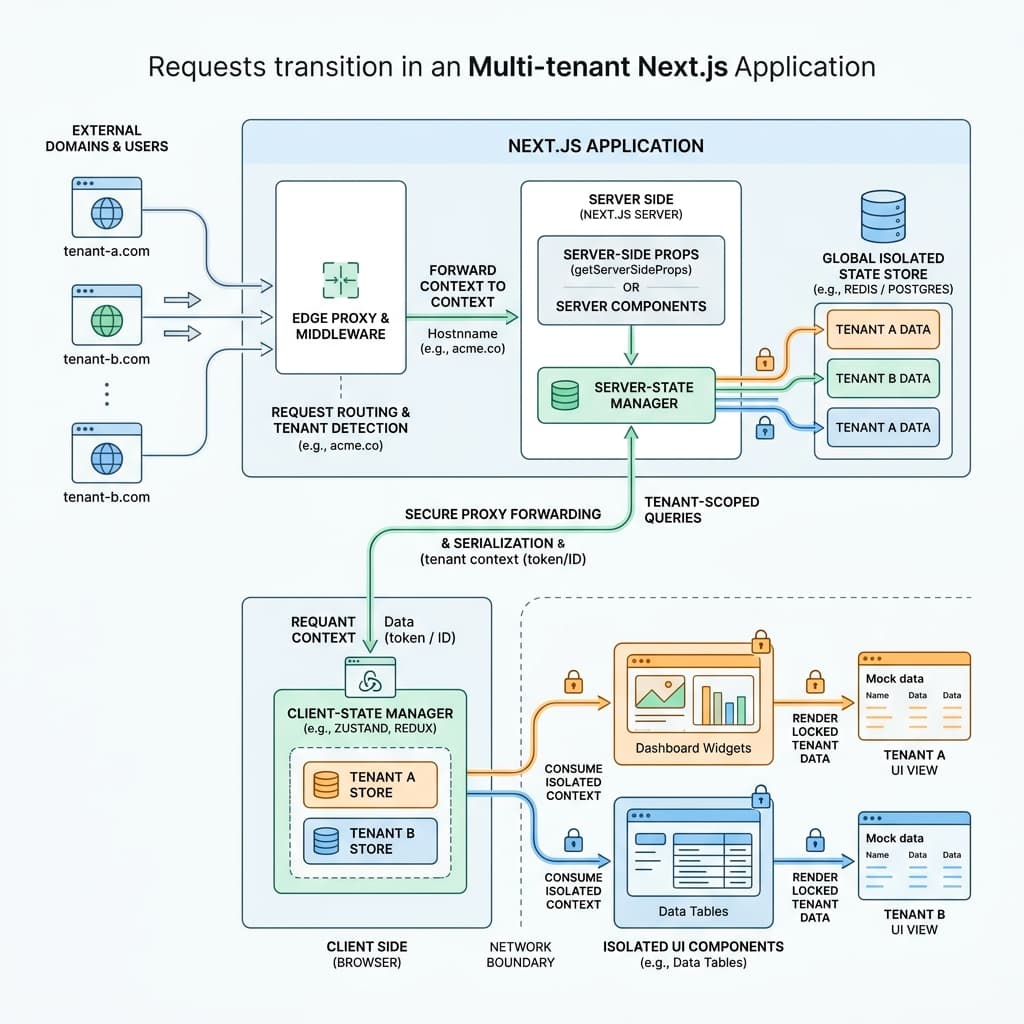 Figure 3: SaaS Platform Pipeline Diagram. High-level map showing how requests transition from external domains to edge proxies, register inside isolated stores, and safely render inside isolated UI components.
Special Interest SaaS Verticals: Real-Time Telemetry and Teleoperation
SaaS platforms are increasingly extending beyond standard CRUD interfaces to power complex operations in fields like logistics, hardware monitoring, and robotics. These heavy-duty applications require specialized architectural patterns to handle real-time data streaming and secure device coordination.
ROS2 Web Integrations for Real-Time Dashboards
When building fleet management solutions or operator dashboards that interface with the Robot Operating System (ROS2), frontends must handle low-latency telemetry data streams and securely publish velocity commands. For details on resolving real-time data loops and state tracking for mechanical controllers, see our analysis on Physical AI: The New Frontier of Robotics.
While simple projects can use rosbridge_suite to translate ROS2 topics to JSON over WebSockets, the serialization overhead can degrade performance in production environments. For enterprise deployments, architects use custom FastAPI or gRPC bridges to serialize raw sensor streams into binary WebSocket payloads:
| Telemetry Vector | rosbridge_suite Protocol | Custom FastAPI/gRPC Web Bridge |
|---|---|---|
| Latency Metric | 5 to 15 ms (High JSON Overhead) | 2 to 5 ms (Optimized binary streams) |
| Data Throughput | Medium (Base64 encoding bloat) | High (Native binary WebSockets) |
| Security Handling | Basic (Limited network filtering) | Robust (JWT authentication, rate limiting) |
| Topic Filtering | Exposes the entire raw ROS2 graph | Selective gateway access points |
Environmental Compliance and Energy-Aware Compute
As SaaS architectures integrate AI components (such as agentic workflows powered by the Vercel AI SDK), compute and cooling demands in host data centers increase significantly. High-performance accelerators like NVIDIA Blackwell operate with thermal design power (TDP) thresholds exceeding 1000 W per GPU. For an analysis of Singapore's tropical data center temperature standards and software-level carbon optimizations, read my post on Sustainable Supercomputing: The Energy Challenge of Modern AI.
To manage resource usage, governments and regulatory bodies are establishing sustainable cooling guidelines. For example, Singapore’s SS 564 Green Data Center Standard and SS 715:2025 IT infrastructure standard require:
- High-Temperature Operation: Running data halls between 26°C and 35°C to reduce energy consumption.
- Active Cooling Optimization: Transitioning dense computing systems to direct-to-chip liquid cooling to target low PUE ranges of 1.04 to 1.1.
- Carbon-Aware Scheduling: Running resource-intensive model training tasks during periods of high renewable energy availability.
Strategic Engineering Framework
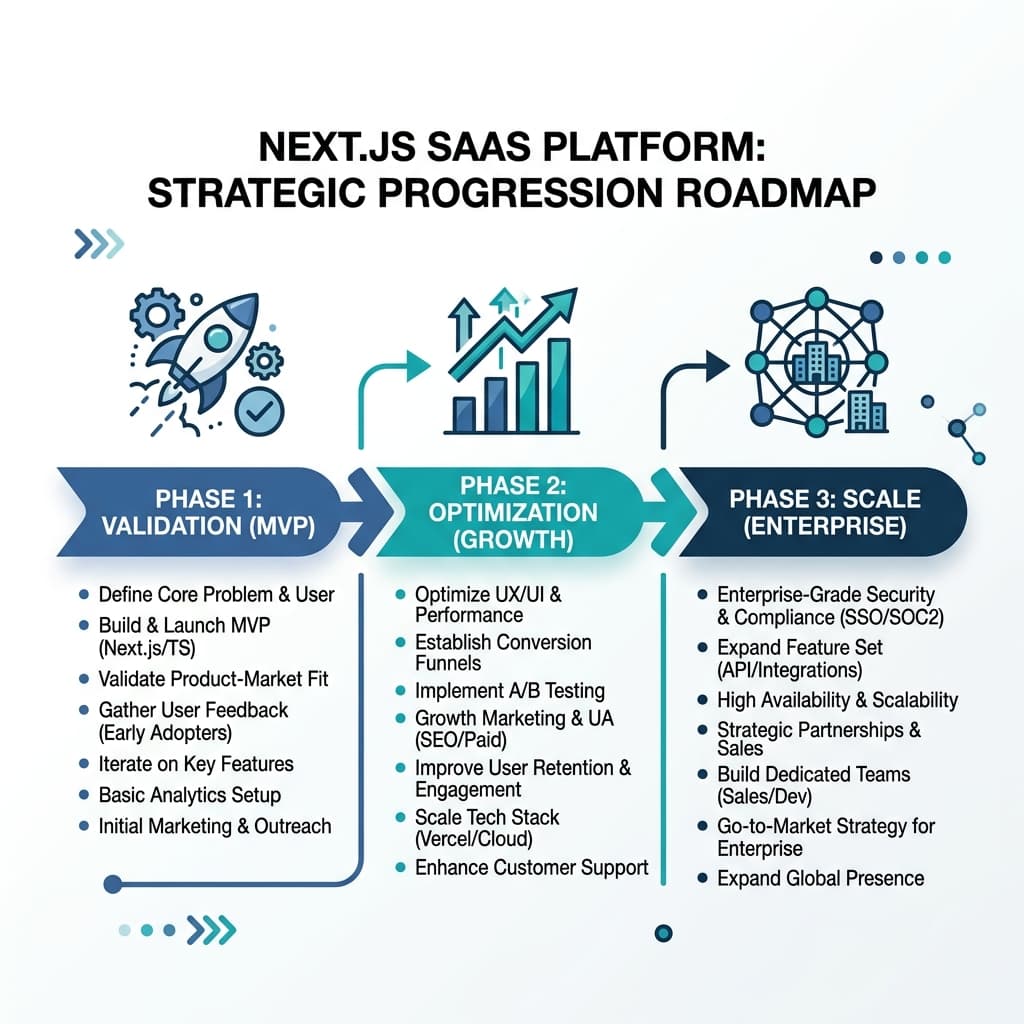 Figure 4: Strategic Roadmap. A conceptual progression map guiding technical leaders from MVP deployment through cost optimization to high-performance enterprise scaling.
To implement a multi-tenant SaaS architecture successfully, technical leaders should follow a structured roadmap. To automate verification step checks (like size-limit or caching preservation) in your CI runs, refer to my walkthrough on Setting Up CI/CD for Next.js SaaS Applications.
1. Configure the Edge Routing Layer Early
Establish a routing structure in proxy.ts to manage hostname resolution before writing core application features. By decoupling host domains from the site layout early in the development lifecycle, teams prevent architectural rework as the platform scales.
2. Isolate Server-Side State Stores
Ensure that no global state is instantiated at the module scope on the backend server. Wrap all interactive views within context-bounded providers to prevent data leaks between concurrent requests.
3. Implement Automatic Bundle Performance Budgets
Add performance budgets to the CI/CD pipeline using tools like size-limit to detect and stop dependency bloat at the pull request stage. Use Next.js 16's native analyzer (next experimental-analyze) to trace bundle sizes and optimize client-side imports.
4. Monitor Hosting Overhead and Optimize Costs
Track operational metrics to identify where metered services are driving up costs. Under high-traffic profiles, plan an incremental migration to flat-rate self-hosted VPS nodes using open-source PaaS managers like Coolify to reduce hosting expenditures.
Engineering Consultation and MVP Development
Developing high-performance, multi-tenant SaaS architectures requires careful alignment between technology choices and business objectives. For organizations seeking to build secure edge-routed architectures, implement isolated state management, or scale cost-effective hosting structures, professional technical direction helps mitigate execution risk and accelerate product delivery.
To design an MVP or evaluate the performance of an existing production application, schedule a direct engineering session or subscribe to the technical leadership advisory to receive targeted development insights.