TypeScript 7.0 Go-Native Compiler: What SaaS Founders Need to Know

Written by
Bhalli B
Full-Stack Engineer & SaaS MVP Architect
Certified Full-Stack Developer & MVP Specialist · Lahore, Pakistan
To migrate a SaaS application to TypeScript 7.0, technical leaders must understand the massive architectural shift of the modern compiler from a Node.js-bootstrapped runtime (Project Strada) to a native, compiled Go binary (Project Corsa). Delivering an immediate 10x type-checking speedup and halving RAM footprint through native shared-memory parallelism, this release solves the compilation performance limits that plague scaling codebases. Upgrading to the TypeScript 7.0 Release Candidate requires almost zero syntax rewrites, helping startups eliminate developer friction, cut cloud CI/CD billing costs, and accelerate product shipping timelines.
1. The Greatest Architectural Shift in TypeScript History
For over a decade, TypeScript was famously a "bootstrapped" language. The compiler (tsc) was written in TypeScript, compiled to JavaScript, and executed on top of the single-threaded Node.js V8 runtime engine (a codebase internally referred to as "Strata"). While this made sense in the early days of the web, it introduced a hidden scaling tax for modern startups. As codebases scale, single-threaded execution limits make type-checking and compilation a major bottleneck.
TypeScript 7.0 resolves this issue with Project Corsa: a complete, methodical port of the entire compiler from JavaScript to native Go (Golang). By executing as compiled native machine code rather than interpreted JavaScript, TypeScript 7.0 eliminates V8 engine startup overhead and leverages multi-threaded processors out of the box.
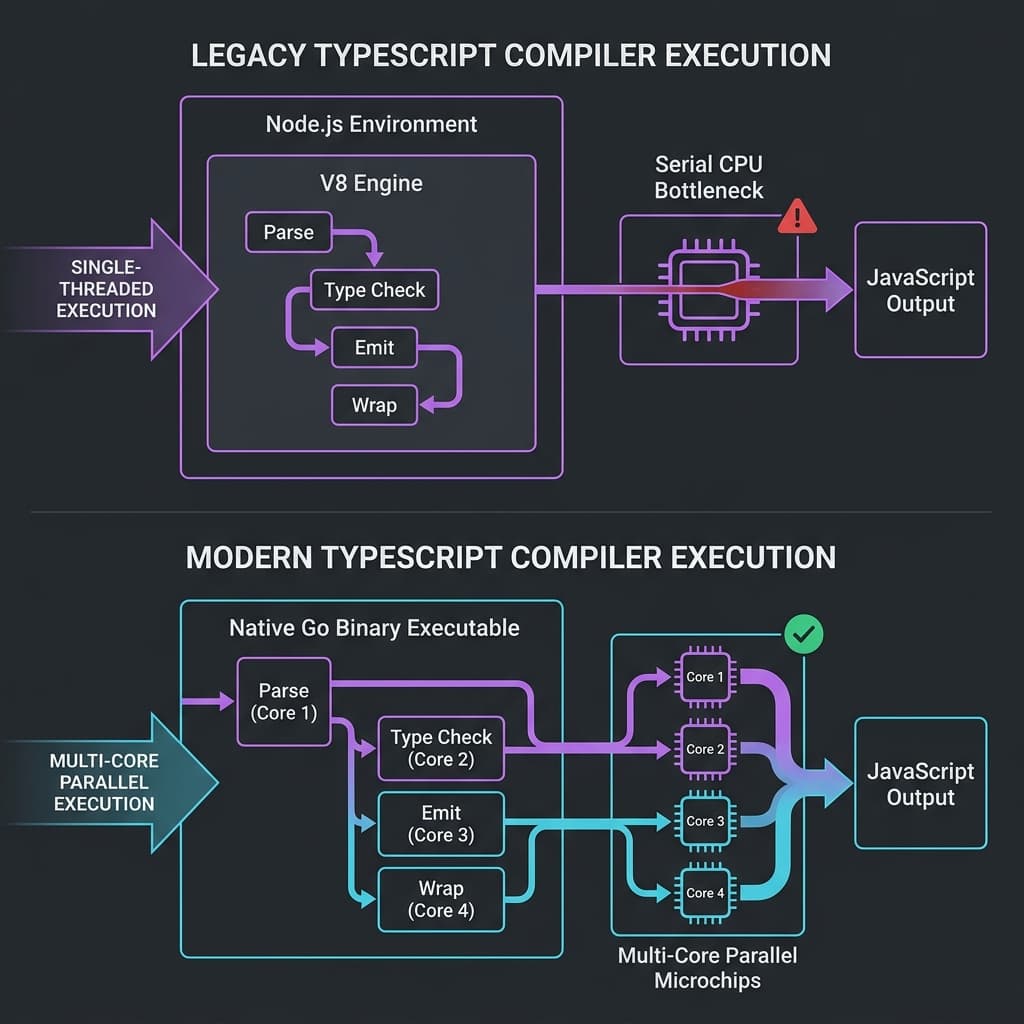 Figure 1: High-level compiler compilation pipeline contrast between TypeScript 6.0's single-threaded runtime and TypeScript 7.0's multi-core parallel architecture.
As detailed in the official Microsoft Developer Blogs, shifting the type-checking engine off the V8 runtime removes garbage collection latency and thread-blocking overhead, allowing larger projects to scale compiler operations linearly with the number of available CPU cores.
2. Why Microsoft Chose Go Over Rust or C++
The decision to choose Go over Rust or C++ for a high-performance developer toolchain sparked substantial debate in the engineering community. Modern tooling engines like esbuild are written in Go, while alternatives like SWC and oxc rely on Rust.
The TypeScript team selected Go for three primary reasons:
- Structural Similarity: The existing TypeScript compiler codebase relies heavily on a functional style with deep tree traversals, complex graphs, and minimal traditional classes. Go’s structural simplicity made porting the existing algorithms file-by-file straightforward.
- Memory Management: High-speed AST parser systems generate millions of temporary nodes. While Rust requires strict, explicit memory management and lifetime annotations that would require a complete rewrite of the compiler's core algorithms, Go's highly optimized, concurrent garbage collector easily handles these structures with minimal performance impact.
- Ergonomic Portability: The porting strategy aimed to keep identical type-checking logic rather than designing a brand-new compiler from scratch. This file-by-file migration allowed the team to preserve years of edge-case fixes and ensure absolute semantic parity with legacy codebases.
3. Direct Comparison: TypeScript 6.0 vs. TypeScript 7.0
To help startup CTOs evaluate this update, the table below compares both versions across key performance vectors:
| Engineering Attribute | TypeScript 6.0 ("Strata") | TypeScript 7.0 ("Corsa") |
|---|---|---|
| Core Architecture | Interpreted JS via Node.js V8 engine | Native Go compiled executable |
| Concurrency Paradigm | Single-threaded event loop | Native Shared-Memory Concurrency |
| Compilation Speed | Baseline standard speed | Up to 10x faster type-checking |
| Project Reference Parsing | Sequential, single-project reference compilation | Multi-project parallel scaling via --builders |
| Editor Feedback Time | Prone to lags on large imports and re-exports | Up to 8x faster language server response |
| Minimum JS Output Targets | Legacy support down to ES5 | Modern execution baseline starting at ES2015 |
| File-Watch Architecture | Polling-based or custom JS OS listeners | Integrated Parcel file-watcher ported to Go |
4. Fine-Tuning the Toolchain: Configurations and CLI Commands
TypeScript 7.0 introduces native multi-threaded compilation controls. Instead of relying on a single core, you can now fine-tune exactly how many CPU threads handle type validation and project reference parsing.
Parallel Type-Checking Configuration
The --checkers parameter controls the number of background workers handling type-checking, while --builders manages parallel project-reference compilation. These settings can be configured directly inside the tsconfig.json file:
{
  "compilerOptions": {
    "target": "ES2022",
    "module": "ESNext",
    "moduleResolution": "bundler",
    "strict": true,
    "skipLibCheck": true,
    "rootDir": "./src"
  },
  "buildOptions": {
    "checkers": 4,
    "builders": 2
  }
}
Optimizing Monorepo Pipelines
For monorepos (such as a turborepo workspace separating a Next.js SaaS frontend, a MERN backend API, and shared logic), teams can run multi-threaded compilations directly from the command line:
# Execute native type checks running 4 parallel checker workers across 4 separate projects
npx tsc --build --builders 4 --checkers 4
Project Management Note on Multiplicative Thread Allocation
Thread scaling scales multiplicatively:
Running --builders 4 --checkers 4 can launch up to 16 concurrent processes on your machine. For local development on an 8-core machine or inside a dual-core GitHub Actions runner container, over-provisioning these threads can lead to CPU throttling and degrade build speeds. For standard CI/CD environments, limiting configuration values to 2 or 3 is recommended to prevent resource contention.
5. Real-World SaaS Metric Impact: VS Code and Sentry Cases
The performance improvements in TypeScript 7.0 are particularly noticeable in large, complex codebases.
Early evaluations across major production repositories highlight these changes:
- VS Code Editor Codebase (1.5M LOC): Full compilation and type-checking times dropped from 77.8 seconds using legacy Node.js down to 7.5 seconds with the Go binary, as documented by the VS Code development blog.
- Playwright Framework (356K LOC): Build execution decreased from 11.1 seconds down to 1.1 seconds.
- TypeORM Workspace (270K LOC): Validation times dropped from 17.5 seconds down to 1.3 seconds.
- Sentry Integration Core: Complete workspace validation dropped from 133 seconds down to 16 seconds.
For startups, faster compile times have direct benefits:
Reduced Cloud CI/CD Bills
GitHub Actions, GitLab CI, and CircleCI charge based on compute time. Shaving minutes off your test and build gates can reduce your overall build pipeline runtime by up to 90%.
Snappier Editor Experiences
The new language server uses the Language Server Protocol (LSP) compiled to a native executable. This makes editor completions, inline error lines, and auto-imports significantly faster, especially on large re-export patterns.
6. Navigating the "Bridge" Release: Migrating from Version 6.0 to 7.0
TypeScript 6.0 acted as a "bridge" release designed to ease the ecosystem's transition to the new Go compiler. It deprecated legacy compilation targets and introduced several strict default settings that can cause unexpected errors if your codebase skipped version 6.0.
Common tsconfig Pitfalls
1. rootDir Defaults to ./
In previous versions, if rootDir was not defined, the compiler inferred it based on the input files. In version 7.0, rootDir defaults to the root of the active workspace (./). If your source code lives in a subdirectory like /src, the compiled output structure may break during build runs.
To fix this, define rootDir explicitly in your configuration:
{
  "compilerOptions": {
    "rootDir": "./src"
  }
}
2. types Defaults to an Empty Array ([])
By default, TypeScript used to scan all @types folders in node_modules and include ambient global types (like Node, Jest, or Mocha) automatically. In TypeScript 7.0, the compiler limits auto-inclusion to prevent bundle bloating.
You must now explicitly list the global type definitions required for your environment:
{
  "compilerOptions": {
    "types": ["node", "jest"]
  }
}
3. JSDoc Type Verification Restrictions
For hybrid JavaScript/TypeScript applications that rely on JSDoc comments for type checks, the Go-native compiler has dropped support for legacy JSDoc tags like @enum and @constructor. Startups migrating these files should convert legacy JSDoc comments to standard TypeScript files to ensure clean type validation.
Running Side-by-Side with TypeScript 6.0
Because the stable programmatic compiler API is planned for the TypeScript 7.1 release, many third-party AST parsers, ESLint plugins, and custom build scripts still depend on the stable 6.0 API.
To help teams adopt 7.0 without breaking existing tooling, Microsoft published a compatibility package called @typescript/typescript6. This allows you to install the Go-native compiler under the main typescript package (providing the high-speed tsc binary for type-checking), while older tooling can fall back to the legacy compiler running as tsc6.
To configure this setup, run:
# Using npm (recommended)
npm install -D typescript@rc @typescript/typescript6

# Using pnpm
pnpm add -D typescript@rc @typescript/typescript6

# Using yarn
yarn add -D typescript@rc @typescript/typescript6

# Using bun
bun add -d typescript@rc @typescript/typescript6
7. Human Project Management Perspective: Context Switching and AI Velocity
While the technical speedups of TypeScript 7.0 are impressive, their true value lies in how they impact developer focus and productivity.
The Hidden Tax of Context Switching
When a type-checking check in a local terminal or CI/CD pipeline takes two minutes, developers often lose focus. This delay prompts them to check Slack, open email, or switch tasks, resulting in a cognitive recovery period before they can return to their core task.
Shaving type-checking times down to 5 seconds keeps developers in their flow state. This immediate feedback loop makes writing code feel highly interactive, allowing engineers to catch errors as they write them.
 Figure 2: The cognitive disruption loop caused by slow compiler execution times vs. the sustained focus of a fast, sub-second compiler loop.
Empowering AI-Driven Workflows
The adoption of AI code generation tools (such as Copilot, Cursor, and Claude Code) has changed how codebases are built. Because AI agents can generate hundreds of lines of code in seconds, having a fast type-checker is critical.
When your compiler can type-check an entire project in seconds, AI tools can test, compile, and validate multiple approaches in the background. This immediate feedback loop ensures that generated code compiles and functions correctly on the first try, significantly accelerating your MVP development speed.
8. Accelerating Your Startup's Software Toolchain
Building a successful, modern SaaS application requires a highly optimized development environment. TypeScript 7.0 provides a major speed advantage, but implementing it safely across complex monorepos and automated pipelines requires deep full-stack and DevOps expertise.
As a Senior Full-Stack Architect and Certified Project Manager, I help startups build scalable Next.js and MERN applications, automate high-performance CI/CD pipelines, and optimize hosting infrastructure for speed and predictability.
Partner to Scale Your Architecture
Let's collaborate to build and optimize your software platform:
- MVP Architecture & Engineering: Build a secure, scalable, and search-optimized product tailored to your business goals.
- Next.js & TypeScript Upgrades: Modernize your codebase, configure multi-threaded type-checking, and resolve dependency bottlenecks to keep your team running fast.
- Automated CI/CD Optimization: Implement fast build caching and performance budgets to keep deployment pipelines quick and cost-effective.